
Introduction
This manual provides instructions for the Beyution 6-in-1 Replacement Remote Control, designed for use with various Mitsubishi television models. This remote is a direct replacement and typically requires no programming. Please read these instructions carefully before use.
Package Contents
- 1 x Beyution 6-in-1 Replacement Remote Control
Note: Batteries are not included and must be purchased separately.
Setup and Battery Installation
To begin using your remote control, you must first install the batteries.
- Locate the battery compartment on the back of the remote control.
- Slide the battery compartment cover downwards or press the latch and lift to open.
- Insert two (2) new AAA alkaline batteries, ensuring the positive (+) and negative (-) terminals match the diagrams inside the compartment.
- Replace the battery compartment cover, ensuring it clicks securely into place.

Figure 1: Battery compartment with cover removed, showing battery placement.
The remote control is designed to work immediately after battery installation with compatible Mitsubishi TV models. No additional programming is typically required.
Operation
This remote control provides full functionality for your compatible Mitsubishi television. Point the remote directly at the TV's infrared receiver for optimal performance.
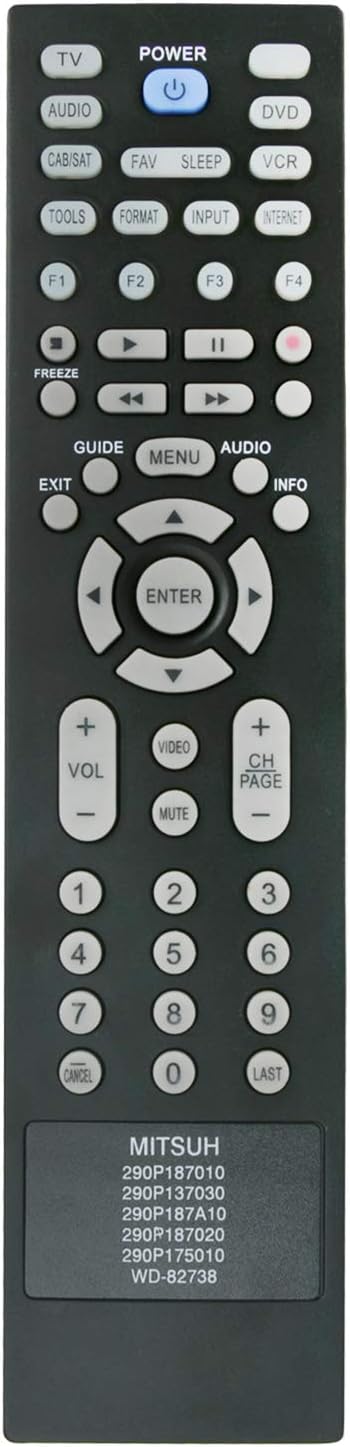
Figure 2: Front view of the remote control with button layout.
Key Functions:
- POWER: Turns the TV on or off.
- TV/AUDIO/DVD/VCR/CAB/SAT: Selects the input source.
- VOL +/-: Adjusts the volume level.
- CH PAGE +/-: Changes channels.
- MUTE: Mutes or unmutes the TV sound.
- Number Buttons (0-9): Direct channel selection.
- GUIDE/MENU/AUDIO/INFO: Accesses TV menu functions.
- Directional Pad (Up/Down/Left/Right) & ENTER: Navigates menus and confirms selections.
- EXIT: Exits current menu or function.
- FAV/SLEEP/TOOLS/FORMAT/INPUT/INTERNET: Additional function buttons as supported by your TV model.
Compatible Models
This replacement remote control is compatible with a wide range of Mitsubishi TV models, including but not limited to:
- WD-60C9, WD-65C9, WD-73C9
- LT-40151, LT-40153, LT-40164
- LT-46151, LT-46153, LT-46164, LT-46265
- LT-52151, LT-52153
- LT-55154, LT-55164, LT-55265
- WD-60638, WD-60737, WD-60738, WD-60C10
- WD-65638, WD-65737, WD-65738, WD-65837, WD-65838, WD-65C10
- WD-73638, WD-73640, WD-73642, WD-73737, WD-73738, WD-73837, WD-73838, WD-73C10, WD-73C11, WD-73C12
- WD-82642, WD-82737, WD-82738, WD-82837, WD-82838, WD-82C12
- 290P137030, 290P175010, 290P187010, 290P187020, 290P187A10
- WD-60638CA, WD-65638CA
If your specific TV model is not listed, please verify compatibility with the seller before purchase.
Troubleshooting
| Problem | Possible Cause | Solution |
|---|---|---|
| Remote control does not work. |
|
|
| Some buttons do not respond. |
|
|
If issues persist after following these steps, please contact the seller for further assistance.
Specifications
- Brand: Beyution
- Model Number: BE-MITSUH-6in1-290P187010
- Connectivity Technology: Infrared (IR)
- Controller Type: Button Control
- Maximum Range: 10 Meters (approximately 33 feet)
- Power Source: 2 x AAA Alkaline Batteries (not included)
- Item Weight: Approximately 2 Ounces
- Special Feature: Ergonomic design
- Max Number of Supported Devices: 1 (direct replacement for specific Mitsubishi models)
Maintenance and Safety Information
- Keep the remote control dry. Avoid exposure to water or excessive humidity.
- Do not expose the remote control to extreme temperatures.
- Clean the remote with a soft, dry cloth. Do not use abrasive cleaners or solvents.
- If the remote will not be used for an extended period, remove the batteries to prevent leakage.
- Dispose of used batteries according to local regulations.
- Do not attempt to disassemble or modify the remote control.