1. Introduction
Thank you for choosing the Turbionaire Smart 10 Eco Dehumidifier. This manual provides essential information for the safe and efficient operation, maintenance, and troubleshooting of your appliance. Please read it thoroughly before use and keep it for future reference.
1.1 Safety Information
- Always place the dehumidifier on a stable, level surface.
- Ensure proper ventilation around the unit. Do not block air inlets or outlets.
- Do not operate the unit near flammable gases or combustible materials.
- The appliance uses R290 natural refrigerant. Handle with care and ensure the appliance is installed, operated, and stored in a room with a floor area larger than 1.92 m².
- Keep children and pets away from the appliance during operation.
- Unplug the unit before cleaning or performing any maintenance.

Image 1.1: Rear view of the dehumidifier showing the air outlet grille and a safety label indicating "Caution, risk of fire" due to the refrigerant.
2. Product Overview
The Turbionaire Smart 10 Eco is a compact and efficient dehumidifier designed for residential use, capable of removing up to 10 liters of moisture per day from rooms up to 31 cubic meters. It features an integrated hygrostat for precise humidity control and operates quietly.
2.1 Key Features
- Automatic Restart: The unit resumes operation with previous settings after a power outage.
- Automatic Shut-off: The appliance automatically stops when the water tank is full.
- Continuous Drainage: Option for continuous water removal, bypassing the tank.
- Portable Design: Equipped with wheels for easy movement.
- Timer Function: Program the unit to turn on or off at specific times.
- Automatic Defrost: Prevents ice build-up on the evaporator coils.
- Integrated Hygrostat: Maintains desired humidity levels automatically.
- Child Lock: Prevents accidental changes to settings.
- Quiet Operation: Operates at a low noise level of 40 dB.
- LED Display: Illuminated display shows current and set humidity levels.
- Eco-friendly Refrigerant: Uses R290 natural refrigerant for minimal environmental impact.
2.2 Components

Image 2.1: Front view of the Turbionaire Smart 10 Eco Dehumidifier, showing the air intake grille, control panel, and water tank window.
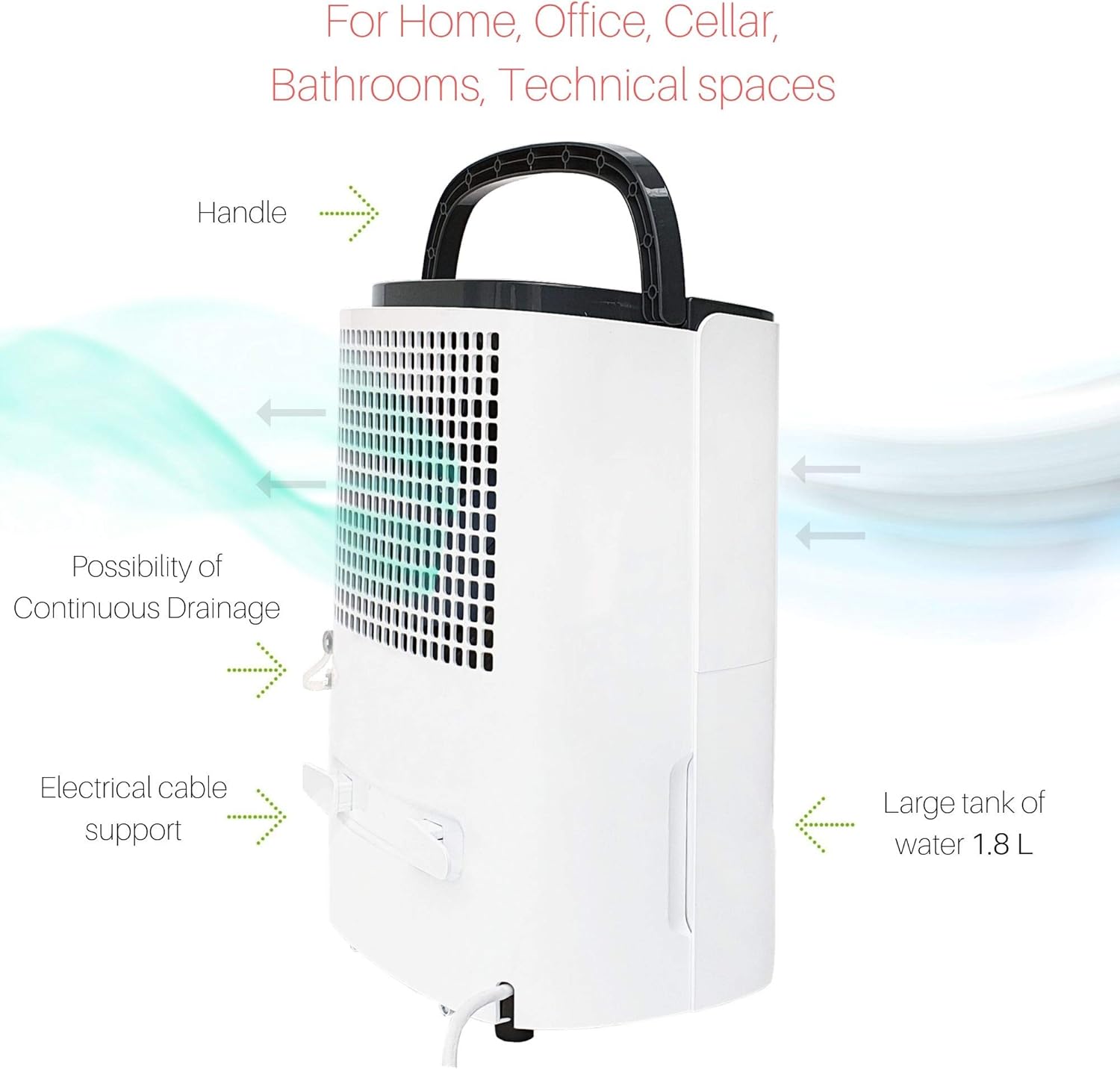
Image 2.2: Side diagram illustrating key components: top handle for portability, continuous drainage port, electrical cable support, and the 1.8-liter water tank.
- Control Panel: Located on the top, with LED display and function buttons.
- Air Inlet: Front grille for drawing in moist air.
- Air Outlet: Rear grille for expelling dry air.
- Water Tank: Removable tank at the bottom for collecting condensed water (1.8 L capacity).
- Continuous Drainage Port: Located on the side for connecting a hose for continuous drainage.
- Handle: Integrated handle on top for easy transport.
- Wheels: For enhanced portability.
3. Setup
3.1 Unpacking
- Carefully remove the dehumidifier from its packaging.
- Remove all packing materials and ensure no components are missing or damaged.
- Keep the packaging for future storage or transport.

Image 3.1: The dehumidifier unit, its retail packaging, and the included user manual.
3.2 Placement
- Place the dehumidifier in a room where the temperature is between 5°C and 35°C.
- Ensure there is at least 20 cm (8 inches) of clear space around the air inlets and outlets for optimal airflow.
- Avoid placing the unit directly against walls or furniture.
- The appliance is suitable for rooms up to 31 cubic meters.

Image 3.2: The dehumidifier positioned in a room, demonstrating appropriate placement away from furniture for effective operation.
3.3 Power Connection
- Ensure the power cord is securely plugged into a grounded electrical outlet.
- Verify that the voltage matches the specifications of the unit (220-240V, 50Hz).
3.4 Continuous Drainage (Optional)
For continuous operation without needing to empty the water tank, you can set up continuous drainage:
- Locate the continuous drainage port on the side of the unit.
- Connect a suitable drainage hose (not included) to this port.
- Ensure the hose is sloped downwards to allow gravity drainage into a floor drain or larger container.
4. Operating Instructions
4.1 Control Panel

Image 4.1: The control panel with an illuminated LED display showing the current humidity level (e.g., 70%) and various function icons.
The control panel features an LED display that shows the current room humidity and your set humidity level. Various buttons allow you to control the unit's functions.
4.2 Power On/Off
- Press the Power button to turn the unit on or off.
4.3 Setting Desired Humidity
- Press the Humidity button (often indicated by a droplet icon) to cycle through desired humidity levels (e.g., 40%, 50%, 60%, Continuous).
- The unit will operate until the set humidity level is reached, then pause, restarting if humidity rises.
- Select "Continuous" mode for non-stop dehumidification, regardless of the humidity level.
4.4 Timer Function
- Press the Timer button to set an auto-on or auto-off time (e.g., 1-24 hours).
- Each press typically increases the time by one hour.
4.5 Child Lock
- To activate the child lock, press and hold the designated button (refer to control panel icons for specific button, often a lock symbol) for a few seconds.
- Repeat the process to deactivate.
5. Maintenance
Regular maintenance ensures optimal performance and extends the lifespan of your dehumidifier.
5.1 Emptying the Water Tank
- When the water tank is full, the unit will automatically shut off, and an indicator light will illuminate.
- Carefully pull out the water tank from the front of the unit.
- Empty the collected water.
- Slide the empty tank back into position until it clicks securely. The unit will then resume operation.
5.2 Cleaning the Air Filter
The air filter should be cleaned every two weeks or more frequently depending on usage and air quality.
- Unplug the dehumidifier from the power outlet.
- Locate the air filter (typically behind the front air inlet grille).
- Remove the filter.
- Clean the filter with a vacuum cleaner or wash it gently with warm, soapy water.
- Rinse thoroughly and allow it to air dry completely before reinserting.
- Reinstall the dry filter and plug the unit back in.
5.3 Cleaning the Unit Exterior
- Wipe the exterior of the unit with a soft, damp cloth.
- Do not use harsh chemicals, abrasive cleaners, or solvents.
5.4 Storage
- If storing the unit for an extended period, ensure the water tank is empty and clean.
- Clean the air filter.
- Store the unit upright in a cool, dry place, preferably in its original packaging.
6. Troubleshooting
Before contacting customer support, please refer to the following common issues and solutions:
| Problem | Possible Cause | Solution |
|---|---|---|
| Unit does not turn on. | No power supply. Power button not pressed. | Check if the power cord is securely plugged in. Press the Power button. |
| No dehumidification. | Air filter is clogged. Room temperature is too low. Humidity setting is too high. Water tank is full. | Clean the air filter. Ensure room temperature is above 5°C. Lower the desired humidity setting. Empty the water tank. |
| Water tank full indicator is on, but tank is not full. | Float switch malfunction or obstruction. | Check the float switch in the water tank for any obstructions and ensure it moves freely. |
| Unit is noisy. | Unit not on a level surface. Air filter clogged. | Place the unit on a flat, stable surface. Clean the air filter. |
| Frost on coils. | Room temperature is too low. | The unit has an automatic defrost function. If frost persists, increase room temperature or ensure proper ventilation. |
7. Technical Specifications
| Feature | Specification |
|---|---|
| Brand | Turbionaire |
| Model | Smart 10 Eco |
| Dehumidification Capacity | 10 Liters/24 hours |
| Recommended Room Area | Up to 31 Cubic meters |
| Power Source | Electric |
| Max. Wattage | 200 W (as per product title) / 240 W (as per specifications) |
| Noise Level | 40 Decibels |
| Water Tank Capacity | 1.8 Liters |
| Refrigerant | R290 (Eco-friendly) |
| Product Dimensions (D x W x H) | 21.7 cm x 29.6 cm x 26.1 cm |
| Weight | 10.5 kg (23.15 pounds) |
| Number of Speeds | 2 |
| Special Features | Continuous drainage, Portable, Timer, Automatic Defrost, Hygrostat, Child Lock, Automatic Restart |
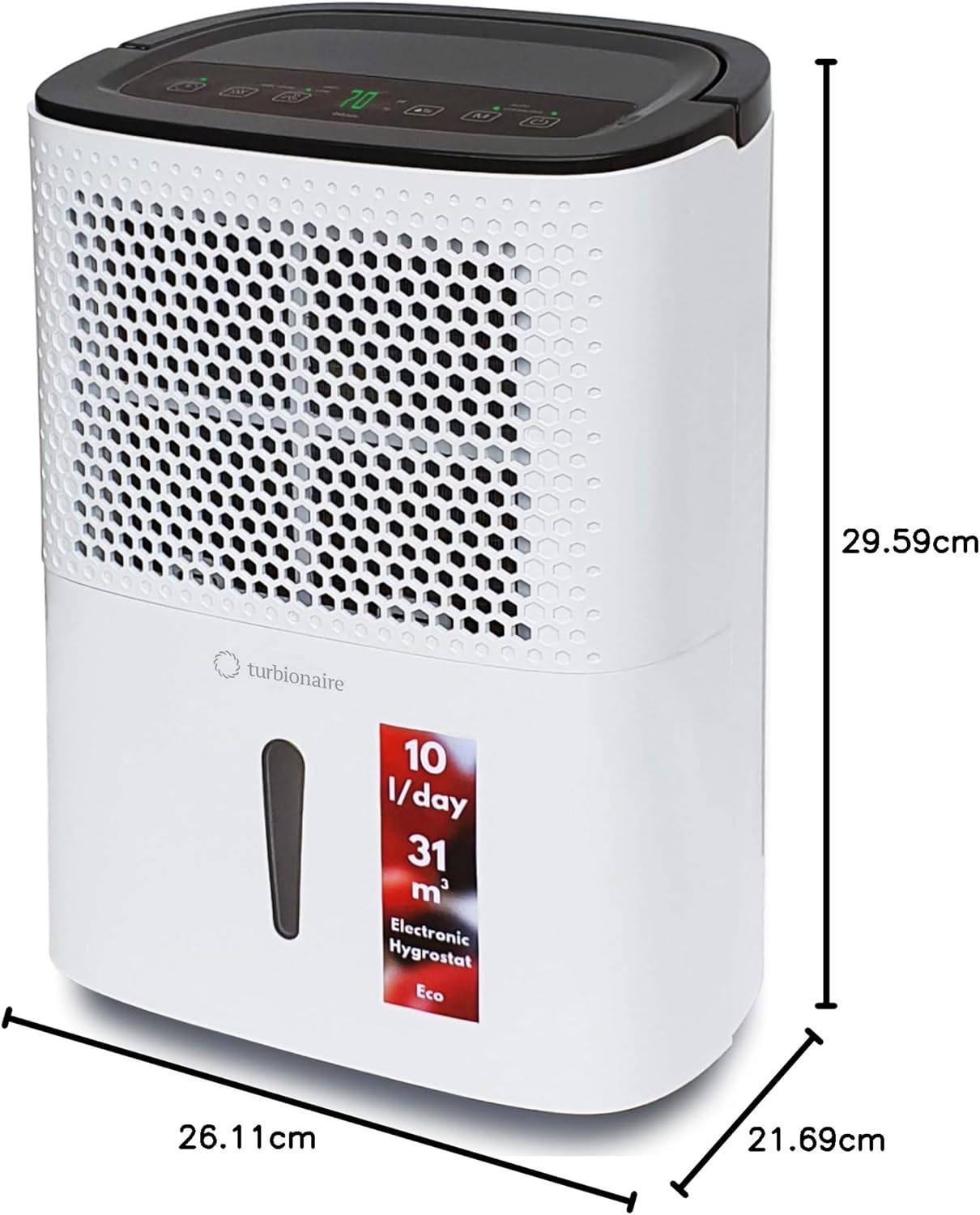
Image 7.1: Dimensional diagram of the dehumidifier, indicating its height (29.59 cm), width (26.11 cm), and depth (21.69 cm).
8. Warranty and Support
8.1 Warranty Information
The Turbionaire Smart 10 Eco Dehumidifier comes with a standard manufacturer's warranty. Please refer to the warranty card included in your product packaging for specific terms, conditions, and duration. Keep your proof of purchase for warranty claims.
8.2 Customer Support
For technical assistance, spare parts, or any questions not covered in this manual, please contact Turbionaire customer support. Contact details can typically be found on the manufacturer's website or on your product packaging.


