
1. Important Safety Information
Please read all safety warnings and instructions carefully before using this product. Keep this manual for future reference.
- Do not expose the speaker to extreme temperatures, direct sunlight, or fire.
- Avoid dropping or subjecting the speaker to strong impacts.
- Do not disassemble, repair, or modify the speaker yourself. Contact authorized service personnel for any repairs.
- Keep the speaker away from water and liquids. While the speaker is waterproof, prolonged submersion is not recommended.
- Use only the specified charging voltage and current.
2. Package Contents
- EWA A115 Mini Bluetooth Portable Speaker
- USB Charging Cable
- Metal Hook
- Carrying Case
- User Manual
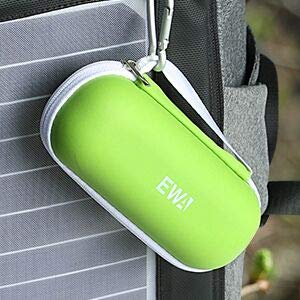
Image: The EWA A115 speaker includes a protective carrying case and a metal hook for portability.
3. Product Overview
The EWA A115 is a compact Bluetooth portable speaker designed for clear audio and extended playback. It features a high-performance driver and a passive subwoofer for impressive sound quality.
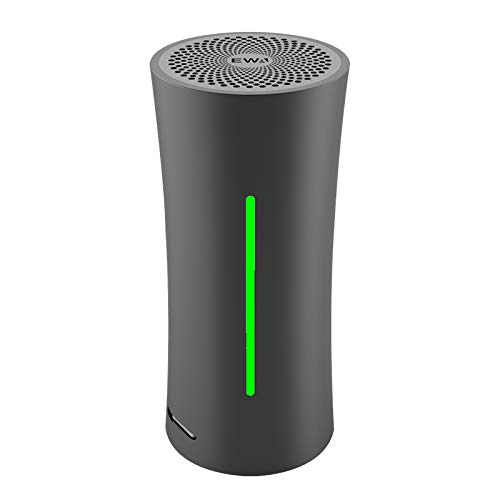
Image: Front view of the EWA A115 Mini Bluetooth Portable Speaker, showcasing its cylindrical design and integrated LED light strip.
Key Features:
- Extended Battery Life: Up to 105 hours of continuous music playback.
- Dancing LED Light: Five LED lights that synchronize with music and indicate battery status.
- True Wireless Stereo (TWS): Ability to pair two A115 speakers for a stereo sound experience.
- Impressive Audio: Crystal clear sound with enhanced bass from a passive radiator.
- Portable Design: Compact size and lightweight, includes a metal hook and carrying case.
4. Setup
4.1 Charging the Speaker
Before first use, fully charge the speaker. Connect the provided USB charging cable to the speaker's charging port and to a USB power source (e.g., computer, wall adapter).
- The LED indicator lights will show charging progress.
- Each LED light represents approximately 20% of the battery charge.
- A full charge typically takes about 4 hours.
- The speaker offers up to 105 hours of playback on a single charge.

Image: The EWA A115 speaker displaying its LED light, which indicates the current battery level. Five lights represent a full charge.

Image: An illustration detailing the EWA A115's battery performance, including charge time, playback duration, and battery cycle life.
4.2 Powering On/Off
- To Power On: Press and hold the power button for approximately 3 seconds until the LED lights illuminate.
- To Power Off: Press and hold the power button for approximately 3 seconds until the LED lights turn off.
5. Operating Instructions
5.1 Bluetooth Pairing
- Ensure the speaker is powered on and in pairing mode (LED lights may flash).
- On your device (smartphone, tablet, etc.), enable Bluetooth.
- Search for available Bluetooth devices and select "EWA A115" from the list.
- Once connected, the speaker will emit a confirmation sound, and the LED lights will indicate a successful connection.
5.2 True Wireless Stereo (TWS) Pairing
TWS technology allows two EWA A115 speakers to connect wirelessly and play music as a stereo pair.
- Ensure both EWA A115 speakers are powered on and not connected to any other Bluetooth device.
- On one of the speakers (this will be the primary speaker), double-press the power button. The speaker will enter TWS pairing mode.
- The two speakers will automatically search for and connect to each other. A confirmation sound will indicate successful TWS pairing.
- Once TWS paired, connect your device to the primary speaker via Bluetooth as described in section 5.1.
- Music will now play in stereo through both speakers. Each speaker can also be used separately.

Image: An illustration showing two EWA A115 speakers wirelessly linked, demonstrating the True Wireless Stereo (TWS) pairing functionality.
5.3 Music Playback
- Play/Pause: Short press the power button.
- Next Track: Double-press the power button.
- Previous Track: Triple-press the power button.
- Volume Control: Adjust volume directly from your connected device.
5.4 LED Indicator Functions
The EWA A115 features 5 LED lights that provide visual feedback:
- Battery Level: Each illuminated LED light indicates approximately 20% of the remaining battery charge.
- Charging Status: LEDs will progressively light up during charging.
- Bluetooth Pairing: Flashing LEDs indicate pairing mode.
- Music Sync: The LEDs can dance in sync with the music rhythm.
6. Maintenance
6.1 Cleaning
- Wipe the speaker with a soft, dry, or slightly damp cloth.
- Do not use abrasive cleaners, alcohol, or chemical solvents.
- Ensure the charging port is dry before charging.
6.2 Storage
- Store the speaker in a cool, dry place away from direct sunlight and extreme temperatures.
- If storing for an extended period, charge the battery to about 50% every few months to maintain battery health.
7. Troubleshooting
| Issue | Possible Cause | Solution |
|---|---|---|
| Speaker does not power on. | Low battery. | Charge the speaker for at least 30 minutes. |
| Cannot pair via Bluetooth. | Speaker not in pairing mode; device Bluetooth off; too far from device. | Ensure speaker is on and in pairing mode. Turn device Bluetooth off/on. Move speaker closer to device. |
| No sound or low volume. | Volume too low on speaker or device; speaker not connected. | Increase volume on both speaker and connected device. Re-pair Bluetooth. |
| TWS pairing fails. | Speakers already connected to other devices; incorrect pairing steps. | Ensure both speakers are disconnected from other devices. Follow TWS pairing steps carefully. |
8. Specifications
| Feature | Specification |
|---|---|
| Model Name | A115 |
| Brand | EWA |
| Connectivity Technology | Bluetooth, Wireless |
| Wireless Communication Technology | Bluetooth |
| Audio Output Mode | Stereo |
| Speaker Type | Outdoor, Subwoofer |
| Special Feature | Radio, Subwoofer (Note: Radio feature not explicitly detailed in product description, may refer to general audio input) |
| Power Source | Battery Powered |
| Battery Type | 1 Lithium Ion battery (included) |
| Product Dimensions (LxWxH) | 4.7 x 4.7 x 11 cm (1.89 x 1.89 x 4.33 inches) |
| Item Weight | 454 g (13.4 ounces) |
| Is Waterproof | TRUE |
| Control Method | App (Note: App functionality not explicitly detailed in product description, may refer to general smartphone control) |
9. Warranty and Support
EWA products are manufactured to high-quality standards. This product is covered by a limited warranty against defects in materials and workmanship from the date of purchase. Please refer to the warranty card included in your package for specific terms and conditions.
For technical support, warranty claims, or general inquiries, please contact EWA customer service through the contact information provided on the product packaging or the official EWA website.


