
Introduction
The KAIWEETS HT118A Digital Multimeter is a versatile electrical testing instrument designed for accurately measuring various electrical parameters. It features True RMS (TRMS) for precise readings of non-sinusoidal waveforms and offers a 6000-count display for high resolution. This multimeter is capable of measuring AC/DC voltage, AC/DC current, resistance, capacitance, frequency, duty-cycle, temperature, and includes functions for diode testing, continuity checking, non-contact voltage (NCV) detection, and Live wire detection. Its auto-ranging capability simplifies operation, making it suitable for both professional and automotive applications.
What's in the Box
The KAIWEETS HT118A package includes the following components:
- KAIWEETS HT118A Digital Multimeter
- Test Leads (Red and Black)
- Thermocouple (for temperature measurement)
- AA Batteries (2 included)
- User Manual (this document)
Product Overview
Familiarize yourself with the main components of your KAIWEETS HT118A Digital Multimeter.
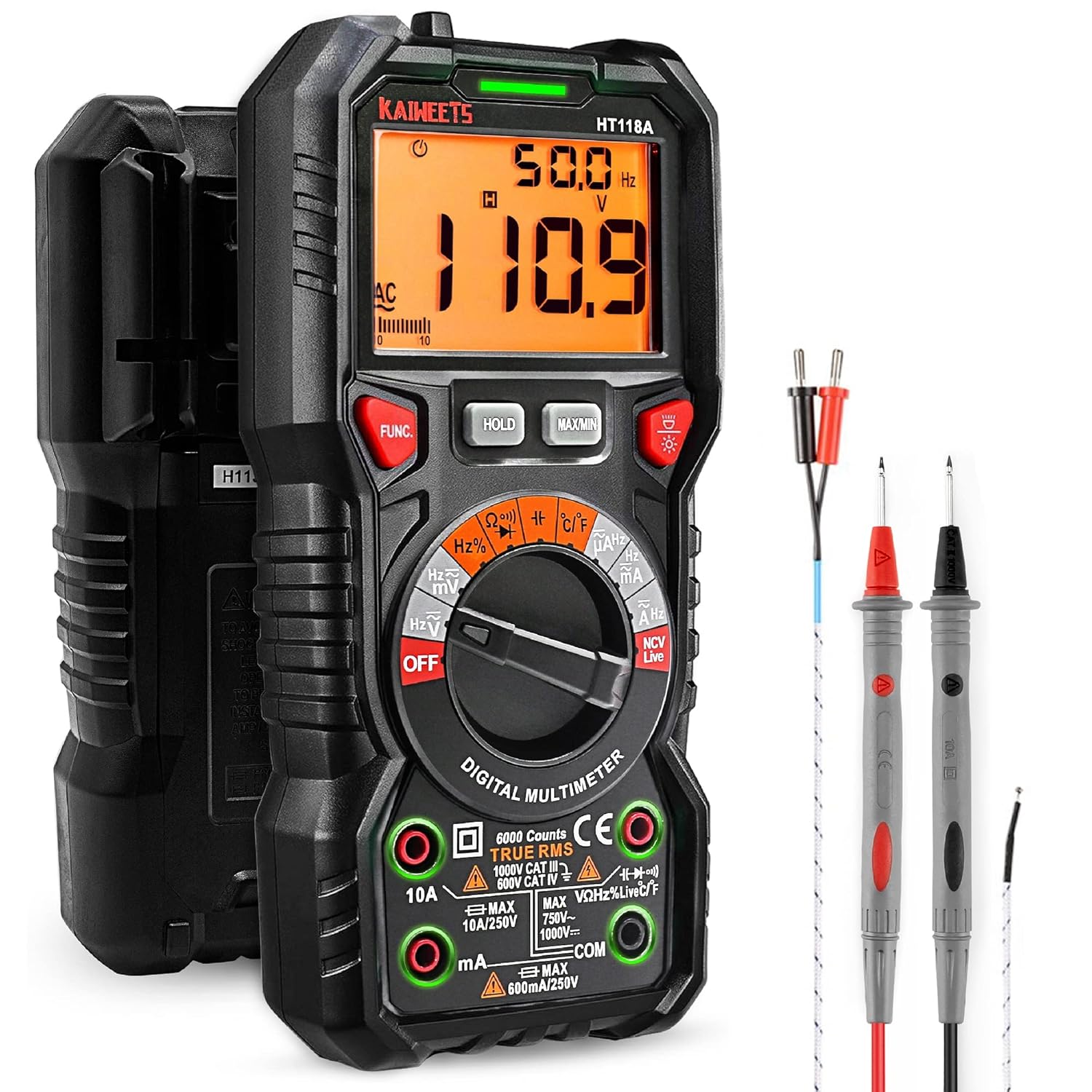
Figure 1: KAIWEETS HT118A Digital Multimeter with included accessories. This image shows the front view of the multimeter along with the red and black test leads and the temperature probe.

Figure 2: Close-up view of the multimeter highlighting the LED lightning jacks. These jacks illuminate to guide the user on correct probe placement for different measurement functions.

Figure 3: Display of the KAIWEETS HT118A Multimeter, showing its 2.9-inch HTN backlit screen. The screen provides dual readings and an orange backlight, which activates when voltage exceeds 80V or current exceeds 10A.
Setup
Battery Installation
The KAIWEETS HT118A Multimeter requires two AA batteries for operation. The batteries are included with the product.
- Locate the battery compartment on the back of the multimeter.
- Use a small screwdriver to open the battery compartment cover.
- Insert the two AA batteries, ensuring correct polarity (+ and -).
- Replace the battery compartment cover and secure it with the screw.
Connecting Test Leads
Always ensure the test leads are properly connected to the multimeter before taking measurements. The multimeter features LED lightning jacks that will illuminate to indicate the correct ports for your selected function.
- Connect the black test lead to the COM (Common) input jack.
- Connect the red test lead to the appropriate input jack based on the measurement you intend to perform. The LED lights will guide you. For most voltage, resistance, continuity, diode, capacitance, and frequency measurements, use the VΩHz jack. For current measurements, use the 10A or mA/µA jack.
Operating Instructions
The KAIWEETS HT118A features auto-ranging, simplifying most measurements. Rotate the central dial to select the desired measurement function.
Measuring Voltage (AC/DC)
- Turn the rotary switch to the "V~" (AC Voltage) or "V-" (DC Voltage) position.
- Connect the test leads to the circuit or component to be measured in parallel.
- The multimeter will automatically select the appropriate range and display the voltage reading.

Figure 4: The KAIWEETS HT118A Multimeter in use, measuring voltage within an electrical panel. This demonstrates the practical application of the device in a real-world scenario.
Measuring Current (AC/DC)
- Turn the rotary switch to the "A~" (AC Current) or "A-" (DC Current) position.
- Connect the multimeter in series with the circuit. Ensure the red test lead is in the 10A or mA/µA jack as appropriate.
- The current reading will be displayed.
Measuring Resistance
- Turn the rotary switch to the "Ω" (Resistance) position.
- Connect the test leads across the component whose resistance you wish to measure. Ensure the component is de-energized.
- The resistance reading will be displayed.
Measuring Capacitance
- Turn the rotary switch to the "Capacitance" position.
- Connect the test leads across the capacitor. Ensure the capacitor is discharged before testing.
- The capacitance reading will be displayed.
Video: How to Use KAIWEETS HT118A to Measure Capacitance. This video demonstrates the steps for accurately measuring capacitance using the multimeter.
Measuring Temperature
- Turn the rotary switch to the "°C/°F" (Temperature) position.
- Connect the included thermocouple to the appropriate input jacks (usually marked with temperature symbols).
- Place the tip of the thermocouple on or in the object whose temperature you want to measure.
- The temperature reading will be displayed in Celsius or Fahrenheit.

Figure 5: The KAIWEETS HT118A Multimeter measuring the temperature of a liquid using the included K-type thermocouple. This illustrates the temperature measurement capability.
Continuity Test
- Turn the rotary switch to the "Continuity" position (often shared with diode test).
- Connect the test leads across the circuit or component.
- A continuous beep indicates a complete circuit (continuity).
Diode Test
- Turn the rotary switch to the "Diode" position (often shared with continuity test).
- Connect the red test lead to the anode and the black test lead to the cathode of the diode.
- The forward voltage drop will be displayed. Reverse the leads; an open circuit reading indicates a good diode.
Non-Contact Voltage (NCV) and Live Wire Detection
The NCV function allows for detection of AC voltage without direct contact. The Live function helps identify live wires.
- Turn the rotary switch to the "NCV Live" position.
- For NCV, bring the top of the multimeter close to the wire or outlet. An audible alarm and LED indicator will signal the presence of AC voltage.
- For Live wire detection, insert the red test lead into the "Live" input jack (if available, or use the NCV function as described).
Additional Functions
- HOLD: Press the HOLD button to freeze the current reading on the display. Press again to release.
- MAX/MIN: Press the MAX/MIN button to record the maximum or minimum reading during a measurement session.
- Backlight: Press the backlight button (often indicated by a light bulb icon) to turn the display backlight on or off.
- Auto Power-Off: The multimeter will automatically power off after a period of inactivity to conserve battery life.
Video: How to Use KAIWEETS HT118A to Measure DC Voltage. This video provides a demonstration of measuring DC voltage with the multimeter.
Maintenance
Proper maintenance ensures the longevity and accuracy of your KAIWEETS HT118A Multimeter.
- Cleaning: Wipe the multimeter with a damp cloth and mild detergent. Do not use abrasives or solvents.
- Battery Replacement: Replace batteries when the low battery indicator appears on the display. Always use new AA batteries.
- Storage: Store the multimeter in a cool, dry place, away from direct sunlight and extreme temperatures. If storing for extended periods, remove the batteries to prevent leakage.
- Test Leads: Inspect test leads regularly for any signs of damage, such as cracked insulation or exposed wires. Replace damaged leads immediately to ensure safety and accurate measurements.
Troubleshooting
| Problem | Possible Cause | Solution |
|---|---|---|
| No display or dim display | Low batteries or no batteries installed. | Replace the AA batteries. |
| Incorrect readings | Incorrect function selected, test leads improperly connected, or damaged test leads. | Ensure the correct function is selected on the dial. Verify test leads are securely connected to the correct input jacks. Inspect test leads for damage and replace if necessary. |
| "OL" (Overload) displayed | The measured value exceeds the selected range or the maximum input limit of the multimeter. | For manual ranging, select a higher range. If auto-ranging, the value is beyond the meter's maximum capacity for that function. Ensure you are not attempting to measure values exceeding the multimeter's specifications. |
| No continuity beep | Open circuit or faulty component. | Check the circuit for breaks. Ensure the component is not faulty. |
Specifications
- Model: HT118A
- Display: 6000 Counts, 2.9" HTN Backlit LCD
- DC Voltage: Up to 1000V
- AC Voltage: Up to 750V
- DC Current: Up to 10A
- AC Current: Up to 10A
- Resistance: Up to 60 MOhms
- Capacitance: Yes
- Frequency: Yes
- Duty-Cycle: Yes
- Temperature: Yes (with included thermocouple)
- Diode Test: Yes
- Continuity: Yes
- NCV (Non-Contact Voltage): Yes
- Live Wire Detection: Yes
- Safety Rating: IEC Rated CAT III 1000V, CAT IV 600V, CE, RoHS certified
- Power Source: 2 AA batteries (included)
- Dimensions: 8.03 x 5.12 x 2.44 inches
- Weight: 9.59 ounces (272 Grams)
Warranty and Support
KAIWEETS provides a 36-Month after-sale service and lifetime technical support for the HT118A Digital Multimeter. If you encounter any concerns or require assistance, please do not hesitate to contact KAIWEETS customer support. For further information or to access the official PDF user manual, please refer to the link provided with your product documentation or visit the KAIWEETS official website.
Note: Please take off the cap before using the test leads.


