
Introduction
This manual provides essential instructions for the safe and effective use of your iLC E14 LED RGBW bulb. This bulb combines daily illumination with color-changing capabilities, offering a versatile lighting solution for various environments. Please read this manual thoroughly before installation and operation, and retain it for future reference.
Safety Information
- Ensure the power is turned off before installing or replacing the bulb.
- Do not use with dimmer switches. This bulb is not compatible with external dimmer circuits, as it has its own dimming function via remote control.
- This bulb is not rechargeable or battery-powered. It requires a standard E14 socket with 85-265V AC power.
- Do not disassemble or modify the bulb.
- Avoid direct exposure to water or high humidity. This product is designed for indoor use.
- Keep the remote control away from children.

Image: The iLC E14 LED bulb showing its dimensions (110mm height, 50mm width, 14mm E14 base). Important warnings indicate that the bulb is not compatible with dimmer switches and is not rechargeable or battery-powered.
Package Contents
Your package should contain the following items:
- iLC E14 LED RGBW Bulbs (Quantity: 4)
- Remote Controls (Quantity: 2)
- User Manual (This document)
Setup
- Unpack: Carefully remove the LED bulbs and remote controls from their packaging.
- Install Bulb: Screw the iLC E14 LED bulb into a standard E14 light socket. Ensure the socket is rated for the bulb's voltage (85-265V).
- Power On: Turn on the power switch to the light fixture. The bulb should illuminate in its default setting (usually cool white).
- Remote Control: Insert batteries (not included) into the remote control if necessary. The remote control uses infrared (IR) technology, so ensure a clear line of sight to the bulb for optimal operation. One remote can control multiple bulbs within its range.
Operating Instructions
The iLC E14 LED bulb offers various lighting modes and functions controlled by the included remote. Familiarize yourself with the remote control layout:

Image: Diagram of the remote control for the iLC E14 LED bulb, showing buttons for On/Off, Flash mode, Smooth mode, Timer, Brightness adjustment, and 12 preset color buttons (Red, Green, Blue, and other colors).
Basic Functions:
- Power On/Off: Press the ON or OFF button to turn the bulb on or off.
- Color Selection: Press any of the 12 fixed preset color buttons (e.g., Red, Green, Blue, Yellow, Purple) to change the bulb's color.
- Brightness Adjustment: Use the Dim Up (sun icon with plus) and Dim Down (sun icon with minus) buttons to adjust brightness. There are three main brightness levels: 100% for daily lighting, 30% for auxiliary night lighting, and 1% for sleep mode.
Special Modes:
- Flash Mode: Press the Flash button (labeled 'C') for a dynamic, rapid color-changing effect, suitable for parties or lively atmospheres.
- Smooth Mode: Press the Smooth button (labeled 'S') for a gradual, continuous cycle through various colors, creating a relaxed ambiance.
Advanced Features:
- Memory Function: The bulb will remember the last color or mode used when it is turned off and back on, even if power is cut.
- Synchronization: When using multiple iLC bulbs together (e.g., in a chandelier), one remote control can synchronize their color changes and modes, ensuring a consistent lighting effect.
- Timer Function: Use the timer buttons on the remote. The 1H button sets a one-hour timer. The 24H Cycle button activates a daily cycle timer, allowing the light to turn on and off automatically at set times each day. This is ideal for outdoor areas like courtyards or hallways.

Image: A grid displaying the 12 distinct colors that the iLC E14 LED bulb can produce, ranging from white to various shades of red, green, and blue.

Image: A collage showing four different room settings, each illuminated with a distinct color to match activities such as 'Party', 'Relax', 'Work', and 'Gaming', demonstrating the bulb's versatility.
Maintenance
- Cleaning: Ensure the bulb is off and cool before cleaning. Wipe with a soft, dry cloth. Do not use liquid cleaners or abrasive materials.
- Storage: If storing the bulb for an extended period, remove it from the fixture and store it in its original packaging in a cool, dry place.
- Remote Control: Replace batteries in the remote control when its range or responsiveness decreases.
Troubleshooting
| Problem | Possible Cause | Solution |
|---|---|---|
| Bulb does not light up. | No power to the socket; bulb not screwed in properly; bulb is faulty. | Check power switch and circuit breaker. Ensure bulb is securely screwed in. Test bulb in another working socket. |
| Remote control not working. | Remote batteries are dead; no clear line of sight; remote is too far. | Replace remote control batteries. Ensure remote is pointed directly at the bulb without obstructions. Move closer to the bulb. |
| Bulb flickers or changes color unexpectedly. | Interference; unstable power supply; incompatible dimmer switch. | Ensure the bulb is not connected to a dimmer switch. Check for other electronic devices causing interference. Ensure stable power supply. |
| Multiple bulbs not synchronizing. | Bulbs are out of remote range; remote signal blocked. | Ensure all bulbs are within the remote's effective range and have a clear line of sight. Try resetting power to all bulbs simultaneously. |
Specifications
| Feature | Specification |
|---|---|
| Model Number | BR16-SA50 |
| Bulb Type | LED |
| Base Type | E14 |
| Power Consumption | 5 Watts |
| Incandescent Equivalent | 40 Watts |
| Input Voltage | 85-265V AC |
| Luminous Flux | 450 Lumens |
| Color Temperature (White) | 5700K (Cool White) |
| Color Rendering Index (CRI) | > 85Ra |
| Beam Angle | 270 Degrees |
| Control Method | Infrared (IR) Remote Control |
| Special Features | RGBW Color Changing, Dimmable, Timer Function, Memory Function, Synchronization |
| Dimensions (L x W x H) | 5 cm x 5 cm x 11 cm (approx.) |
| Usage Environment | Indoor |
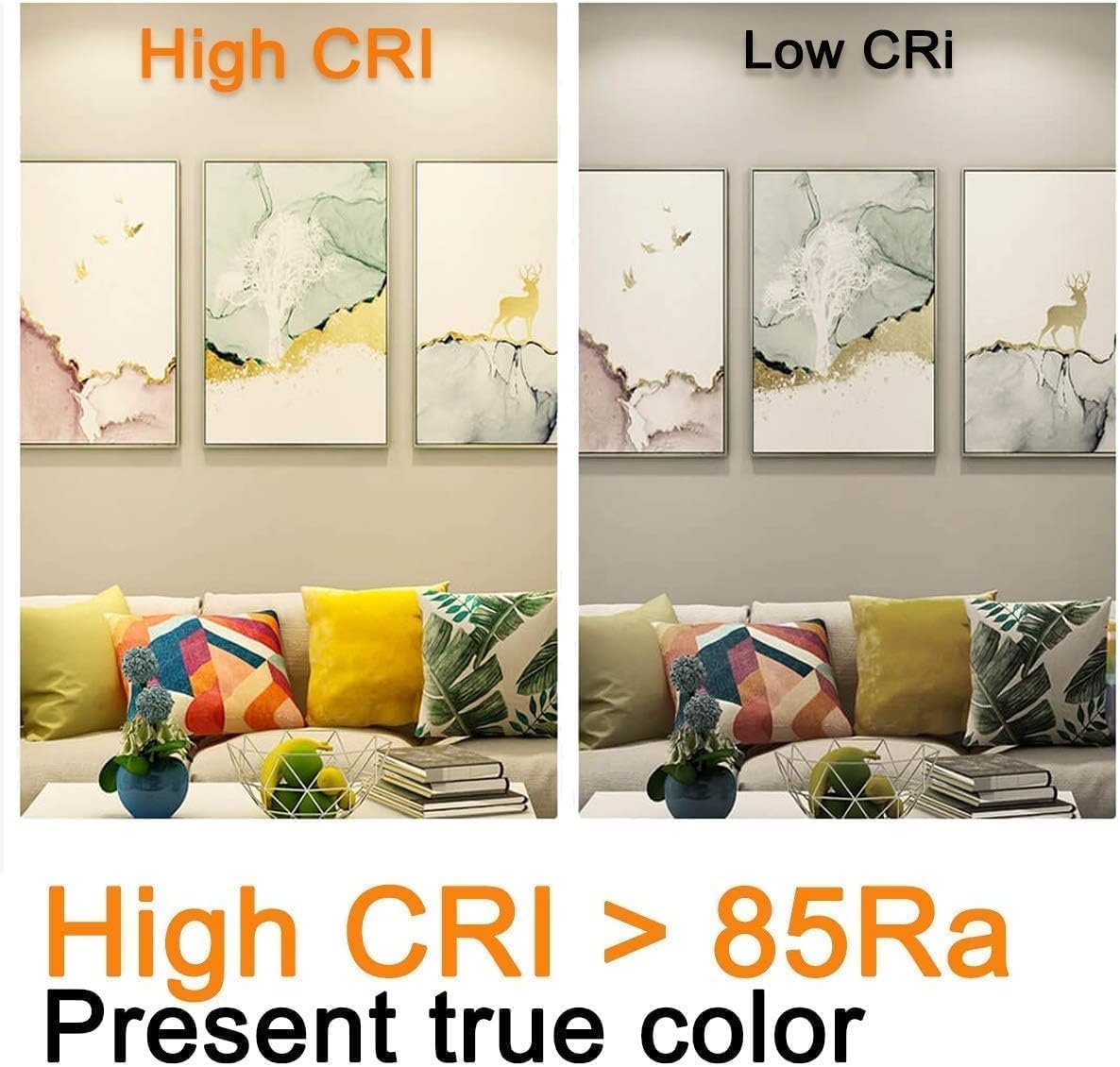
Image: A visual comparison demonstrating the difference between High CRI (>85Ra) and Low CRI lighting, highlighting how High CRI presents true colors more accurately.

Image: The EU Energy Label for the iLC BR16-SA50 LED bulb, indicating an energy efficiency class of E and a consumption of 5 kWh/1000h. For more details, refer to the official EPREL database: https://eprel.ec.europa.eu/qr/1634975
Warranty and Support
Specific warranty details for this product are not provided within this manual. For warranty information, please refer to the product packaging or contact your retailer. For technical support or further inquiries, please reach out to the manufacturer, ILC, through their official website or customer service channels.