
Introduction
The Lava SF-95 Satellite Finder is an essential tool designed to assist in the installation and fine-tuning of satellite TV systems, including DirectTV, DishNetwork, Bell ExpressVu, FTA, and Satellite Internet systems. Utilizing SMT technology, this device offers superior sensitivity, capable of indicating signals across a frequency range of 0.2dB to 2300MHz. It operates directly from the LNB power supplied by your receiver and features a built-in buzzer that increases in pitch as signal strength improves. The SF-95 complies with EMC directives and is CE qualified, making it suitable for DIY satellite TV installations.
Product Features
- Input Frequency: 0.95 ~ 2.3 GHz
- Power: 13 ~ 18 VDC (Supplied from receiver)
- Gain: 17dB
- Built-in buzzer for audible signal indication.
- Analog meter for visual signal strength display.
- Level control knob for sensitivity adjustment.

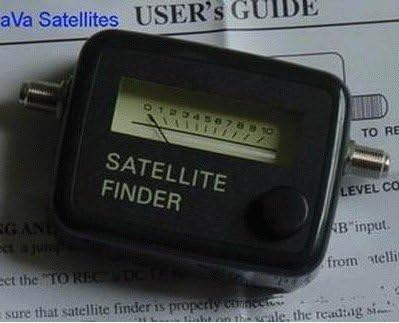
A detailed view of the Lava SF-95 Satellite Finder, showing its analog signal strength meter, the 'SATELLITE FINDER' label, and the rotary 'LEVEL CONTROL' knob on the right side.
Setup
Follow these steps to correctly connect your SF-95 Satellite Finder:
- Ensure your satellite receiver is powered off before making any connections.
- Connect the coaxial cable from your satellite dish's LNB (Low Noise Block) to the "SATELLITE" input port on the SF-95 Satellite Finder.
- Connect a short coaxial jumper cable from the "TO REC" output port on the SF-95 Satellite Finder to the satellite input on your satellite receiver.
- Once all connections are secure, power on your satellite receiver. The SF-95 Satellite Finder will receive power from the receiver.
This diagram illustrates the correct connection sequence for the SF-95 Satellite Finder. The satellite dish connects to the 'SATELLITE' input on the finder, and the 'TO REC' output on the finder connects to your satellite receiver. The 'LEVEL CONTROL' knob is also indicated.
Operating Instructions
The SF-95 Satellite Finder is designed for fine-tuning signal strength. It does not identify the specific satellite you are receiving; this must be verified through your satellite receiver's setup menu.
- Initial Adjustment: With the satellite receiver powered on and the SF-95 connected, turn the LEVEL CONTROL knob on the satellite finder clockwise until the meter needle shows a reading of approximately 5 or 6. This sets the initial sensitivity.
- Dish Alignment: Slowly adjust your satellite dish's azimuth (horizontal) and elevation (vertical) until the meter needle on the SF-95 shows the highest possible reading. The built-in buzzer will emit a higher-pitched tone as the signal strength increases.
- Fine-Tuning: If the meter needle goes off the scale (reads maximum), turn the LEVEL CONTROL knob counter-clockwise to reduce sensitivity. Then, continue to fine-tune the dish's position for the absolute highest possible signal reading. Repeat this process until you achieve the maximum signal strength without the meter pegging.
- Verification: Once the SF-95 indicates maximum signal strength, verify the signal quality and lock on your satellite receiver. Make any final minor adjustments to the dish if necessary, monitoring the receiver's signal indicators.
- Disconnection: After successful alignment, power off your satellite receiver and disconnect the SF-95 Satellite Finder. Reconnect the coaxial cable directly from the LNB to your satellite receiver.
Important Note: The SF-95 Satellite Finder is solely for fine-tuning signal strength. You must ensure your dish is aimed at the correct satellite, which can be verified using your receiver's setup menu. The satellite finder cannot identify the specific satellite being received, only its signal strength.
Maintenance
The Lava SF-95 Satellite Finder requires minimal maintenance to ensure its longevity and accurate performance:
- Keep the device clean and free from dust and debris. Use a soft, dry cloth for cleaning.
- Avoid exposing the unit to extreme temperatures, direct sunlight, or high humidity.
- Store the satellite finder in a dry, safe place when not in use.
- Do not attempt to open the casing or modify the internal components, as this will void any potential warranty and may damage the device.
Troubleshooting
If you encounter issues with your SF-95 Satellite Finder, consider the following:
- No Power/No Meter Movement:
- Ensure your satellite receiver is powered on. The SF-95 draws power from the receiver.
- Check all coaxial cable connections to ensure they are secure and properly tightened.
- Verify that the LNB on your satellite dish is functioning correctly.
- No Signal Indication (even with dish aimed):
- Confirm that the LEVEL CONTROL knob is not turned completely counter-clockwise (minimum sensitivity).
- Ensure there are no obstructions between your satellite dish and the satellite.
- Check the LNB and coaxial cables for any damage.
- Meter Pegs Constantly:
- Turn the LEVEL CONTROL knob counter-clockwise to reduce the sensitivity.
- This indicates a very strong signal, which is good, but the meter needs to be adjusted to allow for fine-tuning.
Specifications
| Feature | Specification |
|---|---|
| Model: | SF-95 |
| Input Frequency: | 0.95 ~ 2.3 GHz |
| Power Supply: | 13 ~ 18 VDC (from receiver) |
| Gain: | 17dB |
| Manufacturer: | LAVA |
| ASIN: | B07SH2W98G |
| Date First Available: | May 29, 2019 |
Warranty and Support
Specific warranty information for the Lava SF-95 Satellite Finder is typically provided at the point of purchase or included with the product packaging. For detailed warranty terms, technical support, or service inquiries, please refer to the documentation supplied with your device or visit the official Lava website. You may also contact your retailer for assistance.