
1. Introduction
Thank you for choosing the SOAIY UHF 2-in-1 Wireless Microphone System. This professional wireless microphone offers both headset and handheld modes, providing clear audio transmission up to 50 meters. It is designed for various applications including teaching, presentations, web podcasts, outdoor recording, and karaoke. Please read this manual carefully before use to ensure optimal performance and longevity of your device.
2. Package Contents
Please check the box for the following items:
- Wireless Headset Microphone (Transmitter) x1
- Receiver x1
- Headband x1
- 6.35mm Adapter x1
- USB Charging Cable x1
- User Manual x1

Image: All components of the SOAIY UHF 2-in-1 Wireless Microphone System, including the headset microphone, receiver, headband, adapter, and charging cable.
3. Product Features
- UHF Anti-Noise Technology: Built-in high-sensitivity condenser microphone with UHF technology for stable signal, no delay, no radiation, anti-howling, anti-interference, and constant frequency for clearer sound quality.
- Extended Transmission Range: Enjoy a transmission distance of up to 50 meters (165 feet) in open areas, ensuring reliable performance.
- 2-in-1 Versatility: Easily switch between headset mode for hands-free operation and handheld mode for traditional microphone use.
- Long Battery Life & Fast Charging: Both the transmitter and receiver feature a built-in 400mAh rechargeable lithium-ion battery, providing approximately 6 hours of operation. A full charge takes only 2.5 hours using the included dual USB cable.
- Broad Compatibility: Compatible with PC, laptops, voice amplifiers, cameras, multimedia systems, PA systems, karaoke machines, and speakers.
- Cardioid Pickup Pattern: Designed to pick up your voice fuller and warmer, focusing on sound from the front while reducing background noise.

Image: Visual representation of the UHF technology benefits, including stable signal, clear sound quality, 50-meter range, power efficiency, constant frequency, anti-interference, and anti-howling capabilities.

Image: Illustration of the microphone's cardioid pickup pattern, indicating its directional sound capture for clearer voice reproduction.
4. Setup Instructions
4.1 Initial Charging
Before first use, fully charge both the transmitter and receiver for approximately 2.5 hours. Use the provided dual USB charging cable to charge both units simultaneously.

Image: The dual USB cable simultaneously charging the microphone transmitter and receiver, highlighting the 6-hour use time and 2.5-hour charge time.
4.2 Connecting to an Audio Device
- Ensure the receiver is plugged into the MIC jack of your audio device (e.g., amplifier, PA system, speaker).
- If your audio device has a 6.35mm MIC jack, use the included 6.35mm adapter.
- Important Note: This microphone system is not compatible with smartphones, MacBooks, or laptops via AUX input. Do not plug the receiver into a phone or AUX jack.

Image: Illustration demonstrating that the receiver should be plugged into a 'Mic jack' and not a 'phone/AUX jack' on an audio amplifier.
4.3 Pairing the Transmitter and Receiver
- Turn off both the receiver and the transmitter.
- Turn on the transmitter (headset microphone). The blue light will illuminate. Long press the "+" button until the blue light starts flashing.
- Turn on the receiver and wait for it to connect.
- Once successfully paired, the blue lights on both the transmitter and receiver will stop flashing and remain solid. You can now begin using the microphone.

Image: Step-by-step visual guide for pairing the SOAIY wireless microphone transmitter and receiver, showing the indicator lights during the process.
5. Operating Instructions
5.1 Switching Between Headset and Handheld Modes
The SOAIY UHF 2-in-1 microphone allows for easy conversion between headset and handheld modes to suit your needs. Simply detach the microphone unit from the headband to use it as a handheld microphone, or attach it to the headband for hands-free operation.
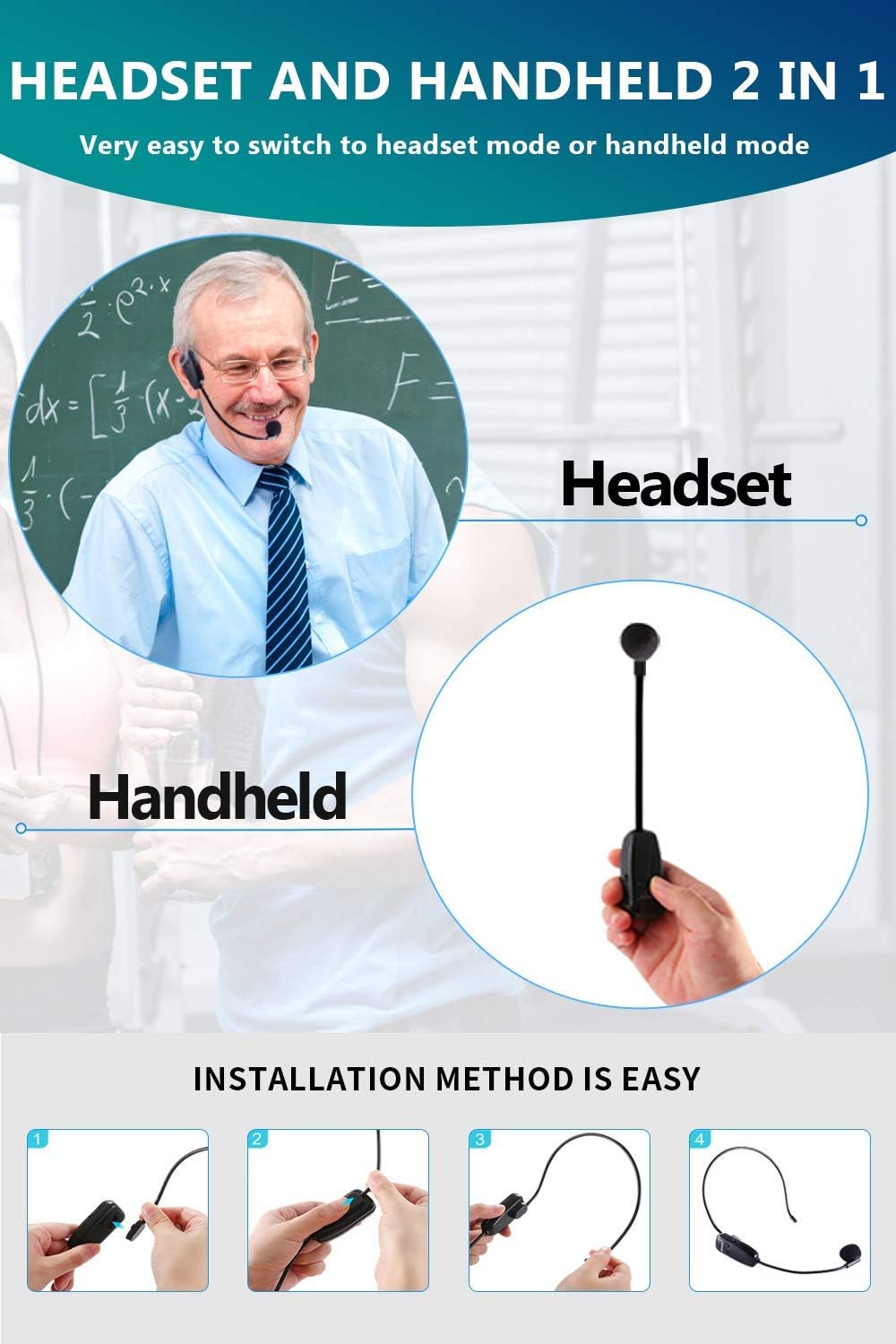
Image: Visual guide showing the microphone in both headset and handheld configurations, along with simple steps for attaching it to the headband.
5.2 Usage Scenarios
This versatile microphone system is suitable for a wide range of applications:
- Classroom teaching
- Stage speaking and presentations
- Interviews
- Conference meetings
- Web podcasts and YouTube recordings
- Outdoor recording
- Yoga and dance instruction
- Karaoke

Image: Examples of the microphone in use for classroom teaching, stage speaking, interviewing, and conference meetings.
Video: A short demonstration showcasing the SOAIY wireless microphone in headset and handheld modes, highlighting its long connection distance, battery life, and compatibility with various devices. It also shows the microphone being used in a professional setting for communication.
6. Maintenance
To ensure the longevity and optimal performance of your SOAIY wireless microphone system, follow these maintenance guidelines:
- Cleaning: Use a soft, dry cloth to clean the microphone and receiver. Avoid using harsh chemicals or abrasive materials.
- Storage: Store the device in a cool, dry place away from direct sunlight and extreme temperatures.
- Battery Care: Recharge the batteries regularly, even if the device is not in frequent use, to maintain battery health. Avoid fully discharging the batteries for extended periods.
- Handling: Handle the microphone and receiver with care to prevent physical damage. Avoid dropping or subjecting them to strong impacts.
7. Troubleshooting
If you encounter issues with your SOAIY wireless microphone, please refer to the following common problems and solutions:
| Problem | Possible Cause | Solution |
|---|---|---|
| No sound or intermittent sound |
|
|
| Noise or howling feedback |
|
|
| Cannot pair devices |
|
|
8. Specifications
| Feature | Detail |
|---|---|
| Brand | SOAIY |
| Model Name | SOAIY UHF 2 in 1 |
| Microphone Form Factor | Headset |
| Power Source | Battery Powered |
| Battery Type | 2 Lithium Polymer batteries (included) |
| Battery Capacity | 400 mAh (Transmitter & Receiver) |
| Working Time | Approx. 6 hours |
| Charging Time | Approx. 2.5 hours |
| Material | Plastic |
| Hardware Platform | Laptop, PC, Smartphone (not compatible with AUX input), Camera |
| Number of Channels | 1 |
| Connectivity Technology | AUX (receiver output), USB (charging) |
| Compatible Devices | PA System, Karaoke Machine, Speaker |
| Color | Black |
| Polar Pattern | Unidirectional |
| Audio Sensitivity | 80 Decibel |
| Item Weight | 150 g |
| Product Dimensions | 17.2 x 17.2 x 3.7 cm |
9. Warranty and Support
SOAIY offers a one-year warranty and free replacement service for this product. If you have any questions or require assistance with your wireless microphone system, please do not hesitate to contact our customer support. Refer to the contact information provided with your purchase or visit the official SOAIY website for support details.

