
Schneider Electric ATV310HU15N4E
Schneider Electric Altivar 310 Variable Speed Drive User Manual
Model: ATV310HU15N4E
Brand: Schneider Electric
1. Introduction and Overview
This manual provides essential information for the safe and efficient operation of the Schneider Electric Altivar 310 Variable Speed Drive (VSD), model ATV310HU15N4E. The Altivar 310 series is designed for simple machine applications, offering robust performance and ease of integration.
Key features of this model include:
- Product Group: Easy Altivar 310
- Product Type: Variable Speed Drive
- Application: Simple Machine
- Assembly: With Heat Sink
- Network Phases: Three Phases
- Rated Supply Voltage: 380-460 Volts (-15% to +10%)
- Motor Power: 1.5 kW (2 HP)
- Noise Level: 50 dB
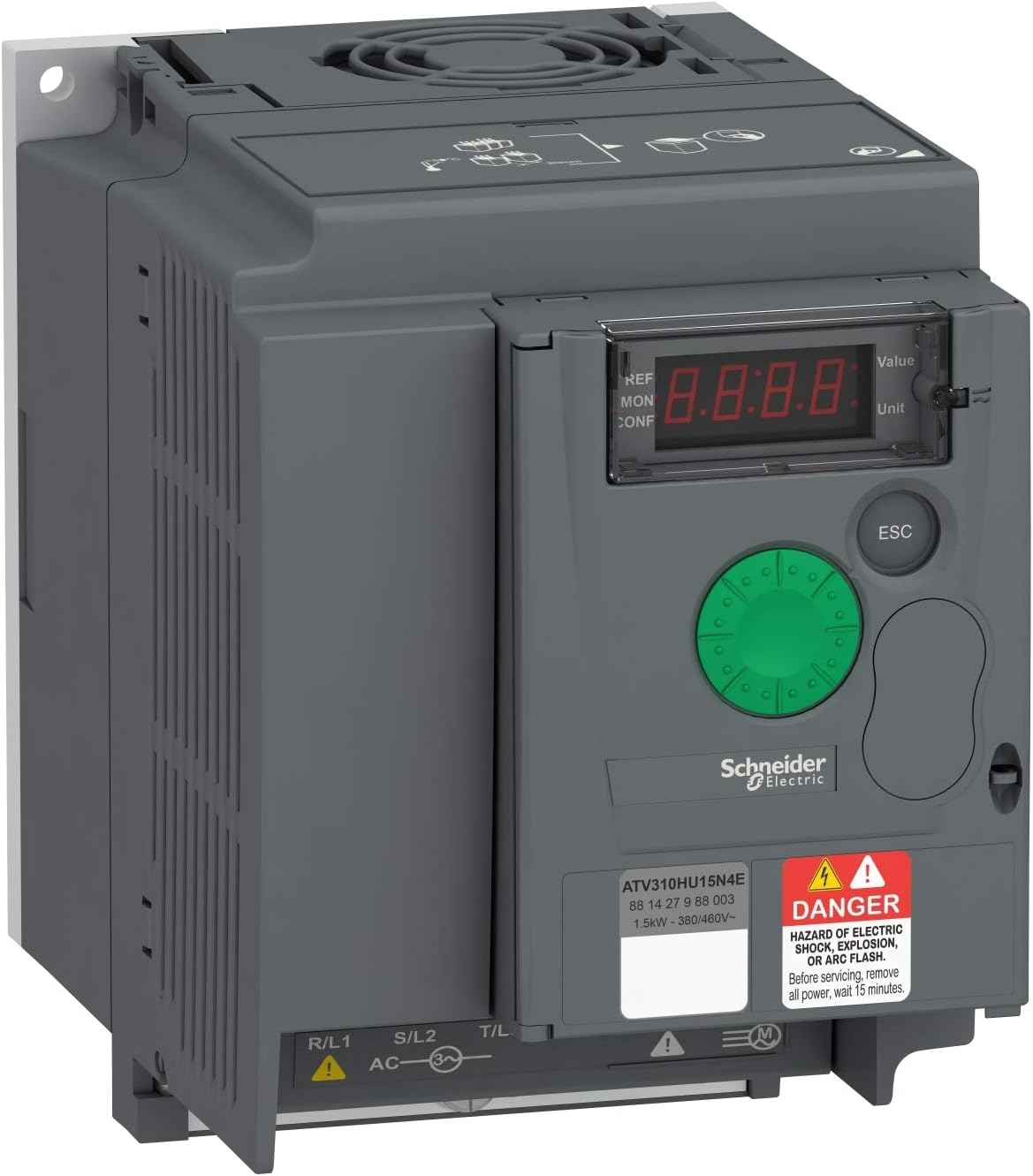
Figure 1.1: Front view of the Altivar 310 Variable Speed Drive, showing the display and control panel.
2. Safety Information
DANGER: HAZARD OF ELECTRIC SHOCK, EXPLOSION, OR ARC FLASH.
Only qualified personnel should install, adjust, repair, or maintain this equipment. Read and understand this manual completely before installing or operating the Altivar 310 VSD. Failure to follow these instructions will result in death or serious injury.
General Safety Precautions:
- Always disconnect power before working on the drive or connected equipment. Wait at least 15 minutes after disconnecting power for capacitors to discharge.
- Ensure proper grounding of the drive and motor.
- Protect against accidental startup.
- Use appropriate personal protective equipment (PPE).
- Verify that the supply voltage matches the drive's rated voltage.
3. Setup and Installation
Proper installation is crucial for the performance and longevity of the Altivar 310 VSD. Follow these guidelines carefully.
Mounting:
The drive should be mounted vertically on a flat, stable surface. Ensure adequate clearance for ventilation, especially around the heat sink. The unit is designed for assembly with a heat sink for efficient thermal management.

Figure 3.1: Side view of the Altivar 310 VSD with the protective cover opened, revealing internal components and connection terminals.
Wiring Connections:
All wiring must comply with local and national electrical codes. The Altivar 310HU15N4E is a three-phase unit. Connect the main power supply to the L1/R, L2/S, L3/T terminals and the motor to the U, V, W terminals. Ensure proper grounding (PE) connections.

Figure 3.2: Top view of the Altivar 310 VSD, showing the input (R/L1, S/L2, T/L3) and output (U, V, W) terminals, along with control terminals.
Terminal Designations:
- R/L1, S/L2, T/L3: Three-phase AC power input (380-460V).
- U, V, W: Three-phase motor output.
- PE: Protective Earth ground connection.
- Control Terminals: For digital inputs, analog inputs/outputs, and relay outputs (refer to detailed wiring diagrams in the full product manual for specific pinouts).
4. Operating Instructions
The Altivar 310 VSD can be operated via its integrated control panel or external control signals.
Control Panel Overview:
The front panel features a 4-digit display, navigation buttons, and an ESC button. The green rotary knob is used for value adjustment and menu navigation.
- Display: Shows parameters, values, and fault codes.
- Rotary Knob: Used to scroll through menus and adjust parameter values. Press to confirm selection.
- ESC Button: Used to exit menus or cancel an operation.
Basic Operation:
- Power On: Apply power to the drive. The display will illuminate.
- Parameter Setting: Use the rotary knob to navigate to the desired parameter menu (e.g., frequency reference, acceleration/deceleration times). Press the knob to enter the parameter, adjust the value, and press again to confirm.
- Start/Stop: Depending on the control mode (local or remote), use the appropriate start/stop command. For local control, there might be dedicated buttons or a specific parameter setting.
- Monitoring: The display can show real-time values such as output frequency, motor current, and motor speed.
Refer to the comprehensive programming manual for detailed parameter descriptions and advanced control modes.
5. Maintenance
Regular maintenance ensures optimal performance and extends the lifespan of your Altivar 310 VSD.
Routine Checks:
- Cleaning: Periodically clean the drive's exterior and ventilation openings to prevent dust accumulation, which can impede cooling. Use a soft, dry cloth. Do not use solvents.
- Fan Inspection: Check the cooling fan for proper operation and ensure it is free from obstructions. Replace if noisy or not functioning correctly.
- Terminal Tightness: Annually check the tightness of all power and control terminal connections. Loose connections can cause overheating and damage.
- Environmental Conditions: Ensure the operating environment remains within specified temperature and humidity ranges.
WARNING: Always disconnect and lock out power before performing any maintenance. Allow 15 minutes for capacitor discharge.
6. Troubleshooting
This section provides guidance for common issues. For complex problems, contact Schneider Electric technical support.
Common Faults and Solutions:
| Symptom/Fault Code | Possible Cause | Solution |
|---|---|---|
| No display/No power | No input power, blown fuse, internal fault. | Check power supply, fuses. Verify wiring. If problem persists, contact support. |
| Motor not running | No run command, incorrect wiring, motor fault, parameter error. | Check run command signal, motor wiring (U, V, W), motor integrity. Verify frequency reference and other parameters. |
| Overcurrent fault (OCF) | Motor overload, short circuit, rapid acceleration/deceleration. | Check motor load, motor wiring. Increase acceleration/deceleration times. Check for mechanical binding. |
| Overvoltage fault (OVF) | High input voltage, rapid deceleration of high inertia load. | Check input voltage. Increase deceleration time. Consider adding a braking resistor if applicable. |
For a complete list of fault codes and detailed troubleshooting steps, refer to the full Altivar 310 programming manual.
7. Technical Specifications
| Specification | Value |
|---|---|
| Manufacturer | Schneider Electric |
| Brand | Schneider Electric |
| Model | Variable Speed Drive |
| Item Model Number | ATV310HU15N4E |
| Manufacturer Part Number | ATV310HU15N4E |
| Product Dimensions | 16 x 17 x 19 cm |
| Item Weight | 1.1 Kilograms |
| Voltage | 460 Volts |
| Safety Rating | Not applicable |
| ASIN | B07SBCPFPJ |
| Date First Available | April 19, 2021 |
8. Warranty and Support
Schneider Electric products are designed for reliability and performance. For specific warranty terms and conditions, please refer to the documentation provided with your purchase or visit the official Schneider Electric website.
Customer Support:
For technical assistance, troubleshooting, or service inquiries, please contact Schneider Electric customer support. You can find contact information on the official Schneider Electric website or through your local distributor.
Online resources and additional documentation, including detailed programming manuals and wiring diagrams, are available on the Schneider Electric website.
Related documentsATV310HU15N4E

Ask a question about this manual
Ask about setup, troubleshooting, compatibility, parts, safety, or missing instructions. Manuals+ will review the question and use this page’s manual context to help answer it.