
Ninja CE251
Ninja 12-Cup Programmable Coffee Brewer
Model: CE251
Introduction
Thank you for purchasing the Ninja 12-Cup Programmable Coffee Brewer. This manual provides essential information for the safe operation, maintenance, and troubleshooting of your new coffee brewer. Please read this manual thoroughly before first use and retain it for future reference.
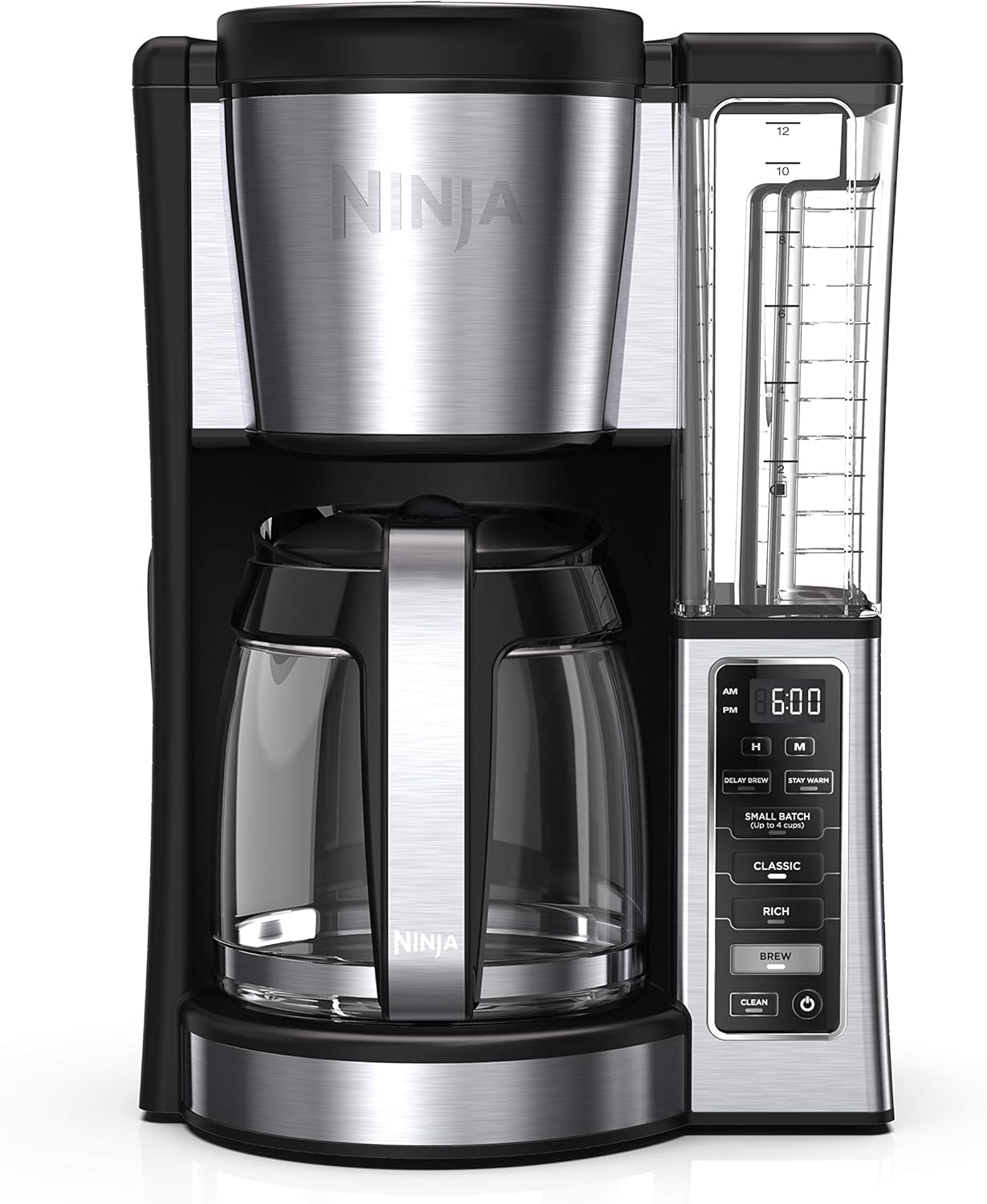
Image: The Ninja 12-Cup Programmable Coffee Brewer, showcasing its sleek black and stainless steel design with the glass carafe and control panel.
Important Safety Information
When using electrical appliances, basic safety precautions should always be followed to reduce the risk of fire, electric shock, and/or injury to persons, including the following:
- Read all instructions before using the appliance.
- Do not touch hot surfaces. Use handles or knobs.
- To protect against electric shock, do not immerse cord, plugs, or coffee maker in water or other liquid.
- Close supervision is necessary when any appliance is used by or near children.
- Unplug from outlet when not in use and before cleaning. Allow to cool before putting on or taking off parts, and before cleaning the appliance.
- Do not operate any appliance with a damaged cord or plug or after the appliance malfunctions, or has been damaged in any manner. Return appliance to the nearest authorized service facility for examination, repair, or adjustment.
- The use of accessory attachments not recommended by the appliance manufacturer may result in fire, electric shock, or injury to persons.
- Do not use outdoors.
- Do not let cord hang over edge of table or counter, or touch hot surfaces.
- Do not place on or near a hot gas or electric burner, or in a heated oven.
- Always attach plug to appliance first, then plug cord into the wall outlet. To disconnect, turn any control to "off", then remove plug from wall outlet.
- Do not use appliance for other than intended use.
- A hot carafe may break if placed on a cold or wet surface.
- Do not use a cracked carafe or a carafe having a loose or weakened handle.
- Do not clean carafe with cleansers, steel wool pads, or other abrasive material.
- This appliance is for household use only.
Components
Familiarize yourself with the parts of your Ninja Coffee Brewer:
- Main Unit: Houses the brewing mechanism and control panel.
- 12-Cup Glass Carafe: For collecting and serving brewed coffee.
- Removable Water Reservoir: 60oz capacity for easy filling.
- Permanent Filter: Reusable filter for ground coffee.
- Ninja Integrated Scoop: For precise coffee measurement.
- Adjustable Warming Plate: Keeps coffee warm after brewing.

Image: A user demonstrating the removal of the water reservoir from the Ninja Coffee Brewer, highlighting its convenient pull-away design for easy filling.
Setup and First Use
- Unpack: Carefully remove all components from the packaging.
- Clean: Wash the glass carafe, permanent filter, and removable water reservoir with warm, soapy water. Rinse thoroughly and dry. Wipe the exterior of the main unit with a damp cloth.
- Position: Place the coffee brewer on a clean, dry, level surface.
- First Clean Cycle:
- Fill the water reservoir to the 12-cup line with fresh water.
- Place the empty permanent filter into the filter basket.
- Place the empty glass carafe on the warming plate.
- Plug the brewer into a power outlet.
- Press the CLEAN button. The brewer will run a full cycle to clean internal components.
- Once complete, discard the water from the carafe. Your brewer is now ready for use.
Operating Instructions
Brewing Coffee
- Fill Water Reservoir: Remove the water reservoir and fill it with fresh, cold water up to the desired brew line. Replace the reservoir securely.
- Add Coffee Grounds: Place the permanent filter into the filter basket. Add your desired amount of ground coffee using the integrated scoop. For best results, use 1 scoop per 2 cups of water.
- Place Carafe: Ensure the glass carafe is empty and properly seated on the warming plate.
- Select Brew Style: Choose between CLASSIC or RICH brew styles by pressing the corresponding button.

Image: Two glasses of coffee, one labeled "CLASSIC" and the other "RICH", illustrating the visual difference in strength between the two brew styles.
- Start Brewing: Press the BREW button. The brewer will begin the brewing process.
- Mid-Brew Pause: You can temporarily remove the carafe during brewing to pour a cup. The brewer will pause and resume brewing once the carafe is returned within 30 seconds.

Image: A person pouring coffee from the carafe while the brewing process is paused, demonstrating the mid-brew pause feature.
- Warming Plate: The adjustable warming plate will keep your coffee hot for up to 4 hours. It automatically shuts off after 2 hours by default, but can be adjusted.

Image: The Ninja Coffee Brewer with its carafe on the warming plate, illustrating the feature that keeps coffee warm for extended periods.
Special Features
- Delay Brew: Program your brewer to start brewing at a specific time up to 24 hours in advance.
- Press the DELAY BREW button.
- Use the H and M buttons to set the desired brew time.
- Select your desired brew style (CLASSIC or RICH).
- Press DELAY BREW again to confirm. The indicator light will illuminate.
- Small Batch Function: For brewing 1-4 cups, this function ensures optimal flavor without dilution.
- Fill water reservoir to the 1-4 cup line.
- Add coffee grounds for 1-4 cups.
- Press the SMALL BATCH button.
- Select your desired brew style.
- Press BREW.

Image: A close-up of the control panel showing the "SMALL BATCH (Up to 4 cups)" button, indicating its function for brewing smaller quantities.
Care and Maintenance
Daily Cleaning
- Always unplug the brewer before cleaning.
- Wash the glass carafe, permanent filter, and removable water reservoir after each use with warm, soapy water. These parts are also top-rack dishwasher safe.
- Wipe the exterior of the main unit with a soft, damp cloth. Do not immerse the main unit in water.
- Clean the warming plate with a damp cloth. Do not use abrasive cleaners.
Descaling (CLEAN Cycle)
Over time, mineral deposits can build up in your brewer, affecting performance. The CLEAN indicator light will illuminate when descaling is recommended.
- Prepare Descaling Solution: Pour 16 oz. of white vinegar into the water reservoir, then fill the remainder of the reservoir with water up to the 12-cup line.
- Start Clean Cycle: Place the empty glass carafe on the warming plate. Press the CLEAN button. The brewer will run a descaling cycle.
- Rinse Cycles: After the descaling cycle is complete, discard the solution from the carafe. Fill the water reservoir with fresh water to the 12-cup line and run two full brew cycles with only water to rinse the system thoroughly.
Troubleshooting
| Problem | Possible Cause | Solution |
|---|---|---|
| Brewer does not turn on. | Not plugged in; power outage; circuit breaker tripped. | Ensure brewer is securely plugged in. Check household circuit breaker. |
| Coffee is not brewing. | Water reservoir empty; carafe not in place; brew button not pressed. | Fill water reservoir. Ensure carafe is correctly positioned. Press the BREW button. |
| Coffee tastes weak or too strong. | Incorrect coffee-to-water ratio; wrong brew style selected. | Adjust coffee grounds amount. Try a different brew style (CLASSIC or RICH). |
| "CLEAN" light is illuminated. | Mineral buildup (calcification). | Perform a descaling cycle as described in the "Care and Maintenance" section. |
| Water leaking from brewer. | Water reservoir not seated correctly; overfilled reservoir. | Ensure water reservoir is securely in place. Do not overfill past the MAX line. |
Specifications
| Feature | Detail |
|---|---|
| Brand | Ninja |
| Model Name | Ninja CE251 Coffee Programmable Brewer |
| Model Number | CE251 |
| Capacity | 12-Cup (60 oz Water Reservoir) |
| Color | Black/Stainless Steel |
| Product Dimensions | 8"D x 10"W x 14"H |
| Item Weight | 6.55 pounds |
| Voltage | 110 Volts |
| Special Features | Programmable, Removable Tank, Adjustable Warming Plate, 2 Brew Styles (Classic, Rich), Small Batch Function, Mid-Brew Pause |
| Included Components | Ninja Programmable Coffee Brewer, 12-cup Glass Carafe, Permanent Filter, Integrated Scoop, Removable Water Reservoir |
| UPC | 622356559225 |
Warranty and Support
For warranty information, please refer to the warranty card included with your product or visit the official Ninja website. For customer support, product registration, or to order replacement parts, please contact Ninja Customer Service.
- Manufacturer: SharkNinja
- Website: www.ninjakitchen.com
- Phone Support: Refer to your product packaging or the official website for current contact numbers.
Please have your model number (CE251) and purchase date available when contacting support.
Related documentsCE251


Ask a question about this manual
Ask about setup, troubleshooting, compatibility, parts, safety, or missing instructions. Manuals+ will review the question and use this page’s manual context to help answer it.