
Krups EA894T40
Krups EA894T40 Evidence Plus Bean to Cup Coffee Machine User Manual
Model: EA894T40
1. Introduction
Welcome to the world of premium coffee with your new Krups EA894T40 Evidence Plus Bean to Cup Coffee Machine. This automatic espresso machine is designed to deliver a wide range of coffee and milk-based beverages with exceptional ease and quality. Featuring an intuitive XL OLED color touch interface and Krups Quattro Force technology, it ensures a perfect cup every time. This manual provides detailed instructions for setup, operation, maintenance, and troubleshooting to help you get the most out of your machine.
2. Safety Instructions
Please read all safety instructions carefully before using the appliance. Keep this manual for future reference.
- Ensure the appliance is connected to a grounded power outlet.
- Do not immerse the appliance, power cord, or plug in water or any other liquid.
- Keep the appliance out of reach of children.
- Unplug the appliance before cleaning and when not in use.
- Do not operate the appliance if it has a damaged cord or plug, or if it malfunctions.
- Use only cold, fresh water in the water tank.
- Do not open the brewing unit during operation.
3. Product Overview
3.1 Components
Familiarize yourself with the main parts of your Krups EA894T40 coffee machine:
- Bean Container: Located at the top, holds up to 260g of coffee beans.
- Water Tank: Removable tank at the back, with a capacity of 2.3 liters.
- XL OLED Color Touch Interface: Front-facing display for intuitive control and drink selection.
- Coffee Outlet: Adjustable height for various cup sizes.
- Drip Tray: Collects excess liquid and coffee grounds.
- Milk System Connection: For attaching the external milk container and frother.

Figure 1: Front view of the Krups EA894T40 Evidence Plus Coffee Machine, showcasing its sleek design, two latte macchiatos, and the external milk container.

Figure 2: Top view of the Krups EA894T40 coffee machine, showing the integrated bean container and the accessible control panel.
4. Setup
4.1 Unpacking and Placement
- Carefully remove the coffee machine from its packaging.
- Place the machine on a stable, flat, and heat-resistant surface. Ensure there is enough space around the machine, especially above, as the water tank is inserted from the top.
- Remove all protective films and packaging materials.
4.2 First Use and Rinsing
- Fill the water tank with fresh, cold water up to the 'MAX' level.
- Place an empty container under the coffee outlets.
- Plug the machine into a power outlet and press the power button. The machine will perform an automatic rinsing cycle.
- Empty the drip tray after the rinsing cycle is complete.
- Fill the bean container with your preferred coffee beans.
5. Operating Instructions
5.1 Control Panel
The XL OLED color touch interface provides easy access to all functions and drink selections.
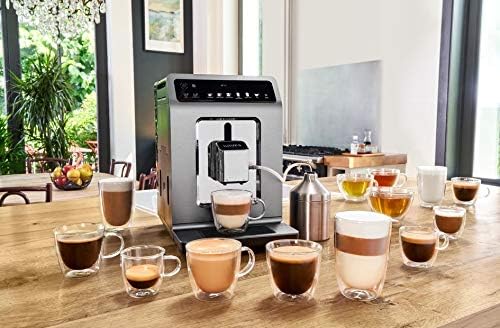
Figure 3: Detailed view of the XL OLED color touch interface, showing various drink icons and settings.
5.2 Making Coffee
Your machine offers 19 preset customizable drinks. To make a basic coffee:
- Ensure the water tank is filled and the bean container has enough beans.
- Place your cup under the coffee outlets.
- Select your desired drink (e.g., Espresso, Long Coffee) from the touch interface.
- The machine will automatically grind the beans and brew your coffee.
5.3 Making Milk-Based Drinks
For drinks like Cappuccino, Latte Macchiato, or Caffe Latte, use the integrated milk system:
- Fill the external milk container with fresh, cold milk.
- Connect the milk tube from the container to the milk frother attachment on the machine.
- Place your cup under the coffee and milk outlets.
- Select your desired milk-based drink from the touch interface. The machine will first froth the milk, then brew the coffee.
5.4 Customizing Drinks
You can customize various parameters for your drinks, including coffee strength (Dark, Extra Shot), volume, and milk quantity. Use the on-screen options to adjust settings before brewing.

Figure 4: Infographic illustrating the wide range of one-touch drink options available, including new milk recipes, and the core principles of Krups Quattro Force technology.

Figure 5: The Krups EA894T40 coffee machine displayed in a home setting, demonstrating its versatility in preparing a variety of coffee and tea drinks.
Video 1: Official product video demonstrating the intuitive operation and various coffee preparations of the Krups EA894T40 Evidence Plus coffee machine. This video highlights the ease of use and the quality of beverages produced.
6. Maintenance
Regular cleaning and maintenance ensure optimal performance and longevity of your coffee machine.
6.1 Daily Cleaning
- Empty Drip Tray and Coffee Grounds Container: Empty and rinse daily.
- Rinse Milk System: After each milk-based drink, run the automatic milk system rinse cycle.
- Wipe Exterior: Use a soft, damp cloth to clean the exterior of the machine.
6.2 Descaling
The machine will prompt you when descaling is required. Follow the on-screen instructions and use only Krups approved descaling solution.
6.3 Cleaning the Milk System
For thorough cleaning of the milk system, disassemble the milk frother unit and wash its components with warm soapy water. Ensure all parts are dry before reassembling.
7. Troubleshooting
If you encounter issues with your coffee machine, refer to the table below for common problems and solutions.
| Problem | Possible Cause | Solution |
|---|---|---|
| No coffee dispenses | Water tank empty; Coffee beans empty; Brewing unit blocked. | Refill water tank; Refill bean container; Run a cleaning cycle. |
| Milk not frothing properly | Milk system dirty; Milk too warm; Wrong type of milk. | Clean milk system thoroughly; Use cold, fresh milk; Try skimmed or semi-skimmed milk. |
| Machine makes unusual noises | Air in the system; Grinder noise (normal). | Run a hot water cycle to prime; Grinding noise is normal during operation. |
| Display shows error message | Specific error code. | Refer to the specific error code in the full manual or contact customer support. |
8. Specifications
| Feature | Specification |
|---|---|
| Brand | Krups |
| Model Number | EA894T40 |
| Color | Titanium |
| Product Dimensions (LxWxH) | 37.2 cm x 24 cm x 36.3 cm |
| Item Weight | 11.3 kg |
| Water Tank Capacity | 2.3 liters |
| Bean Container Capacity | 260g |
| Power | 1450 W |
| Special Feature | Milk Frother |
| Coffee Maker Type | Espresso Machine |
9. Warranty and Support
Your Krups EA894T40 Evidence Plus Coffee Machine comes with a manufacturer's warranty. Please refer to the warranty card included in your product packaging for specific terms and conditions.
For technical support, spare parts, or service, please contact Krups customer service. Contact details can typically be found on the Krups official website or on your warranty documentation.
Related documentsEA894T40


Ask a question about this manual
Ask about setup, troubleshooting, compatibility, parts, safety, or missing instructions. Manuals+ will review the question and use this page’s manual context to help answer it.