
1. Introduction
This instruction manual provides comprehensive guidance for the setup, operation, maintenance, and troubleshooting of your VMAI 2.1 Sound Bar with Subwoofer. Please read this manual thoroughly before using the product to ensure optimal performance and longevity.
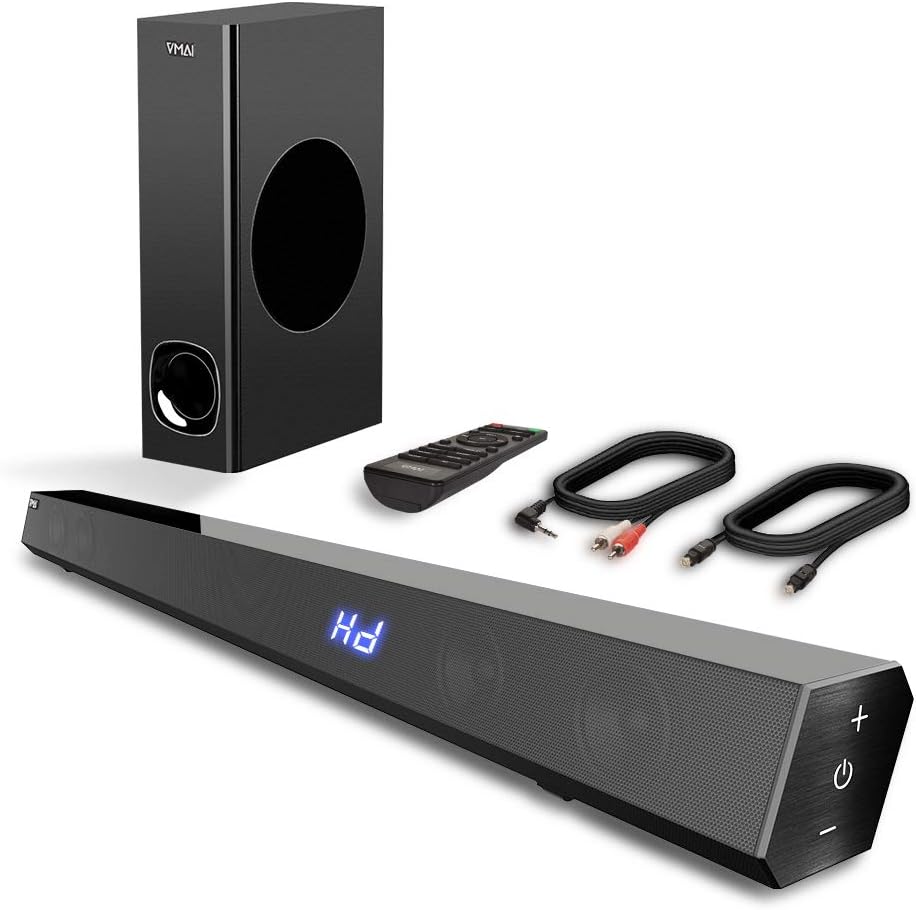
Figure 1.1: VMAI 2.1 Sound Bar with Subwoofer, remote control, and included cables.
2. Product Features
- 2.1 Channel Immersive Sound: Delivers 120W of power for clear audio, powerful bass, and surround sound, enhancing your home audio experience. Features 110dB sound level pressure for detailed midrange and crisp treble.
- Bluetooth 5.0 Connectivity: Ensures faster transmission speeds, stable connectivity, and smooth transmission over long distances with low power consumption. Allows wireless streaming from smartphones, tablets, and PCs.
- Multiple Sound Modes: Includes Music, Movie, News, and 3D modes, adjustable via the included remote control. Treble and bass levels can also be customized.
- Versatile Input Options: Supports wired connections including HDMI ARC, Optical, USB (flash drive only), and AUX input, compatible with various devices like TVs, projectors, computers, and gaming consoles.
- Sleek and Mountable Design: Engineered to be less than 2.5 inches high with a jet-black surface. Features luxury touch-button controls on the side. Includes a mount bracket for wall installation.

Figure 2.1: The VMAI Sound Bar and Subwoofer provide strong bass and immersive sound for an enhanced viewing experience.

Figure 2.2: Internal speaker configuration of the 2.1 channel sound bar, highlighting its full-range frequency speakers.
3. Package Contents
Please check the box for the following items:
- VMAI 2.1 Sound Bar
- Wired Subwoofer
- Remote Control
- Power Adapter
- 5 ft Premium Optical Cable
- 5 ft RCA to 3.5 mm Cable
- Wall Mount Bracket Kit
- User Manual (this document)
4. Setup
4.1 Placement
The VMAI Sound Bar offers flexible placement options:
- Table Top: Place the sound bar on a flat surface below your TV.
- Wall Mount: Use the included mount bracket to secure the sound bar to the wall. Ensure it is securely fastened.

Figure 4.1: Examples of sound bar placement: on a TV stand or wall-mounted.
4.2 Connections
Connect your sound bar to your audio source using one of the following methods:
- HDMI ARC: For optimal audio quality and control, connect an HDMI cable (not included) from the sound bar's HDMI (ARC) port to your TV's HDMI ARC port.
- Optical: Use the provided optical cable to connect the sound bar's OPTICAL input to your TV's optical output. Important: When using Optical Mode, ensure PCM settings are enabled on your TV. Refer to your TV's manual for specific instructions (e.g., Audio Format settings, HDMI Audio Format settings).
- AUX: Use the provided RCA to 3.5 mm cable to connect the sound bar's AUX input to your device's audio output.
- USB: Insert a USB flash drive (formatted to FAT32, max 32GB) into the USB port to play audio files directly.
- Bluetooth: For wireless connection, enable Bluetooth on your device and pair with "VMAI Sound Bar".

Figure 4.2: Available input options on the VMAI Sound Bar.
Video 4.1: An official VMAI video demonstrating the sound bar's features, including its 120W power, 2.1 channel sound, and various connectivity options like Bluetooth 5.0, HDMI (ARC), Optical, AUX, and USB. It also highlights the slim design and touch-button controls.
5. Operating Instructions
5.1 Power On/Off
Press the Power button on the sound bar's side panel or the remote control to turn the unit On or Off.
5.2 Input Selection
Press the Input button on the remote or the touch panel to cycle through available input sources: Bluetooth, HDMI ARC, Optical, AUX, and USB.
5.3 Volume Control
Use the Volume + and Volume - buttons on the sound bar or remote to adjust the master volume.
5.4 Sound Modes
The remote control allows you to select from four distinct sound modes:
- Music Mode: Optimized for music playback.
- Movie Mode: Enhances cinematic audio for films.
- News Mode: Clarifies dialogue for news and spoken content.
- 3D Mode: Provides an immersive, three-dimensional audio experience.
5.5 Bass and Treble Adjustment
Use the dedicated Bass +/- and Treble +/- buttons on the remote control to fine-tune the audio output to your preference.

Figure 5.1: Sound bar touch controls and remote control for comprehensive operation.

Figure 5.2: The VMAI Sound Bar system creating a live surround sound experience in a home environment.
6. Maintenance
To ensure the longevity and optimal performance of your VMAI Sound Bar, follow these maintenance guidelines:
- Cleaning: Use a soft, dry cloth to wipe the surfaces of the sound bar and subwoofer. Do not use liquid cleaners or abrasive materials, as they may damage the finish.
- Ventilation: Ensure proper ventilation around the sound bar and subwoofer. Do not block any ventilation openings.
- Storage: If storing the unit for an extended period, disconnect it from power and store it in a cool, dry place away from direct sunlight and extreme temperatures.
- Avoid Moisture: Keep the sound bar and subwoofer away from water, humidity, and any liquids. They are not waterproof.
7. Troubleshooting
If you encounter issues with your VMAI Sound Bar, please refer to the following common problems and solutions:
| Problem | Possible Cause | Solution |
|---|---|---|
| No Sound |
|
|
| Bluetooth Pairing Failure |
|
|
| Remote Control Not Working |
|
|
For further assistance, please contact VMAI customer support.
8. Specifications
| Feature | Detail |
|---|---|
| Model Name | 2.1 Sound Bar |
| Speaker Type | Subwoofer |
| Speaker Maximum Output Power | 120 Watts |
| Connectivity Technology | Bluetooth, Auxiliary, USB, Optical, HDMI (ARC) |
| Wireless Communication Technology | Bluetooth 5.0 |
| Bluetooth Range | 50 Feet (approx. 15 meters) |
| Audio Output Mode | Surround, Stereo |
| Color | Jet Black |
| Product Dimensions | 2.7"D x 34"W x 2.5"H |
| Item Weight | 13 Pounds |
| Mounting Type | Wall Mount, Table Top |
| Control Method | Remote, Touch Panel |
| Water Resistance Level | Not Water Resistant |
9. Warranty and Support
VMAI offers a 12-month warranty for this product, covering manufacturing defects and ensuring quality performance. Every VMAI sound bar undergoes a strict quality test process before shipment.
For any questions, technical support, or warranty claims, please refer to the official VMAI support channels or the contact information provided in the original product packaging. You can also find the full user manual in PDF format here.


