
Introduction
This manual provides comprehensive instructions for the setup, programming, operation, and maintenance of your XIHADA Universal Garage Door Opener Remote Cloner. This device is designed to clone existing remote controls for garage doors and gates operating across multiple frequencies (280MHz-868MHz).
Important Note: Your original working remote is required for cloning. This universal remote cannot be programmed without an existing functional remote.
Product Overview

Figure 1: XIHADA Universal Remote with included visor clip. The compact design allows for easy attachment to a keychain or vehicle visor.

Figure 2: The remote features four programmable buttons, labeled Key 1, Key 2, Key 3, and Key 4, for controlling up to four different devices.
Setup and Programming
The XIHADA Universal Remote can clone up to four different original remotes, even if they operate on different frequencies (280MHz - 868MHz).
Programming Steps (General)
- Clear Existing Codes: Hold down Button 1 and then press Button 2 four times. Release both buttons. The LED on the universal remote will emit a quick flash every 2 seconds, indicating it is ready for learning.
- Position Remotes: Place your original remote very close to the universal remote, ideally back-to-back or face-to-face, about 2-3 cm apart.
- Initiate Cloning: Hold down the button on your original remote that you wish to clone. Simultaneously, press any button on the universal remote where you want to store the code. Continue holding both buttons until the LED on the universal remote starts to flash quickly. This indicates successful cloning.
- Verify: Once the LED on the universal remote turns off, the code has been copied. Test the newly programmed button.
Programming for Garage Door Openers (Rolling Code)
For garage door openers, an additional step is required after cloning the code to the universal remote:
- Activate Learn Mode on Opener: Press the 'LEARN' button on your garage door opener's receiver (the mechanical unit that opens the door). The LED on your garage door opener should turn ON.
- Transmit Code: Within 30 seconds of activating the learn mode, press the same button you programmed on the universal remote. The lights on your garage door opener should either flash or go on/off, depending on the brand of the opener, indicating successful pairing.
Video 1: Detailed Programming and Duplication Video for XIHADA Universal Remote. This video demonstrates the step-by-step process for cloning and programming the remote with various systems.

Figure 3: Visual guide for programming rolling code remotes, including the step to activate the 'LEARN' button on the garage door opener.
Compatibility Information
Before purchasing or programming, please review the compatibility lists. This remote is designed to work with major brands and models, but some are explicitly not compatible.

Figure 4: List of compatible remote brands and models for cloning. Please verify your original remote is listed here.

Figure 5: List of brands and models not compatible with the XIHADA Universal Remote. Ensure your system is not on this list.
Operating Instructions
Once programmed, the universal remote operates identically to your original remote. Simply press the corresponding button to activate your garage door or gate opener.

Figure 6: The remote in use, demonstrating its function in opening a garage door.

Figure 7: The universal remote can be used for various applications, including garage doors, entry gates, and other compatible systems.
Maintenance
Battery Replacement
The remote requires 1 CR2 battery (included). To replace the battery:
- Locate the small slot on the back of the remote.
- Carefully insert a thin object (like a credit card tip or small screwdriver) into the slot and gently pry open the remote casing.
- Remove the old CR2 battery and insert a new one, ensuring correct polarity.
- Snap the remote casing back together firmly.
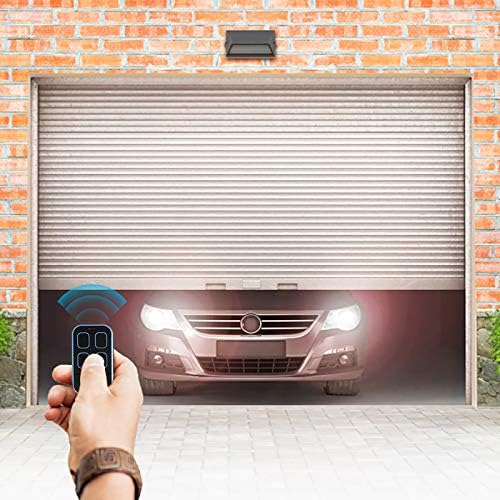
Figure 8: Illustration of the battery compartment and the CR2 battery used in the remote.
Troubleshooting
- Remote not programming: Ensure your original remote is working correctly. Verify that your original remote's brand and model are not on the non-compatible list (Figure 5). Make sure the remotes are positioned correctly and close enough during the cloning process.
- Garage door opener not responding after programming: For rolling code systems, ensure you have completed the 'LEARN' button step on your garage door opener's receiver. Refer to your garage door opener's manual for specific 'LEARN' button procedures.
- Short range: Check the battery level of the universal remote. Ensure there are no obstructions between the remote and the receiver.
Specifications
- Product Dimensions: 2.36 x 1.38 x 0.39 inches
- Item Weight: 1.34 ounces
- Model Number: ML999-06
- Battery: 1 CR2 battery (included)
- Frequency Range: Multi-frequency 280MHz-868MHz
- Max Number of Supported Devices: 1 (per button, up to 4 buttons)
- Compatible Devices: Garage Doors, Gates (check compatibility lists)
Warranty and Support
For warranty information or technical support, please contact the manufacturer, Xiamen Xihada Information Technology Co., Ltd, or refer to the product's official Amazon listing page for current support details.