
Introduction
The ISUO XS816 4K Drone is a versatile and user-friendly quadcopter designed for beginners, offering advanced features for an immersive flying experience. Equipped with a 4K HD camera, it provides real-time video transmission and various viewing options. Key functionalities include optical flow positioning for stable flight, one-key following mode, gesture shooting, G-sensor control, and waypoint flight. Its foldable design ensures portability, and LED navigation lights enable night flights. This manual provides essential information for setting up, operating, and maintaining your drone.
What's in the Box
- ISUO XS816 4K Drone
- Remote Control
- USB Charging Cable
- Spare Propellers
- Propeller Guards
- Screwdriver

Figure 1: Contents of the ISUO XS816 4K Drone package, including the drone, remote control, and various accessories.
Setup
1. Unfolding the Drone
Carefully unfold the drone arms until they click into place. Ensure all four arms are fully extended before flight. The foldable design makes it compact for transport.
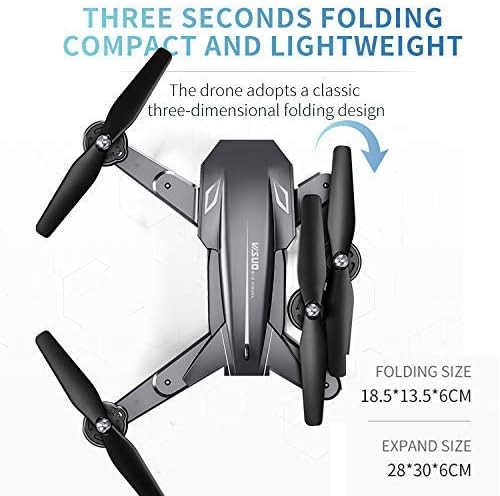
Figure 2: The drone features a three-dimensional folding design for portability. Folded size is 18.5*13.5*6CM, and expanded size is 28*30*6CM.
2. Battery Installation & Charging
Insert the drone battery into its compartment. Ensure it is securely latched. Connect the USB charging cable to the drone's battery port and a compatible USB power source (e.g., computer, USB wall adapter). The battery capacity is 1800 Milliamp Hours. A full charge typically takes 60-90 minutes. The remote control requires separate batteries (not included).
3. Controller Setup & Pairing
Install the required batteries into the remote control. Power on the drone, then power on the remote control. The drone and controller should automatically pair. Refer to the manual for specific pairing instructions if automatic pairing fails.
4. App Installation & Connection
Download the dedicated control app (Teeggi WiFi FPV) from your smartphone's app store (Google Play or Apple App Store). Connect your smartphone to the drone's Wi-Fi network (usually named 'VISUO-XXXXXX'). Once connected, you can view the live camera feed and control the drone via the app.
Operating Instructions
1. Basic Flight Controls
- Altitude Hold: Built-in barometer with altitude hold function provides stable flight, making it easier for beginners to control.
- Headless Mode: In this mode, you don't need to know the drone's head position, simplifying flight orientation.
- One Key Off/Landing: Press a single button for automatic take-off or landing.
- One Key Return: The drone will return to its original flying place with a single button press, enhancing flight safety.
2. Special Flight Features
- 360-degree Flip Function: Press one key to perform aerobatic flips.
- Optical Flow Positioning: Ensures stable flight, especially useful for hovering.
- Gesture Shooting: Take photos or videos with simple hand gestures, eliminating complex operations.
- G-sensor Control: Control the flying direction by tilting your mobile phone.
- Way-point Flight: Plan a flight line on the APP interface for automated flight paths.

Figure 3: The 3D Roll Design Technique allows for 360-degree stunt actions with a single key press.

Figure 4: Gesture control allows users to take photos and videos by recognizing specific hand gestures.
3. Camera Operation
- 4K HD Camera: Equipped with a 4K HD camera for high-quality video and photo capture.
- FPV (First Person View): Transmits real-time video to your smartphone for an immersive flying experience.
- View Switch: Supports various view modes including normal front lens, lower lens, picture-in-picture, and split screen. The pitch angle of the camera is adjustable.
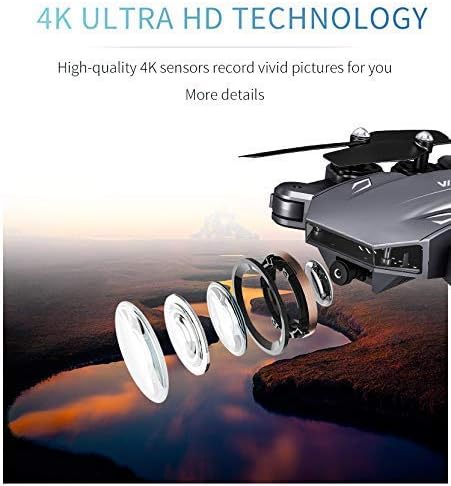
Figure 5: High-quality 4K sensors record vivid pictures, capturing more details from an aerial perspective.
Maintenance
- Regularly inspect propellers for any damage (cracks, bends). Replace damaged propellers immediately using the provided spare parts and screwdriver.
- Keep the drone clean from dust and debris, especially around the motors and camera lens.
- Store the drone in a cool, dry place away from direct sunlight when not in use.
- Ensure batteries are fully charged before each flight and discharged to storage levels if not used for extended periods.
Troubleshooting
| Problem | Possible Cause | Solution |
|---|---|---|
| Drone does not take off or flies erratically. | Low battery, propellers damaged or incorrectly installed, calibration issue. | Charge battery, replace damaged propellers, ensure correct propeller installation (A/B), recalibrate the drone. |
| Poor camera quality or no live feed. | Weak Wi-Fi signal, incorrect app settings, dirty lens. | Ensure strong Wi-Fi connection, check app settings, clean camera lens. |
| Short flight time. | Battery not fully charged, old battery, aggressive flying. | Fully charge battery, consider replacing old batteries, fly more conservatively. |
| Loss of control or signal. | Out of range, interference, low controller battery. | Fly within specified range (50 meters), avoid areas with strong interference, replace controller batteries. |
Specifications
| Feature | Detail |
|---|---|
| Brand | TeeGGi |
| Model Name | ISUO XS816 |
| Age Range (Description) | Adult |
| Color | black |
| Video Capture Resolution | 4K |
| Effective Still Resolution | 0.3 MP |
| Connectivity Technology | Wi-Fi, USB |
| Included Components | Remote Control |
| Skill Level | Beginner |
| Item Weight | 0.79 Pounds (12.6 ounces) |
| Battery Capacity | 1800 Milliamp Hours |
| Video Capture Format | 4k |
| Remote Control Technology | Wi-Fi |
| Control Type | App Control |
| Media Type | SD |
| Maximum Range | 50 Meters |
| Material | Lightweight composite material, likely plastic or reinforced plastic |
| Wireless Communication Technology | Wi-Fi |
| Battery Cell Composition | Lithium Ion |
| Are Batteries Included | No (for remote control) / Yes (rechargeable for drone) |
| Supported Image Format | JPEG |
| Video Output Resolution | 720p |
| Remote Control Included? | Yes |
| Optical Sensor Technology | CMOS |
| Rechargeable Battery Included | Yes |
| Product Dimensions | 17.32"L x 17.32"W x 2.56"H |
| UPC | 721821163827 |
| Manufacturer | TeeGGi |
Warranty & Support
For warranty information, technical support, or further assistance with your ISUO XS816 4K Drone, please visit the official TeeGGi website or contact their customer service department. Keep your purchase receipt for any warranty claims.
