
1. Introduction
This manual provides essential instructions for the installation, operation, and maintenance of the FAAC Omnidec XR4 868 C 4-Channel 868 MHz External Radio Receiver. This device is designed for outdoor use and features universal decoding, allowing compatibility with various FAAC transmitters. Please read this manual thoroughly before installation and use to ensure proper function and safety.
2. Safety Information
- Electrical Safety: Installation and wiring must be performed by qualified personnel in accordance with local electrical codes. Disconnect power before performing any work on the receiver.
- Environmental Conditions: Although designed for outdoor use, ensure the receiver is installed in a location protected from extreme weather conditions where possible, and away from sources of strong electromagnetic interference.
- Authorized Use: Use this receiver only for its intended purpose as a radio control device for FAAC automation systems. Any other use may result in damage or injury.
- Children: Keep remote controls and the receiver out of reach of children.
3. Product Overview
The FAAC Omnidec XR4 868 C (Model 787750) is a 4-channel external radio receiver operating at 868 MHz. It is housed in a dedicated enclosure suitable for outdoor installation. Key features include:
- Universal Decoding (Omnidec): Compatible with any FAAC transmitter using micro-switch or rolling code encoding.
- 4 Channels: Provides control for up to four distinct functions or devices.
- Memory Capacity: Stores up to 250 codes for channels 1-2 and 250 codes for channels 3-4.
- Mounting Options: Designed for wall mounting or DIN rail installation.
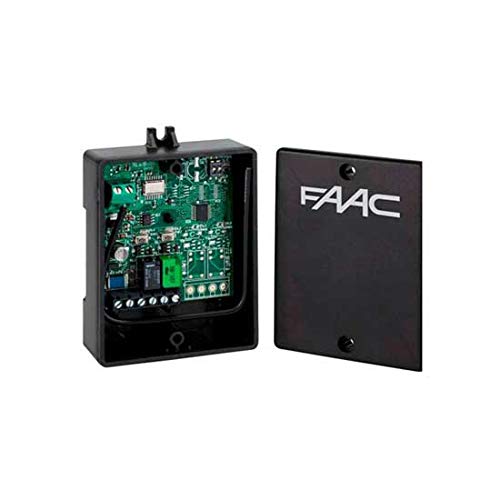
Figure 1: FAAC Omnidec XR4 868 C External Radio Receiver. This image shows the compact, weather-resistant housing of the receiver, designed for outdoor installation.
4. Setup and Installation
4.1 Mounting
The receiver can be mounted on a wall or a DIN rail. Choose a location that is easily accessible for wiring, provides good radio signal reception, and is protected from direct impact or excessive moisture.
- Wall Mounting: Use appropriate screws and wall plugs (not supplied) to secure the receiver's enclosure to a flat, stable surface.
- DIN Rail Mounting: The receiver is pre-arranged for DIN rail installation. Snap the unit onto a standard DIN rail within a suitable electrical enclosure.
4.2 Wiring
Before connecting any wires, ensure the power supply to the automation system is disconnected. Refer to the wiring diagram provided with your specific FAAC automation system for detailed connection points. Generally, the receiver requires a power supply (typically 12-24V AC/DC) and output connections to the control unit of your FAAC gate or door opener.
- Open the receiver's enclosure carefully.
- Connect the power supply wires to the designated terminals (e.g., +V and GND).
- Connect the output channels (CH1, CH2, CH3, CH4) to the corresponding input terminals on your FAAC control board.
- Ensure all connections are secure and correctly polarized.
- Close the enclosure, ensuring the seal is properly seated for weather protection.
5. Operating Instructions
5.1 Programming Transmitters (Learning Codes)
The Omnidec XR4 868 C receiver can learn codes from various FAAC transmitters. The exact programming procedure may vary slightly depending on the specific FAAC control unit it is connected to, but the general steps are as follows:
- Access Programming Mode: Typically, this involves pressing a programming button on the receiver or the connected FAAC control board. Consult your FAAC control unit's manual for precise instructions on entering programming mode. An LED indicator on the receiver or control board will usually illuminate or flash to confirm entry into programming mode.
- Transmit Code: While in programming mode, press the desired button on your FAAC transmitter. The receiver will detect the signal.
- Confirmation: The LED indicator will usually change state (e.g., flash rapidly, turn solid, or turn off) to confirm that the code has been successfully learned.
- Exit Programming Mode: Wait for the programming mode to time out automatically, or press the programming button again to exit.
The receiver can store up to 250 codes for channels 1-2 and 250 codes for channels 3-4. If the memory is full, you may need to clear existing codes before adding new ones (refer to the troubleshooting section or your control unit's manual for clearing procedures).
5.2 Channel Operation
Once a transmitter button is programmed to a specific channel, pressing that button will activate the corresponding output on the receiver, which in turn controls the connected FAAC automation device (e.g., opening/closing a gate, activating a light).
6. Maintenance
The FAAC Omnidec XR4 868 C receiver is designed for minimal maintenance. However, periodic checks can help ensure its longevity and reliable operation:
- Cleaning: Occasionally wipe the exterior of the enclosure with a soft, damp cloth to remove dirt and debris. Do not use abrasive cleaners or solvents.
- Connection Check: Periodically inspect the wiring connections to ensure they are secure and free from corrosion. Ensure the enclosure remains properly sealed.
- Antenna: Ensure the antenna (if external) is unobstructed and in good condition for optimal range.
7. Troubleshooting
| Problem | Possible Cause | Solution |
|---|---|---|
| Receiver not responding to transmitter. |
|
|
| Reduced operating range. |
|
|
| Cannot program new transmitters (memory full). | Receiver memory capacity reached. | Consult your FAAC control unit's manual for instructions on clearing the receiver's memory. This typically involves a specific sequence of button presses or a master reset function. |
8. Specifications
- Model: Omnidec XR4 868 C
- FAAC Reference: 787750
- Manufacturer: FAAC
- Frequency: 868 MHz
- Channels: 4
- Decoding: Universal (Omnidec) for FAAC micro-switch or rolling code transmitters
- Memory Capacity: 250 codes (CH1-2), 250 codes (CH3-4)
- Mounting: Wall or DIN rail
- Enclosure: Dedicated for outdoor use
- Item Weight: 460 grams
- ASIN: B07S6C7KNZ
- Date First Available on Amazon.com.be: May 20, 2022
9. Warranty and Support
Information regarding specific warranty terms and technical support for the FAAC Omnidec XR4 868 C (Model 787750) is not available in this document. Please refer to the documentation provided with your purchase or contact FAAC customer service directly for details on warranty coverage and support options.


