
1. Product Overview
The SP Silicon Power microSDXC Express Card 256GB (Model SP256GBSTEI31V10) is a high-performance memory solution designed for next-generation devices. Featuring SD Express 7.1 with PCIe Gen 3x1 and NVMe protocol, it delivers read speeds up to 880MB/s and write speeds up to 700MB/s. This card is engineered to enhance the experience on compatible devices, such as the Nintendo Switch 2, by significantly reducing game download, installation, and update times.
Its dual interface design (PCIe Gen 3x1 + UHS-I) ensures broad compatibility with a wide range of devices, including cameras, smartphones, laptops, and gaming consoles, providing both high-speed performance and versatility. The card incorporates 3D NAND technology and Silicon Motion's NANDXtend ECC and LDPC for superior data integrity and reliability. It is built to withstand various environmental conditions, having passed rigorous durability tests for extreme temperatures, shock, X-ray, and static.

Figure 1.1: The SP Silicon Power microSDXC Express Card (Hypera) shown with a gaming console, illustrating its primary use for enhanced gaming performance.
2. Setup and Installation
Follow these steps to properly install your microSDXC Express card into a compatible device:
- Identify the microSD Card Slot: Locate the microSD card slot on your device (e.g., Nintendo Switch, smartphone, camera). Refer to your device's user manual for the exact location.
- Orient the Card: Hold the microSDXC card with the gold contacts facing down or as indicated by your device's slot design. Ensure the card is oriented correctly to avoid damage.
- Insert the Card: Gently push the card into the slot until it clicks into place. Do not force the card. If it does not insert easily, recheck the orientation.
- Device Recognition: Once inserted, your device should automatically detect the new storage. You may receive a notification.
- Formatting (If Required): Some devices may prompt you to format the card before use. Follow the on-screen instructions. Note: Formatting will erase all data on the card. Ensure any important data is backed up before proceeding.

Figure 2.1: The dual interface design of the microSDXC Express card ensures compatibility with a wide range of devices, including gaming consoles, smartphones, and cameras.
3. Operating Instructions
This section outlines general usage guidelines for your microSDXC Express card.
3.1. Data Transfer
- Using a Card Reader: For transferring data to and from a computer, insert the microSDXC card into a compatible card reader. Connect the card reader to your computer's USB port. The card will appear as a removable drive.
- Direct Device Transfer: Many devices allow direct transfer of files to and from the microSD card via their internal file management systems. Consult your device's manual for specific instructions.
- High-Speed Performance: The card's high read (up to 880MB/s) and write (up to 700MB/s) speeds are optimized for quick data transfers, especially with large files like 4K videos and game installations.
3.2. Gaming and 4K Video
- Gaming Consoles (e.g., Nintendo Switch 2): The card is ideal for expanding storage on gaming consoles. Install games directly to the card for faster loading times and seamless gameplay.
- 4K UHD Video Recording: With V30 video standard support, this card is suitable for capturing and playing back high-resolution 4K UHD video without dropped frames.
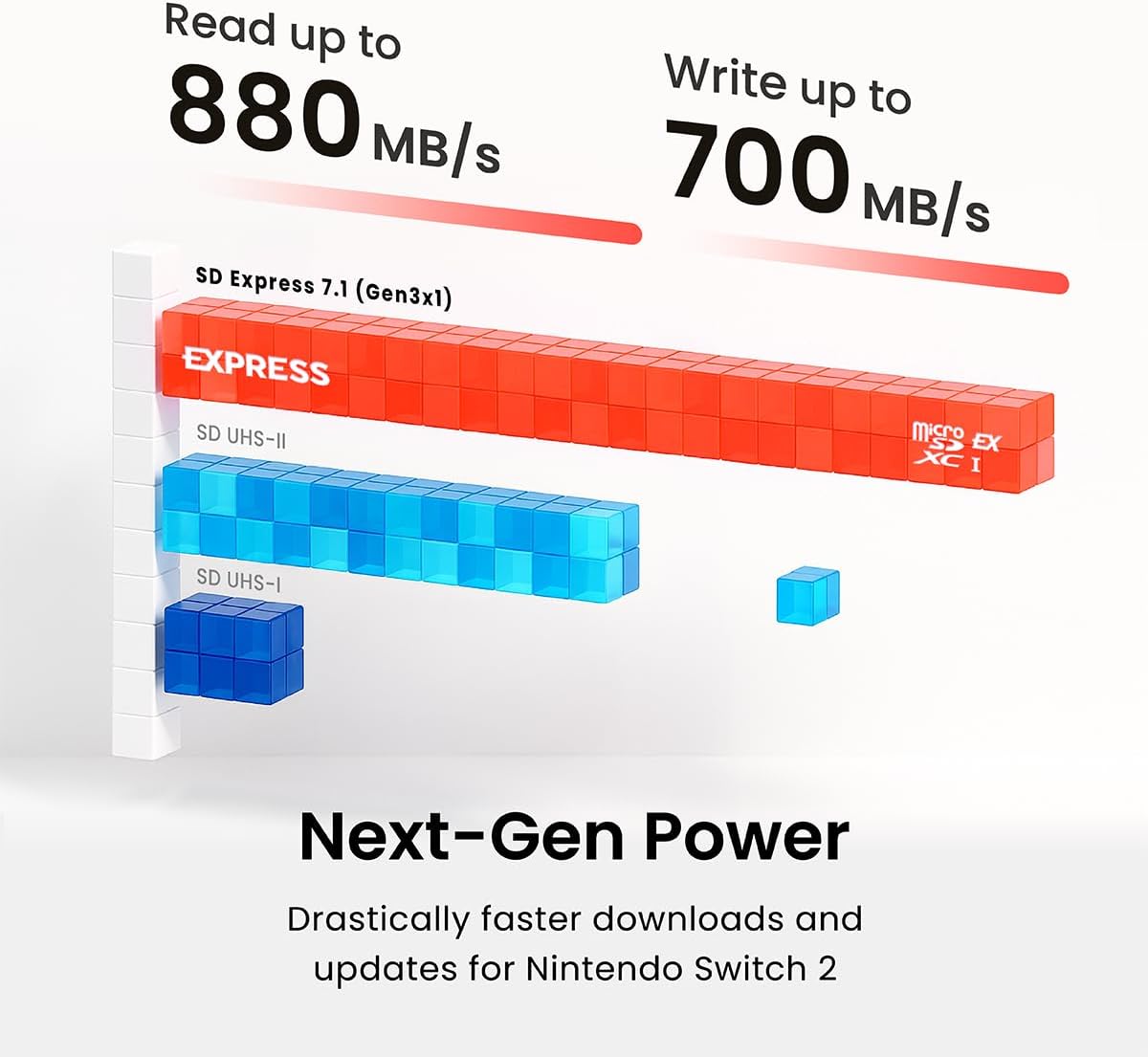
Figure 3.1: Speed comparison illustrating the superior read and write performance of the microSDXC Express card compared to older standards.

Figure 3.2: The large capacity of the microSDXC Express card is perfect for expanding storage for gaming and high-resolution media on devices like the Nintendo Switch 2.
4. Maintenance and Care
To ensure the longevity and optimal performance of your SP Silicon Power microSDXC Express Card, follow these maintenance guidelines:
- Safe Removal: Always safely eject the card from your device or computer before physically removing it. This prevents data corruption.
- Physical Protection: Avoid bending, dropping, or exposing the card to excessive force. While durable, physical damage can impair functionality.
- Environmental Conditions: The card is designed to operate in temperatures from 0℃ to 70℃ and stored from -40℃ to 85℃. Avoid prolonged exposure to extreme conditions outside these ranges.
- Cleanliness: Keep the gold contacts clean and free from dust or debris. Use a soft, dry cloth if cleaning is necessary.
- Data Backup: Regularly back up important data stored on the card to another storage medium to prevent data loss.
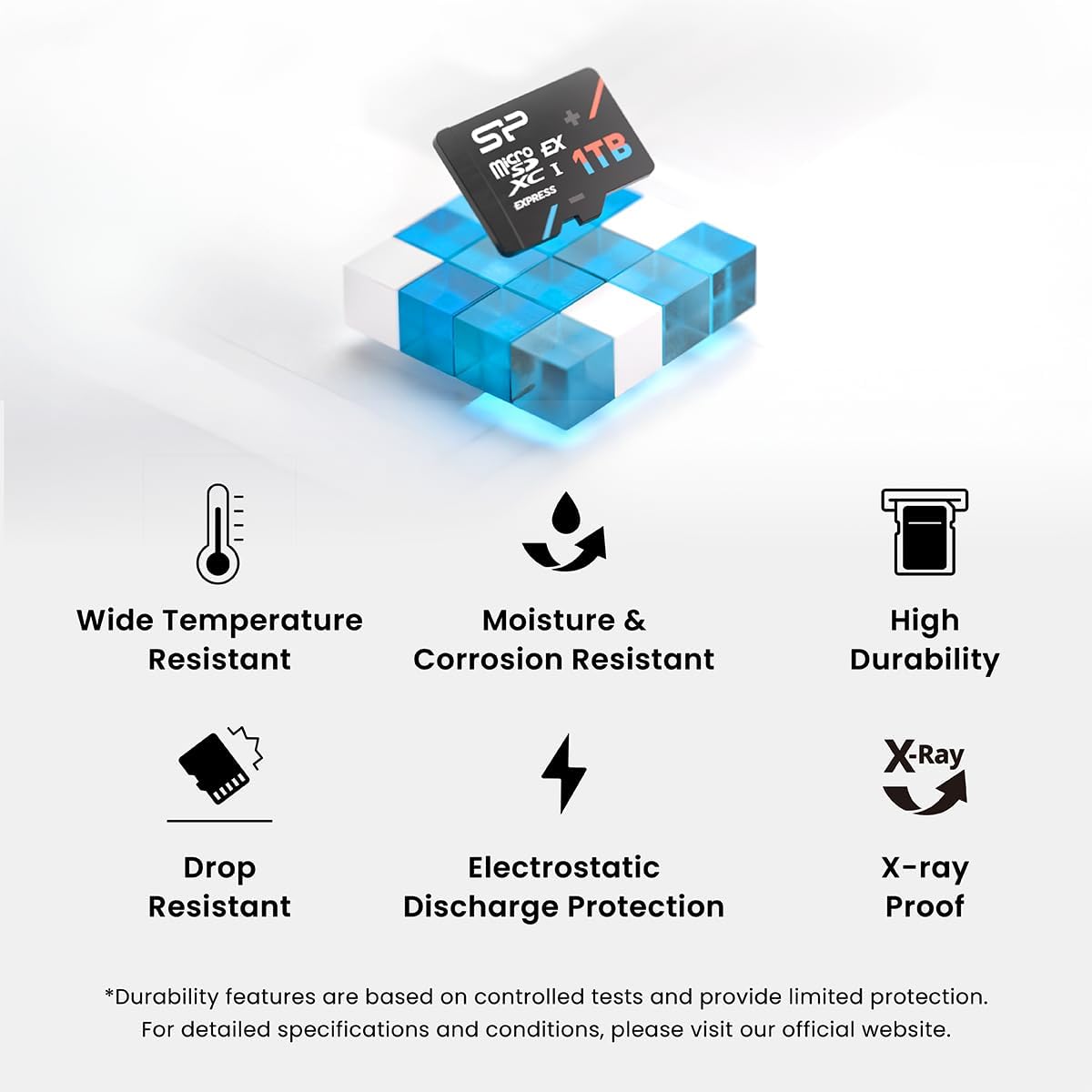
Figure 4.1: The microSDXC Express card features enhanced durability, including resistance to wide temperatures, moisture, corrosion, drops, electrostatic discharge, and X-rays.

Figure 4.2: Reliable technology, including 3D NAND and LDPC, ensures enhanced performance and strong data integrity for your storage.
5. Troubleshooting
If you encounter issues with your microSDXC Express card, refer to the following common problems and solutions:
- Card Not Recognized:
- Ensure the card is fully and correctly inserted into the slot.
- Restart your device.
- Try the card in another compatible device or a different card reader to rule out a device-specific issue.
- Check if your device's firmware is up to date.
- Slow Performance:
- Ensure your device and card reader support SD Express 7.1 or at least UHS-I for optimal speeds. Older interfaces will limit performance.
- Check if the card is nearly full; performance can degrade when storage is almost exhausted.
- Avoid running multiple demanding applications simultaneously while accessing the card.
- Data Corruption or Errors:
- Always safely eject the card before removal.
- If errors persist, try formatting the card. Warning: This will erase all data. Back up your files first.
- If the card continues to show errors after formatting, it may be faulty. Contact customer support.
- Card Gets Hot:
- Some heat generation during intensive read/write operations is normal, especially with high-speed cards.
- If the card becomes excessively hot or causes device malfunction, discontinue use and contact support.
6. Product Specifications
| Feature | Detail |
|---|---|
| Model Name | SP256GBSTEI31V10 |
| Memory Storage Capacity | 256 GB |
| Flash Memory Type | Micro SDXC |
| Hardware Interface | microSDXC (SD Express 7.1, PCIe Gen 3x1, NVMe protocol, UHS-I) |
| Read Speed | Up to 880 MB/s |
| Write Speed | Up to 700 MB/s |
| Compatible Devices | Gaming Consoles (e.g., Nintendo Switch 2), Cameras, Smartphones, Laptops |
| Special Feature | X-Ray Proof |
| Operating Temperature | 0℃ to 70℃ (32℉ to 158℉) |
| Storage Temperature | -40℃ to 85℃ (-40℉ to 185℉) |
| Durability | 10,000 insertions, 10N bend, 1.5m drop, ±15kV/±4kV ESD protection, ISO 7816-1, 0.1G X-ray resistance |
| Technology | 3D TLC NAND flash, SM2708 controller, NANDXtend ECC, LDPC |
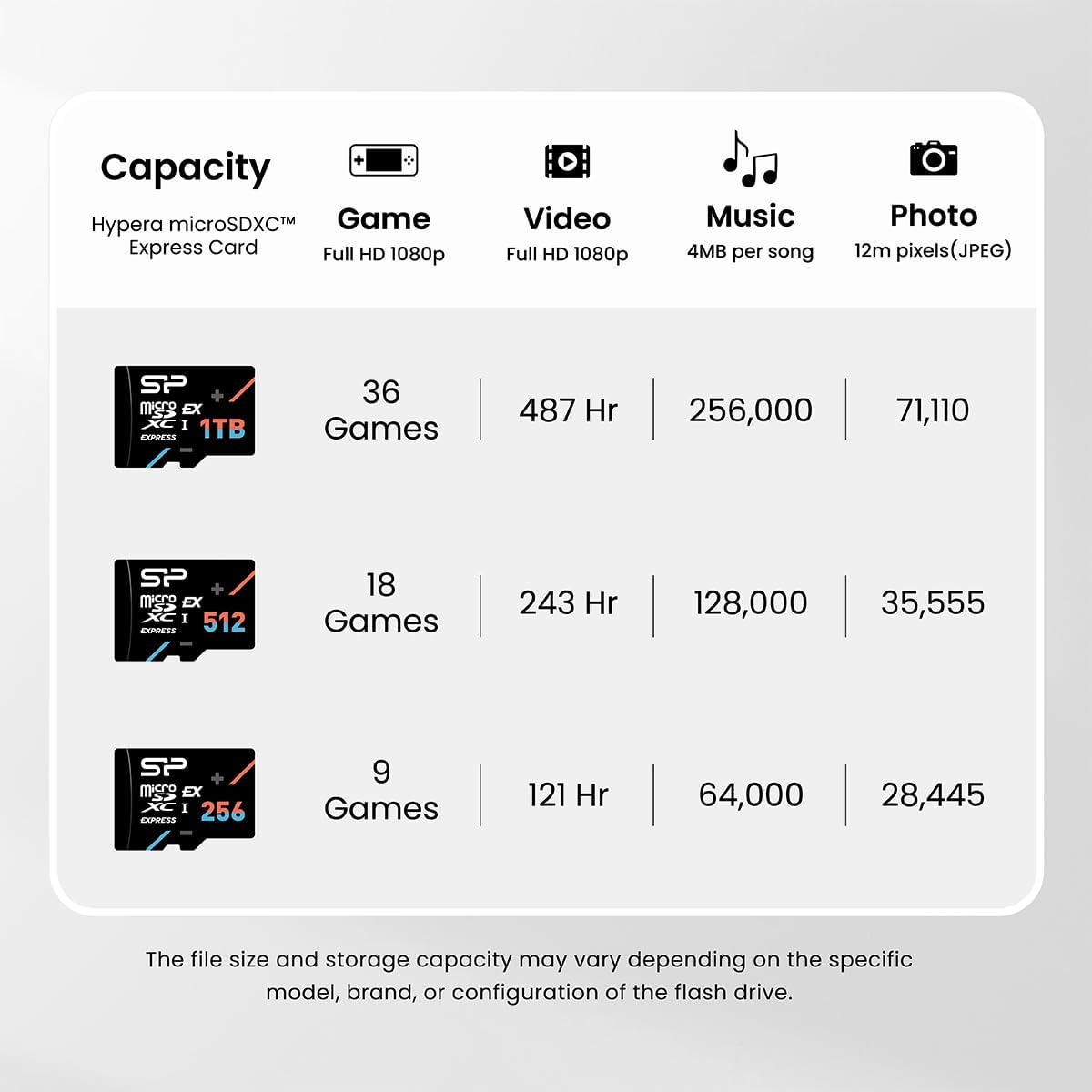
Figure 6.1: Capacity estimates for various data types across different microSDXC Express card sizes. For the 256GB model, this translates to approximately 9 games (Full HD 1080p), 121 hours of video (Full HD 1080p), 64,000 songs (4MB per song), or 28,445 photos (12m pixels JPEG).
7. Warranty and Support
7.1. Limited Warranty
This SP Silicon Power microSDXC Express Card is covered by a 10-Year Limited Warranty. This warranty covers defects in materials and workmanship under normal use. For full terms and conditions, including limitations and exclusions, please refer to the official SP Silicon Power website or contact customer support.
7.2. Customer Support
For technical assistance, warranty claims, or further inquiries, please visit the official SP Silicon Power website or contact their customer support team. You may need to provide your product model number (SP256GBSTEI31V10) and proof of purchase.
- Official Website: www.silicon-power.com
- Support Contact: Refer to the 'Support' or 'Contact Us' section on the official website for regional contact information.


