
1. Introduction and Overview
Thank you for choosing the Volcano Eye USB Rechargeable LED Bike Tail Light. This manual provides essential information for the safe and effective use of your new bike light. Designed for enhanced cycling safety, this tail light offers superior visibility during both day and night, featuring multiple light modes and a durable, waterproof design.
The Volcano Eye bike tail light is equipped with advanced LED technology to ensure you are seen by motorists and pedestrians, significantly reducing the risk of accidents. Its versatile mounting options make it suitable for various bicycles and personal gear.
2. What's in the Box
- Volcano Eye USB Rechargeable LED Bike Tail Light (2 units)
- USB Charging Cable (2 units)
- Silicone Mounting Straps (2 units)
- Instruction Manual
3. Setup and Installation
The Volcano Eye bike tail light features universal mounting for easy attachment to various locations. No tools are required for installation.
- Select Mounting Location: Choose a secure location on your bicycle, such as the seat post, handlebars, or helmet. The light can be mounted horizontally or vertically.
- Attach Silicone Strap: Wrap the silicone mounting strap around the chosen location.
- Secure the Light: Hook the light onto the silicone strap. Ensure it is firmly attached and does not wobble.
- Adjust Position: Adjust the light's angle to ensure maximum visibility to others.

Image: The tail light can be mounted on a bicycle seat post or a helmet for versatile use.
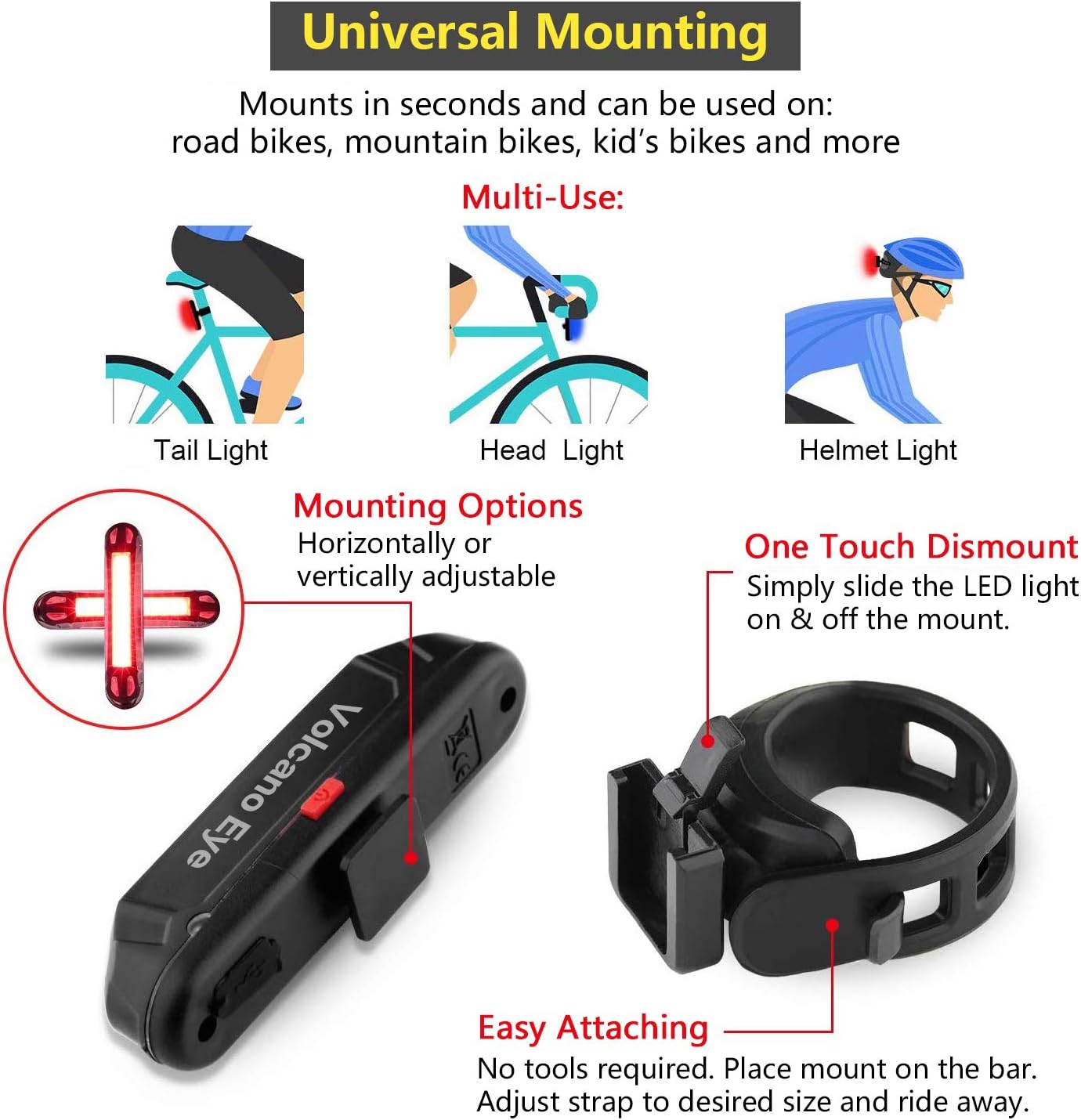
Image: Detailed view of the universal mounting system, illustrating horizontal and vertical attachment with the silicone strap.
4. Charging Instructions
The Volcano Eye bike tail light is USB rechargeable, eliminating the need for disposable batteries.
- Locate Charging Port: The USB charging port is located on the side of the light, typically covered by a rubber flap for water resistance.
- Connect Cable: Open the rubber flap and connect the provided USB charging cable to the light and to a USB power source (e.g., computer, wall adapter, power bank).
- Charging Indicator: During charging, a red indicator light will illuminate. Once fully charged, the indicator light will turn green.
- Disconnect and Seal: After charging, disconnect the USB cable and ensure the rubber flap is securely closed to maintain water resistance.
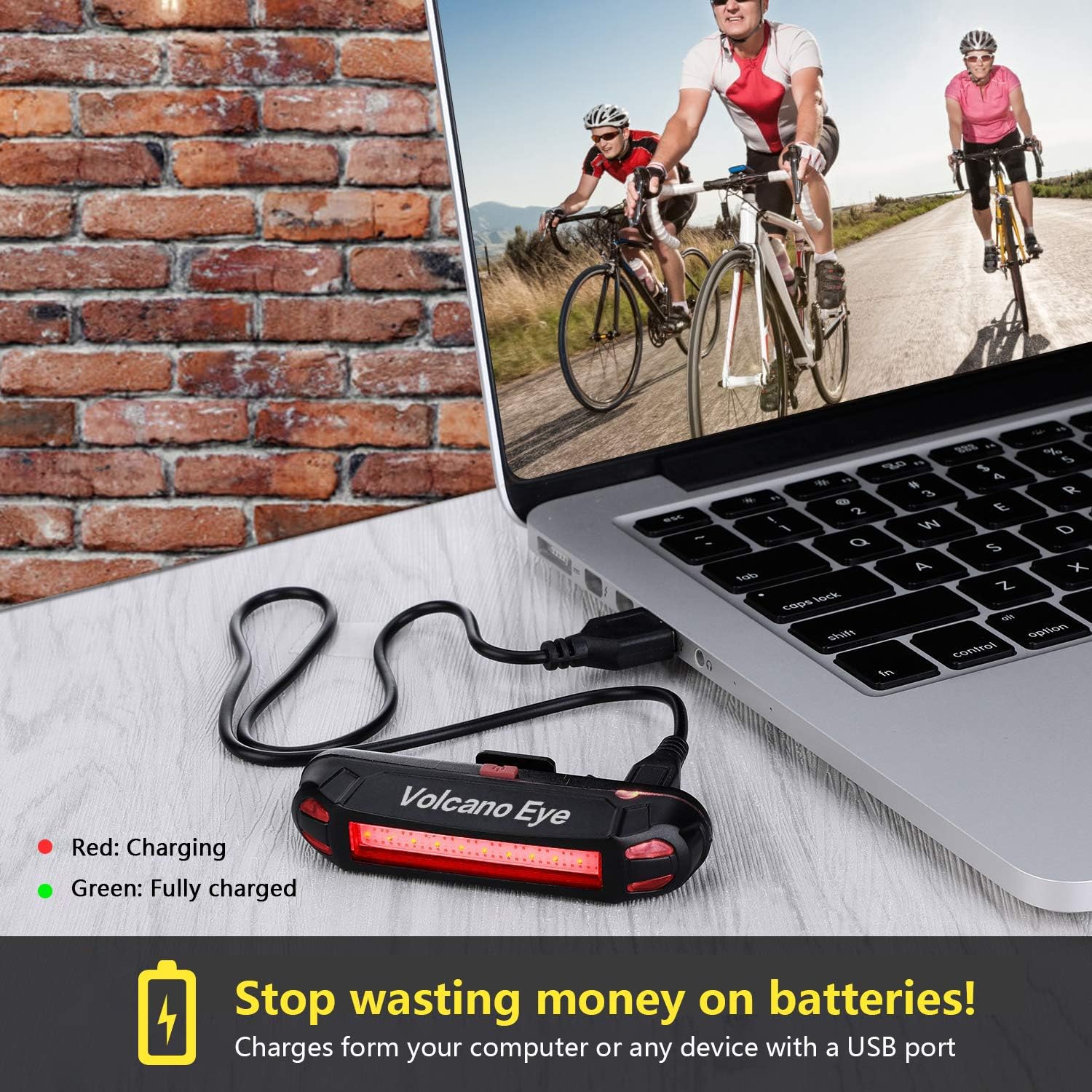
Image: The bike light charging via USB, with indicators for charging (red) and fully charged (green).
5. Operating Instructions: Light Modes
The tail light features 7 distinct lighting modes to suit various cycling conditions and preferences. Press the power button to cycle through the modes.
- Red Light: Standard rear visibility.
- Green Light: Enhanced visibility, suitable for specific conditions like fog.
- Blue Light: Can be used as a unique signaling light or a bike headlight.
- Red Green Flash: Alternating flash for increased attention.
- Red Blue Flash: High-visibility flashing pattern.
- Blue Green Flash: Distinctive flashing for varied environments.
- Red Blue Green Flash: Multi-color rapid flash for maximum daytime and nighttime visibility.
To turn the light off, press and hold the power button for approximately 2-3 seconds.

Image: Visual representation of the seven available light modes for the tail light.
6. Maintenance
- Cleaning: Wipe the light with a soft, damp cloth. Avoid abrasive cleaners or solvents.
- Water Resistance: The light is IPX4 water resistant, meaning it is protected against splashing water from any direction. Ensure the USB port's rubber flap is always securely closed to maintain this protection, especially in wet conditions.
- Storage: Store the light in a cool, dry place when not in use. For long-term storage, charge the battery periodically to prolong its lifespan.
- Battery Care: Avoid fully discharging the battery frequently. Recharge the light when the indicator shows low battery.

Image: The bike light operating effectively in rainy conditions, highlighting its IPX4 water resistance.
7. Troubleshooting
- Light Not Turning On:
- Ensure the battery is charged. Connect to a USB power source and check the charging indicator.
- Press and hold the power button for 2-3 seconds to ensure it's not just in standby mode. - Light Not Charging:
- Verify the USB cable is securely connected to both the light and the power source.
- Try a different USB cable or power source to rule out a faulty component.
- Ensure the charging port is clean and free of debris. - Light Flickers or Shuts Off Unexpectedly:
- The battery may be low. Recharge the light fully.
- Ensure the light is securely mounted and not experiencing excessive vibration.
8. Specifications
| Brand | Volcano Eye |
| Model Number | VolcanoEye3colors-2 |
| Color | Red Blue Green |
| Material | Plastic, Silicone |
| Power Source | Battery Powered (USB Rechargeable) |
| Water Resistance Level | IPX4 |
| Item Weight | 6.4 ounces |
| Mounting Type | Seatpost Mount (Silicone Strap) |
| Product Dimensions (L x W x H) | 5" x 3.2" x 0.8" |
| Number of Settings | 7 |
| Light Output Maximum | 100 Lumens |
| UPC | 711414758608 |
9. Warranty and Support
The Volcano Eye USB Rechargeable LED Bike Tail Light comes with a 1-year manufacturer's warranty. This warranty covers defects in materials and workmanship under normal use.
If you experience any issues with your product or require technical assistance, please contact Volcano Eye customer support through the retailer where you purchased the product or visit the official Volcano Eye website for contact information.
Please retain your proof of purchase for warranty claims.