
1. Safety Information
Please read all instructions carefully before using this treadmill. Improper use can lead to injury or damage to the equipment. Keep this manual for future reference.
- User Restrictions: Individuals who are pregnant, disabled, or children under 10 years of age are prohibited from using this treadmill.
- Emergency Stop: Always attach the safety lock to your clothing before starting a workout. In case of an emergency, the safety lock will immediately stop the treadmill.
- Placement: Place the treadmill on a flat, stable surface. Ensure adequate clear space around the treadmill for safe operation.
- Power Supply: Connect the treadmill to a grounded power outlet. Do not use extension cords or adapters.
- Maintenance: Regularly inspect the treadmill for any signs of wear or damage. Do not operate if damaged.
- Footwear: Always wear appropriate athletic footwear when using the treadmill.
- Hydration: Stay hydrated during your workout.
2. Product Overview
The RHYTHM FUN RF-MC01 Folding Treadmill is a versatile 2-in-1 fitness solution designed for both walking and running. Its compact, foldable design makes it ideal for home or office use, offering convenience without sacrificing performance. The treadmill features a wide tread belt, quiet operation, and smart control options via remote and a dedicated workout application.
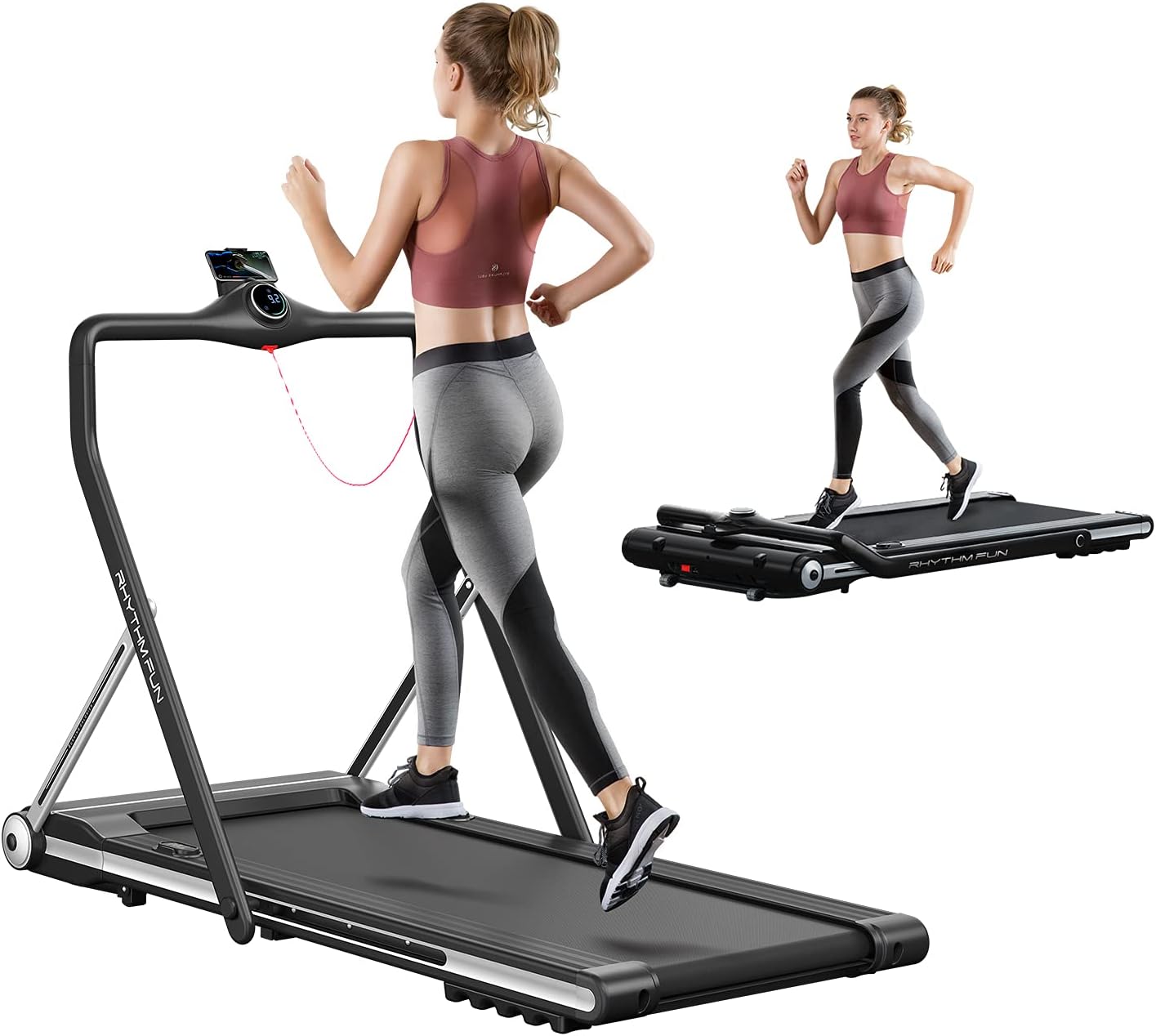
This image displays the RHYTHM FUN Folding Treadmill. On the left, a woman is running on the treadmill with the handrail in the upright position. On the right, the treadmill is shown in its folded, flat configuration, suitable for walking under a desk, with a woman walking on it. This illustrates the product's dual functionality and space-saving design.
3. Setup
The RHYTHM FUN RF-MC01 treadmill requires no assembly. It is designed for immediate use directly out of the package.
3.1 Unpacking
- Carefully remove the treadmill from its packaging.
- Place the treadmill on a flat, stable surface in your desired workout area.
3.2 Unfolding for Running Mode
To transition from walking pad mode to running mode, raise the handrail:
- Ensure the treadmill is powered off and unplugged.
- Gently lift the handrail until it locks securely into the upright position.
- Verify that the handrail is stable before use.
3.3 Folding for Walking Mode or Storage
To fold the handrail down for walking pad mode or storage:
- Ensure the treadmill is powered off and unplugged.
- Locate the release mechanism at the base of the handrail.
- Press the release and gently lower the handrail until it is flat against the treadmill deck.
- The treadmill can then be easily moved using its integrated wheels or stored in a compact space.

This image demonstrates the space-saving capability of the RHYTHM FUN Folding Treadmill. The treadmill is shown folded flat and discreetly stored underneath a sofa, highlighting its suitability for small living spaces.
4. Operating Instructions
4.1 Power On/Off
- Plug the power cord into a suitable outlet.
- To power on, press the main power switch (usually located near the front of the treadmill).
- To power off, press the main power switch again and unplug the unit.
4.2 Safety Lock
The safety lock is a crucial safety feature. Attach the red clip to your clothing before starting any workout. If the clip detaches, the treadmill will stop immediately.
4.3 Modes of Operation
The treadmill supports two primary modes:
- Walking Mode: When the handrail is folded down, the maximum speed is 3.7 mph (6 km/h). This mode is suitable for walking while working at a standing desk.
- Running Mode: When the handrail is in the upright position, the maximum speed is 7.5 mph (12 km/h). This mode allows for more intense running workouts.

This image illustrates the two primary modes of the RHYTHM FUN Folding Treadmill. On the left, a woman is walking on the treadmill with the handrail folded down, indicating walking mode (max 6km/h). On the right, the handrail is upright, and a woman is running, indicating running mode (max 12km/h).
4.4 Speed Control
You can adjust the treadmill speed using three methods:
- Remote Control: Use the provided wireless remote to start, stop, and adjust speed.
- Smart Workout App: Connect your smartphone via Bluetooth to control the treadmill and track your workout data.
- Manual Control: The handrail features a 'Home' button for quick start/stop and speed adjustments.

This image shows the RHYTHM FUN Folding Treadmill's smart features. A remote control is depicted on the left, and a smartphone displaying the dedicated workout application is shown on the right, demonstrating the various ways to control the treadmill and monitor exercise data.
4.5 Integrated Features
- Bluetooth Speaker: Connect your phone to the treadmill's Bluetooth speaker to enjoy music during your workout.
- Phone Holder: Utilize the integrated phone holder on the handrail to keep your device secure and accessible for entertainment or app use.
- Display: The LED display shows key metrics such as time, distance, calories burned, and current speed.
5. Maintenance
Regular maintenance ensures the longevity and optimal performance of your treadmill.
- Cleaning: Wipe down the treadmill with a damp cloth after each use to remove sweat and dust. Avoid using abrasive cleaners.
- Belt Lubrication: The running belt requires periodic lubrication to reduce friction and extend its lifespan. Refer to the included lubrication instructions and use only approved silicone lubricant. Frequency depends on usage, typically every few months.
- Belt Adjustment: If the running belt appears to be slipping or misaligned, it may require adjustment. Consult the detailed instructions in the full user manual for proper belt tensioning and centering procedures.
- Storage: When not in use, especially for extended periods, store the treadmill in a clean, dry place. Its folding design allows for convenient storage under furniture or in a corner.
6. Troubleshooting
This section addresses common issues you might encounter with your RHYTHM FUN treadmill.
| Problem | Possible Cause | Solution |
|---|---|---|
| Treadmill does not power on. | Power cord not plugged in, main switch off, safety key not in place. | Ensure power cord is securely plugged in, main switch is on, and safety key is correctly inserted. |
| Running belt slips or is off-center. | Belt tension too loose, belt misalignment. | Adjust belt tension and alignment according to the detailed instructions in the full user manual. Lubricate the belt if necessary. |
| Unusual noises during operation. | Lack of lubrication, loose components, foreign object. | Lubricate the running belt. Check for and tighten any loose screws or bolts. Inspect for any foreign objects under the belt. |
| Bluetooth speaker connectivity issues. | Device not paired, Bluetooth off on device, interference. | Ensure Bluetooth is enabled on your device and the treadmill. Re-pair the device. Move closer to the treadmill to reduce interference. |
| Treadmill stops unexpectedly. | Safety key detached, motor overheating, power interruption. | Re-attach the safety key. Allow the treadmill to cool down if it was in prolonged use. Check power connection. |
If you experience issues not covered here or require further assistance, please contact customer support.
7. Specifications
Detailed technical specifications for the RHYTHM FUN RF-MC01 Folding Treadmill.
| Feature | Specification |
|---|---|
| Brand | RHYTHM FUN |
| Model Name | RF-MC01 |
| Color | Black |
| Product Dimensions (Standing) | 61"D x 30"W x 43"H |
| Folded Size | 61" x 30" x 8" |
| Item Weight | 97 Pounds |
| Material | Alloy Steel, Aluminum |
| Maximum Speed | 7.5 Miles per Hour (Running Mode) |
| Minimum Speed | 0.6 Miles per Hour |
| Walking Speed Range | 0.6-3.7 MPH |
| Running Speed Range | 0.6-7.5 MPH |
| Maximum Horsepower | 3 Horsepower |
| Maximum Weight Recommendation | 264 Pounds |
| Deck Length | 50 Inches |
| Deck Width | 18 Inches |
| Display Type | LED |
| Connectivity Technology | Bluetooth |
| Metrics Measured | Time, Distance, Calorie, Speed |
| Assembly Required | No |
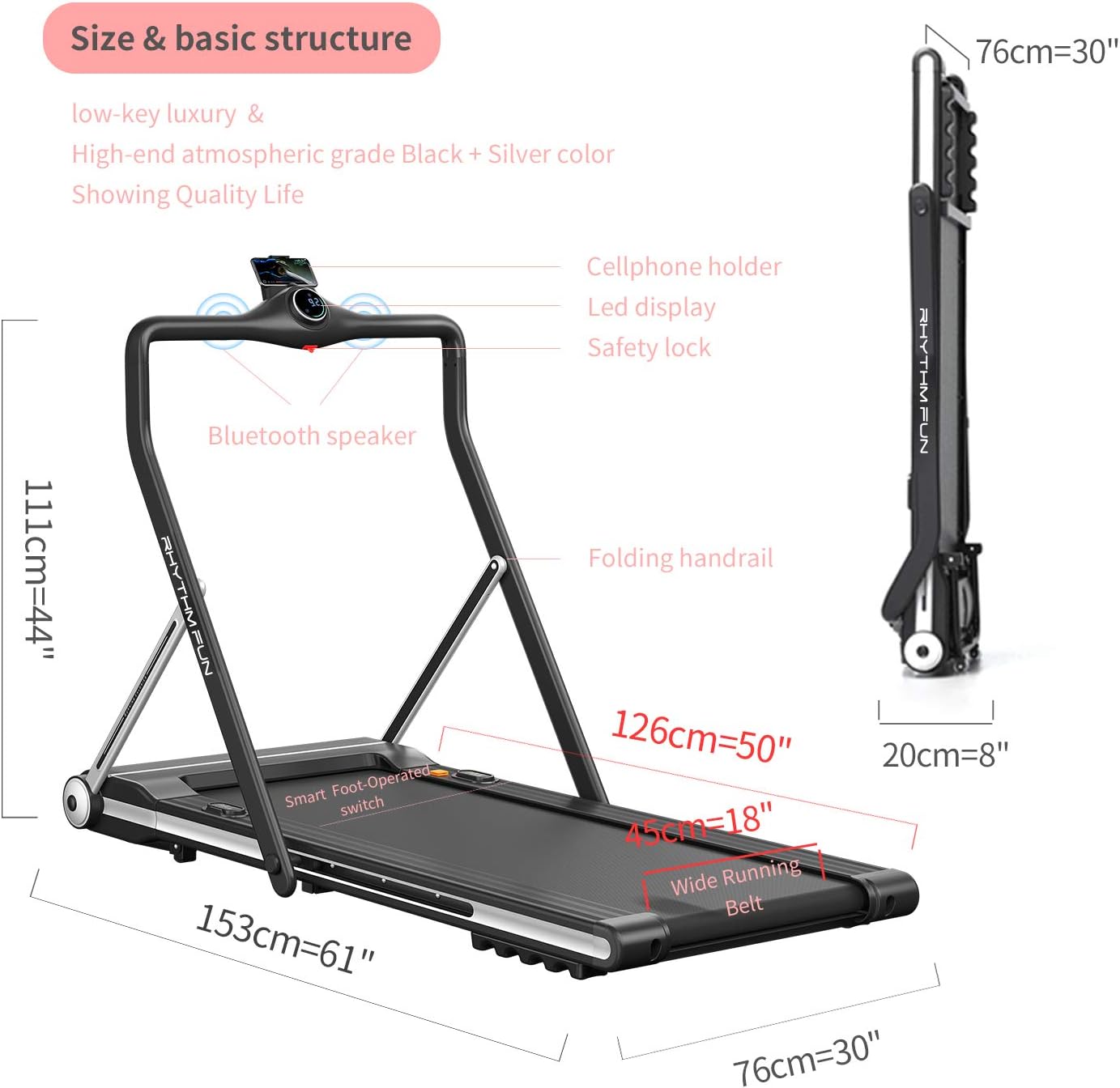
This image provides a detailed view of the RHYTHM FUN Folding Treadmill, highlighting its dimensions in both upright and folded positions. Labels point out key components such as the cellphone holder, LED display, safety lock, Bluetooth speaker, folding handrail, wide running belt, and smart foot-operated switch.

This image illustrates the advanced features of the RHYTHM FUN Treadmill. It highlights the shock absorption system with high-density elasticity, the noise reduction design using cellular silica and porous silicon, the 2.0 CHP DC drive system for smooth acceleration, and the seven-level elastic running platform designed for anti-skid and abrasion resistance.
8. Warranty Information
The RHYTHM FUN RF-MC01 Folding Treadmill comes with the following warranty:
- Main Frame: 10 Years
- Motor: 2 Years
- Parts: 1 Year
Please retain your proof of purchase for warranty claims. The warranty covers manufacturing defects under normal use conditions.
9. Customer Support
For any questions, technical support, or warranty claims, please refer to the contact information provided with your product packaging or visit the official RHYTHM FUN website.