
Product Overview
The COMICA CVM-SPX-TC is a USB-C to 3.5mm audio adapter designed to connect external microphones and headphones to USB Type-C smartphones and tablets. It supports both 3.5mm TRS and TRRS microphones and features real-time monitoring capabilities.
Key Features:
- USB-C to 3.5mm Mic Adapter: Enables connection of video microphones, lavalier microphones, and other microphones to Android smartphones or tablets via USB-C.
- Android Phone Compatibility: Universal compatibility with Samsung, Huawei, Google, and other USB Type-C smartphones, supporting both 3.5mm TRS and TRRS audio plugs.
- Real-Time Monitoring: Equipped with a Mic/Phone monitor switch button, allowing users to monitor recording effects in real-time.
- Clear Audio Transmission: Designed to maintain high audio quality during recording, enhancing video blogs and other audio capture.

Image: The COMICA CVM-SPX-TC adapter showing its USB Type-C connector and the 3.5mm microphone port, along with the Mic/Phone Audio Monitor Switch.
Setup Guide
- Connect to Smartphone: Insert the USB Type-C connector of the CVM-SPX-TC adapter into the USB-C port of your Android smartphone or tablet.
- Connect Microphone: Plug your 3.5mm TRS or TRRS microphone into the 3.5mm microphone port on the adapter.
- Connect Headphones (Optional): If real-time monitoring is desired, plug your 3.5mm headphones into the designated headphone jack on the adapter.
- Verify Connection: Ensure all connections are secure. The adapter may have an indicator light to confirm connection (refer to product for specific indicator behavior).
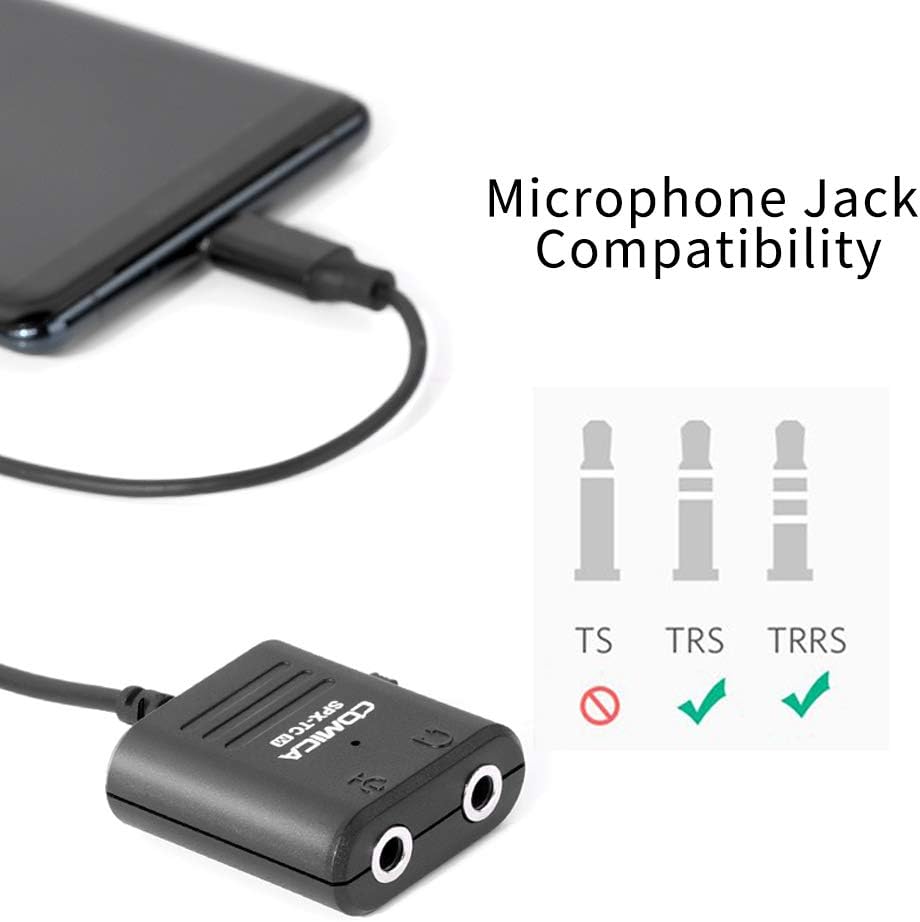
Image: The adapter connected to a smartphone, demonstrating compatibility with both TRS and TRRS microphone jacks. TS jacks are not supported.
Operating Instructions
Recording Audio:
- Launch Recording App: Open your preferred audio or video recording application on your smartphone. For Android systems, if the default video app does not work, try a third-party video application.
- Select Audio Input: In your recording app settings, ensure the external microphone (via USB-C) is selected as the audio input source.
- Start Recording: Begin your audio or video recording.
Real-Time Monitoring:
- Connect Headphones: Ensure headphones are connected to the adapter's headphone jack.
- Use Monitor Switch: The CVM-SPX-TC features a Mic/Phone monitor switch.
- Switch to "Mic" position to monitor the audio input from your microphone.
- Switch to "Phone" position to monitor the audio output from your phone (e.g., playback).
- Adjust Volume: Adjust the monitoring volume through your smartphone's volume controls.

Image: A user demonstrating real-time audio monitoring during video recording on a smartphone using the CVM-SPX-TC adapter and headphones.
Video: This video demonstrates the COMICA CVM-SPX-TC adapter, highlighting its use for simultaneous recording and listening. It clarifies that the product is for Samsung devices, not iPhones, and advises caution against bending the USB-C cable.
Care and Maintenance
- Cleaning: Use a soft, dry cloth to clean the adapter. Avoid liquid cleaners or solvents.
- Storage: Store the adapter in a cool, dry place away from direct sunlight and extreme temperatures.
- Cable Care: Avoid sharp bends or excessive pulling on the USB-C cable to prevent internal wire damage.
- Connector Protection: Keep the USB-C and 3.5mm ports free from dust and debris. Use protective caps if available.
Troubleshooting
| Problem | Possible Cause | Solution |
|---|---|---|
| No audio input from microphone. |
|
|
| No real-time monitoring. |
|
|
| Adapter not recognized by phone. |
|
|
Specifications
- Model: CVM-SPX-TC
- Connector Type: USB Type-C (Male) to 3.5mm (Female)
- Compatibility: Android Smartphones and Tablets with USB Type-C port (e.g., Samsung, Huawei, Google). Supports 3.5mm TRS & TRRS microphones.
- Functionality: Microphone input, headphone output, real-time monitoring (Mic/Phone switch).
- Product Dimensions: 5.11 x 3.14 x 0.59 inches
- Item Weight: 0.64 ounces
- Manufacturer: COMICA