
1. Product Overview
The MCN-UV80 Paste Flux is a high-quality, no-clean soldering flux specifically formulated for advanced SMT solder products, including PCB, BGA, PGA, and SMD applications. It offers high bond strength, a neutral pH value, and strong insulation, resulting in smooth welding surfaces. This flux is non-corrosive to IC and PCB components and has a boiling point only slightly higher than the melting point of solder, ensuring efficient and reliable soldering.

Image 1.1: MCN-UV80 Paste Flux in its container, showing the paste inside.
2. Safety Information
WARNING: This product contains chemicals known to be harmful if swallowed or inhaled. It is a respiratory irritant and may contain rosin, a known sensitizer.
- Ventilation: Use with adequate ventilation. Avoid breathing fumes, especially when soldering. Work in a well-ventilated area or use local exhaust ventilation.
- Handling: Wash hands thoroughly after handling. Do not re-use containers.
- Storage: Keep away from children. Store in a cool, dry place.
- Intended Use: FOR INDUSTRIAL USE ONLY.
- SDS: Refer to the Material Safety Data Sheet (MSDS) for complete safety information before use.
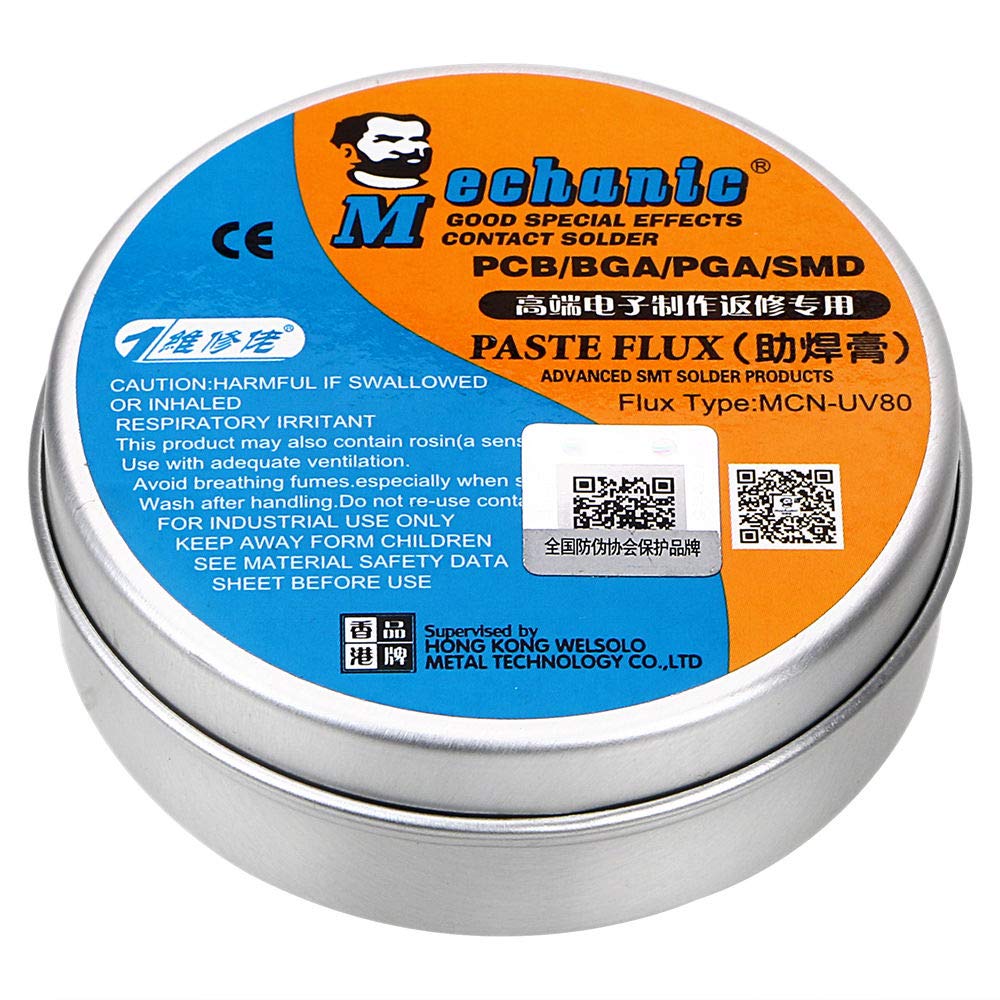
Image 2.1: Close-up view of the MCN-UV80 Paste Flux tin, highlighting safety warnings and QR codes for additional information. One QR code links to http://weixin.qq.com/r/RnR9ZdvEi4b0rZ8G9yFU.
3. Setup
Before beginning any soldering task, ensure your workspace is prepared and safe.
- Ventilation: Set up your soldering station in a well-ventilated area. If possible, use a fume extractor to minimize inhalation of soldering fumes.
- Tools: Gather all necessary tools, including your soldering iron, solder wire, components, and any cleaning supplies.
- Surface Preparation: Ensure the surfaces to be soldered (e.g., PCB pads, component leads) are clean and free of dirt, grease, or oxidation.
- Flux Preparation: Open the MCN-UV80 Paste Flux tin. The paste should have a consistent texture.
4. Operating Instructions
Follow these steps for effective use of MCN-UV80 Paste Flux:
- Apply Flux: Using a small applicator (e.g., a toothpick, small brush, or specialized flux applicator), apply a thin, even layer of MCN-UV80 Paste Flux directly to the area where the solder joint will be made. Only a small amount is needed.
- Position Components: Place the components onto the fluxed pads or align the wires to be soldered.
- Solder Application: Heat the joint with your soldering iron. Once the area reaches soldering temperature, apply solder wire to the heated joint. The flux will activate, cleaning the metal surfaces and allowing the solder to flow smoothly and create a strong, reliable connection.
- No-Clean Feature: MCN-UV80 is a no-clean flux, meaning that typically, no residue removal is required after soldering. The remaining residue is non-corrosive and electrically non-conductive. However, for aesthetic reasons or specific applications, residue can be cleaned with appropriate solvents if desired.

Image 4.1: The MCN-UV80 Paste Flux in an open tin, revealing the amber-colored paste ready for application.
5. Maintenance
Proper storage is essential to maintain the quality and effectiveness of your MCN-UV80 Paste Flux.
- Storage: Always keep the flux in its original sealed container. Ensure the lid is tightly closed after each use to prevent exposure to air, which can cause the flux to dry out or become contaminated.
- Environment: Store the container in a cool, dry place, away from direct sunlight, high temperatures, and humidity.
- Shelf Life: While specific shelf life is not provided, proper storage will maximize the product's usability. Discard if the flux appears hardened, discolored, or has an unusual odor.
6. Troubleshooting
Most issues related to flux performance stem from improper application or storage.
- Poor Solder Flow/Joints:
- Ensure the soldering iron tip is clean and properly tinned.
- Verify the soldering iron temperature is appropriate for the solder and components being used.
- Check if enough flux was applied. A thin, even layer is sufficient.
- Ensure the surfaces to be soldered are clean and free of contaminants.
- Flux Appears Dry/Hardened:
- This usually indicates improper storage (lid not sealed, exposure to air/heat).
- If the flux has significantly hardened, it may no longer be effective and should be replaced.
7. Specifications
| Feature | Detail |
|---|---|
| Flux Type | MCN-UV80 |
| Form | Paste |
| Cleaning Required | No-Clean |
| Compatibility | PCB, BGA, PGA, SMD |
| Approximate Dimensions | 7.8 cm (diameter) x 2.5 cm (height) |

Image 7.1: MCN-UV80 Paste Flux tin with approximate dimensions of 7.8 cm diameter and 2.5 cm height. A QR code is also visible, linking to http://weixin.qq.com/r/RnR9ZdvEi4b0rZ8G9yFU.
8. Package Contents
The package for the MCN-UV80 Paste Flux typically includes:
- 1 x MCN-UV80 Paste Flux (in tin container)
9. Warranty and Support
Specific warranty information for the MCN-UV80 Paste Flux is not provided in the product details. For any product support, technical inquiries, or warranty-related questions, please contact the manufacturer, Deeoee, or your point of purchase.

Image 9.1: Top view of the MCN-UV80 Paste Flux tin, featuring text indicating it is 'the high quality product from MECHANIC' and a QR code. The QR code links to http://weixin.qq.com/r/RnR9ZdvEi4b0rZ8G9yFU.