
Güde 55247
Güde GNS 200 VS Wet Grinder User Manual
Model: 55247
Brand: Güde
1. Safety Instructions
Always observe the following safety precautions when operating the Güde GNS 200 VS Wet Grinder to prevent injury or damage to the machine.
- Read and understand all instructions before use.
- Wear appropriate personal protective equipment (PPE), including safety glasses and gloves.
- Ensure the machine is placed on a stable, level surface to prevent tipping during operation.
- Keep the work area clean and well-lit. Cluttered or dark areas invite accidents.
- Do not operate the machine in damp or wet conditions, except for the intended wet grinding process. Ensure electrical connections are dry.
- Always disconnect the power supply before performing any adjustments, maintenance, or when the machine is not in use.
- Keep children and bystanders away from the operating machine.
- Do not force the tool. Use the correct tool for your application.
- Maintain the machine with care. Keep cutting tools sharp and clean for better and safer performance.
- Check for misalignment or binding of moving parts, breakage of parts, and any other condition that may affect the machine's operation. If damaged, have the machine repaired before use.
2. Product Overview
The Güde GNS 200 VS Wet Grinder is a versatile tool designed for sharpening various blades and tools with precision and ease. Its robust construction and intuitive controls make it suitable for a wide range of sharpening tasks.

Figure 2.1: Overall view of the Güde GNS 200 VS Wet Grinder.
Key Components:
- Corundum Sharpening Stone (K 220): The primary grinding wheel for initial sharpening and shaping.
- Leather Honing Disc: Used for deburring and polishing the sharpened edge to a fine finish.
- Water Tank: Holds water to keep the sharpening stone cool and prevent overheating of the workpiece, featuring overflow protection.
- Adjustable Work Supports: Provide stable platforms for guiding tools against the grinding wheels.
- Speed Control Knob: Allows for stepless adjustment of the grinding speed (Vario Speed).
- Direction Switch: Enables selection of two different rotation directions for versatile sharpening.
- Angle Gauge: A precise tool for setting and maintaining the correct sharpening angle.

Figure 2.2: Detailed view of the control panel, grinding stone, leather honing disc, and angle gauge.
Features:
- Efficient 120 W induction motor with continuous speed adjustment.
- Low-vibration operation for precise sharpening.
- Two selectable directions of rotation for various sharpening techniques.
- Stable machine base for secure operation.
- Ball-bearing grinding compartments for smooth performance.
3. Setup
Proper setup ensures safe and efficient operation of your wet grinder.
- Unpacking: Carefully remove all components from the packaging. Check for any damage during transit.
- Placement: Position the grinder on a firm, level, and stable workbench or surface. Ensure there is adequate space around the machine for safe operation and water splash.
- Install Grinding Stone and Honing Disc: The corundum sharpening stone and leather honing disc should be securely mounted on their respective shafts. Ensure all fasteners are tightened.
- Fill Water Tank: Fill the water tank with clean water. The water level should be sufficient to immerse the lower part of the grinding stone (approximately 1-2 cm). The tank has overflow protection.

Figure 3.1: Ensure the water tank is filled to the appropriate level before operation.
- Attach Work Supports: Securely attach the adjustable work supports as needed for the tool you intend to sharpen. These supports provide stability and control during grinding.
- Connect Power: Plug the power cord into a suitable electrical outlet (230 V AC).
4. Operating Instructions
Follow these steps for effective and safe sharpening.
4.1 Basic Operation
- Power On: Press the red power button to turn on the grinder.
- Adjust Speed: Use the speed control knob to set the desired grinding speed. Start with a lower speed and increase as needed for control and material removal.

Figure 4.1: The control panel features the power switch and stepless speed adjustment knob.
- Select Direction: Use the direction switch to choose the rotation direction. For most sharpening, the wheel should rotate towards the edge.
4.2 Sharpening Process
The wet grinding process keeps the blade cool, preventing loss of temper and maintaining the tool's hardness.
- Set Angle: Use the included angle gauge to determine and set the correct sharpening angle for your tool. This is crucial for consistent and effective sharpening.

Figure 4.2: The angle gauge assists in setting the precise sharpening angle for various tools.
- Grinding: Gently guide the tool against the rotating corundum sharpening stone, maintaining the set angle. Apply light, consistent pressure. Move the tool evenly across the stone's surface to ensure uniform wear and a straight edge.
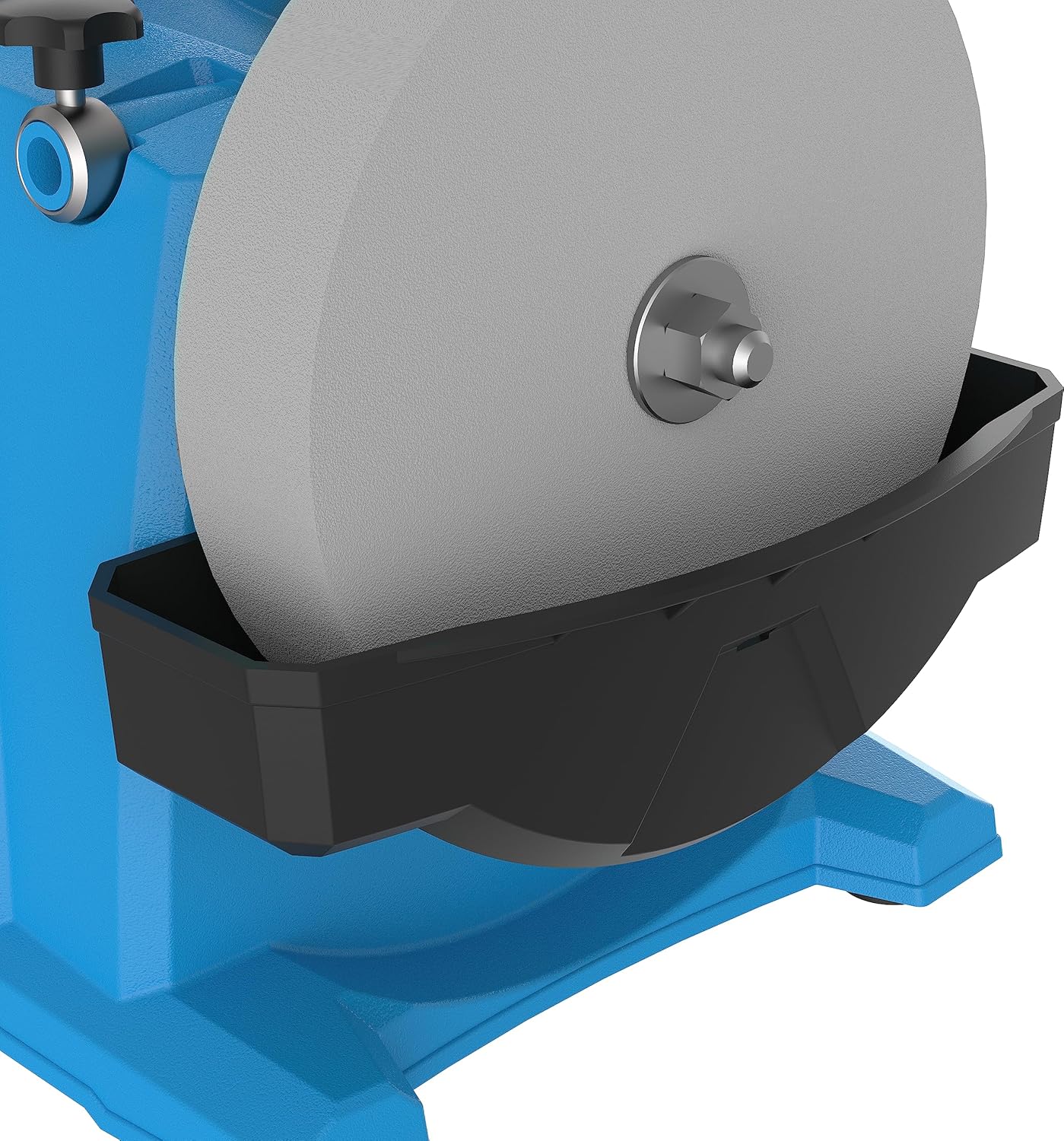
Figure 4.3: The grinder is ideal for sharpening knives and axes, ensuring a sharp and durable edge.

Figure 4.4: The machine can also sharpen wood plane blades and scissors, providing versatility for various workshop tools.
- Honing: Once the desired sharpness is achieved on the corundum stone, switch to the leather honing disc. Apply a small amount of honing paste (included) to the disc. Gently hone the edge to remove any burrs and achieve a razor-sharp finish.
- Check Sharpness: Carefully test the sharpness of your tool on a piece of scrap material.
- Power Off: When finished, turn off the grinder by pressing the power button and unplugging the machine.
5. Maintenance
Regular maintenance ensures the longevity and optimal performance of your Güde GNS 200 VS Wet Grinder.
- Clean Water Tank: After each use, empty and clean the water tank to prevent algae buildup and maintain water quality.
- Clean Grinding Stone and Honing Disc: Periodically clean the grinding stone to remove embedded metal particles. The leather honing disc should also be kept clean and re-pasted as needed.
- Inspect Components: Regularly inspect the power cord, switch, and all moving parts for signs of wear or damage. Replace any worn or damaged parts immediately.
- Storage: Store the grinder in a dry, clean place, away from direct sunlight and extreme temperatures.
6. Troubleshooting
This section addresses common issues you might encounter with your wet grinder.
| Problem | Possible Cause | Solution |
|---|---|---|
| Grinder does not start | No power supply; Power switch off; Motor overload. | Check power connection; Ensure switch is ON; Disconnect from power, wait 5 minutes, then restart. |
| Poor sharpening results | Incorrect angle; Worn grinding stone; Insufficient water; Too much pressure. | Re-adjust angle with gauge; Replace stone if excessively worn; Ensure adequate water level; Apply lighter pressure. |
| Excessive vibration | Unstable surface; Grinding stone unbalanced or damaged; Loose components. | Place on stable surface; Inspect stone for damage/replace; Check all fasteners. |
| Water splashing excessively | Water level too high; Grinding too aggressively. | Reduce water level; Use lighter pressure. |
If you encounter issues not listed here or if the suggested solutions do not resolve the problem, please contact Güde customer support.
7. Specifications
| Attribute | Value |
|---|---|
| Manufacturer | Güde GmbH & Co. KG |
| Model Number | 55247 |
| Dimensions (L x W x H) | 45.5 x 28 x 37 cm |
| Weight | 7.6 Kilograms |
| Color | Blue |
| Style | 200 mm/120 W |
| Material | Metal |
| Power Type | Corded Electric |
| Voltage | 230 Volts (AC) |
| Power | 120 Watts |
| Grinding Stone Grain | 220 (Coarse) |
| Max Rotation Speed | 150 rpm |
| Included Components | Grinding disc, Leather honing disc, Angle gauge, Honing paste |
8. Warranty and Support
Güde is committed to providing durable products and excellent customer service.
Designed to Last:
Güde ensures the availability of appropriate spare parts in their service center for all products, including older models, to support the longevity of your device.
Service as it Should Be:
Should you encounter any difficulties with your Güde device, qualified staff in the internal service center are available to assist you by phone.
Professional Assistance:
If your Güde device requires professional attention, the internal repair service is available to provide the necessary support.
For specific warranty terms and to initiate a support request, please refer to the documentation provided with your purchase or visit the official Güde website.
Related documents55247


Ask a question about this manual
Ask about setup, troubleshooting, compatibility, parts, safety, or missing instructions. Manuals+ will review the question and use this page’s manual context to help answer it.