
1. Introduction
The ELEGOO Tumbller is a self-balancing programmable robot car kit designed to provide an engaging and educational experience in robotics and programming. This kit is compatible with Arduino, allowing users to explore various functions and customize their robot.
Key features of the Tumbller include:
- Infrared Control: Navigate the robot using infrared signals.
- Automatic Tracking: Program the robot to follow a designated path or object.
- Obstacle Avoidance: Utilize sensors to detect and avoid obstacles in its path.
- Bouncing Mode: Experience dynamic movement capabilities.
- Multi-color LED Lighting: Customize the robot's appearance with various LED colors.
- Arduino Compatibility: Modify default codes and upload custom programs via the Arduino IDE. Reserved pins allow for the addition of more sensors and functionalities.
This kit is suitable for both beginners and experienced robotics enthusiasts, offering hands-on experience and fundamental programming knowledge. A comprehensive, illustrated tutorial is included to guide you through assembly and function utilization.

Image 1.1: The ELEGOO Tumbller Self-Balancing Robot Car Kit, fully assembled and ready for operation.
2. Setup
2.1. Unpacking and Component Check
Before beginning assembly, carefully unpack all components and verify that all parts are present according to the packing list. The kit includes:
- Controller Board
- Ultrasonic Sensor
- Cables and USB Cable
- Aluminum Plates
- Phillips Screwdriver
- Screws and Nuts
- User Manual (Tutorial)

Image 2.1: Overview of all components included in the ELEGOO Tumbller kit.
2.2. Assembly Instructions
The assembly process is designed to be straightforward. Refer to the included tutorial manual for step-by-step instructions with detailed illustrations. The manual provides clear guidance for connecting all electronic components and assembling the structural parts using the provided screws and nuts.
While the assembly is primarily mechanical, ensure all electrical connections are secure and correctly oriented as per the tutorial. The kit is designed for easy assembly, making it accessible for younger users with adult supervision.

Image 2.2: An example technical assembly diagram, similar to those found in the included tutorial.
3. Operating
The ELEGOO Tumbller offers several operating modes and control options. The robot comes with pre-installed code, allowing for immediate use after assembly.
3.1. Initial Power-On and Self-Balancing
Once assembled and powered on, the Tumbller will automatically attempt to self-balance. Ensure the robot is placed on a flat, stable surface for optimal performance.

Image 3.1: The Tumbller robot adjusting its position to maintain balance.
3.2. Control Modes
The Tumbller supports various control modes, including:
- Infrared Remote Control: Use a compatible infrared remote to steer the robot.
- Automatic Tracking: The robot can be programmed to follow lines or objects.
- Obstacle Avoidance: The ultrasonic sensor allows the robot to detect and navigate around obstacles.
- Mobile App Control: Control the Tumbller via a dedicated smartphone application (Android compatible) using Bluetooth.

Image 3.2: Tumbller utilizing its ultrasonic sensor for obstacle detection.
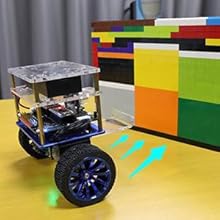
Image 3.3: Tumbller in auto-follow mode, indicated by blue arrows.
3.3. Mobile App Usage
Download the official ELEGOO Tumbller app from the Android app store. The app provides an intuitive interface for controlling the robot, selecting modes, and potentially customizing LED colors.

Image 3.4: ELEGOO app interface for selecting the Tumbller robot.

Image 3.5: User controlling the Tumbller robot via the mobile application.
4. Maintenance
To ensure the longevity and optimal performance of your ELEGOO Tumbller, follow these basic maintenance guidelines:
- Cleaning: Regularly wipe down the robot with a dry, soft cloth to remove dust and debris. Avoid using liquids or harsh chemicals.
- Component Check: Periodically inspect all connections, screws, and wires to ensure they are secure. Loose connections can affect performance.
- Storage: When not in use, store the robot in a dry, cool place away from direct sunlight and extreme temperatures.
- Battery Care: If the robot uses rechargeable batteries, follow the manufacturer's guidelines for charging and storage to maximize battery life.
5. Troubleshooting
If you encounter issues with your ELEGOO Tumbller, consider the following troubleshooting steps:
- Robot Not Balancing: Ensure all components are correctly assembled and connected. Verify that the self-balancing algorithm is loaded onto the controller board. The robot is designed to stop if tilted more than ±27 degrees to prevent damage.
- Control Issues: Check battery levels for both the robot and any remote control devices. For app control, ensure Bluetooth is enabled and the robot is paired correctly.
- No Power: Verify that the power source is connected and functional. Check all power cables and battery connections.
- Custom Code Problems: If you have uploaded custom code, ensure there are no syntax errors and that the code is compatible with the Tumbller's hardware. Refer to the ELEGOO website for example programs and documentation.
For persistent issues, refer to the detailed tutorial manual or contact ELEGOO customer support.

Image 5.1: Important operational notes for the Tumbller, including tilt limits and charging information.
6. Specifications
| Feature | Detail |
|---|---|
| Model Name | Tumbller 1.0 |
| Model Number | FR-GYE-KIT-017 |
| Brand | ELEGOO |
| Age Range (Description) | 6-16 years (Manufacturer Recommended: 8-16 years) |
| Item Dimensions (L x W x H) | 17 x 14 x 7 centimeters |
| Item Weight | 1.12 Kilograms |
| Educational Objective | Building Skills, Programming, Electronics |
| Included Components | Controller Board, Ultrasonic Sensor, Cables, USB Cable, Aluminum Plates, Phillips Screwdriver, Screws and Nuts, User Manual |
| Country of Origin | China |
7. Warranty
The ELEGOO Tumbller Self-Balancing Programmable Robot Car Kit comes with a 1-year manufacturer warranty. This warranty covers defects in materials and workmanship under normal use. Please retain your proof of purchase for warranty claims.
For warranty service or inquiries, please contact ELEGOO customer support.
8. Support
For additional support, resources, and the latest information regarding your ELEGOO Tumbller, please visit the official ELEGOO website. You can find:
- Downloadable code and explanatory files.
- Updated tutorials and guides.
- Frequently Asked Questions (FAQs).
- Contact information for technical assistance.
ELEGOO is committed to providing excellent customer service and support for its products.