Introduction
This manual provides essential information for the proper setup, operation, and maintenance of your ALLIMITY GA586WJSA replacement remote control. This remote is designed to function as a direct replacement for various Sharp LCD AQUOS TV models. Please read this manual thoroughly before use to ensure optimal performance.
Product Overview
The ALLIMITY GA586WJSA remote control features a standard layout for easy navigation and control of your Sharp LCD AQUOS TV. Below is an image of the remote with a description of its key buttons and functions.
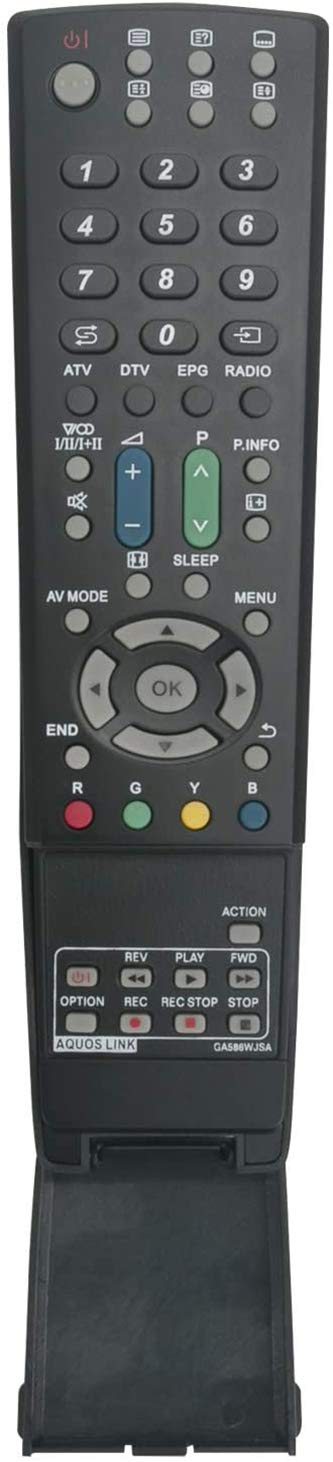
Button Functions:
- Power Button (Top Right): Turns the TV on or off.
- Number Pad (0-9): Directly selects channels or enters numerical inputs.
- S / ATV / DTV: Switches between different signal sources or TV modes (e.g., Satellite, Analog TV, Digital TV).
- EPG (Electronic Program Guide): Displays the TV program guide.
- RADIO: Switches to radio mode if supported by the TV.
- P.INFO (Program Information): Displays information about the current program.
- Channel Up/Down (P+/P-): Changes the TV channel.
- Volume Up/Down (V+/V-): Adjusts the TV volume.
- AV MODE: Cycles through available audio/video input modes.
- SLEEP: Sets the sleep timer for the TV.
- MENU: Accesses the TV's main menu.
- END: Exits the current menu or function.
- Navigation Buttons (Up, Down, Left, Right): Navigates through menus and options.
- OK Button (Center): Confirms selections in menus.
- Color Buttons (R, G, Y, B): Red, Green, Yellow, Blue buttons for specific functions within menus or interactive services.
- OPTION: Accesses additional options or settings.
- REV (Rewind): Rewinds media playback.
- PLAY: Starts or resumes media playback.
- FWD (Fast Forward): Fast forwards media playback.
- REC (Record): Initiates recording (if TV supports PVR functionality).
- REC STOP (Record Stop): Stops recording.
- STOP: Stops media playback.
- ACTION: Performs a specific action, often context-sensitive.
- AQUOS LINK: Activates or controls Sharp AQUOS Link compatible devices.
Setup
The ALLIMITY GA586WJSA remote control is designed for immediate use with compatible Sharp LCD AQUOS TVs without requiring complex programming.
Battery Installation:
- Locate the battery compartment on the back of the remote control. This is typically a sliding cover at the bottom.
- Slide the battery compartment cover open.
- Insert two new AAA batteries (not included), ensuring the correct polarity (+ and -) as indicated inside the compartment.
- Slide the battery compartment cover back into place until it clicks securely.
Once batteries are installed, the remote control is ready for use. No additional pairing or programming is required for compatible Sharp LCD AQUOS TV models.
Operating Instructions
To operate your TV with the ALLIMITY GA586WJSA remote control, point the remote directly at the TV's infrared sensor. Ensure there are no obstructions between the remote and the TV.
Basic Operations:
- Power On/Off: Press the Power button once.
- Channel Selection: Use the Number Pad to enter a channel number directly, or use the P+ / P- buttons to cycle through channels.
- Volume Adjustment: Use the V+ / V- buttons to increase or decrease the volume.
- Input Source: Press the AV MODE button to cycle through available input sources (e.g., HDMI, AV, Component).
- Menu Navigation: Press the MENU button to open the TV's main menu. Use the Navigation buttons (Up, Down, Left, Right) to move through options and OK to select. Press END to exit the menu.
Advanced Functions:
- Digital/Analog TV: Use the ATV or DTV buttons to switch between analog and digital television broadcasts.
- Program Guide: Press EPG to view the Electronic Program Guide.
- Media Playback Controls: For compatible media players or TV functions, use PLAY, STOP, REV, and FWD buttons.
- Recording Functions: If your TV supports PVR, use REC and REC STOP.
- AQUOS LINK: Utilize this button to control other Sharp AQUOS Link compatible devices connected to your TV.
Troubleshooting
If you experience issues with your remote control, please refer to the following common solutions:
- Remote not responding: Ensure the remote is pointed directly at the TV's infrared sensor. Check for any obstructions.
- Buttons unresponsive: Replace the batteries with fresh ones. Weak batteries are a common cause of intermittent or non-responsive remote control behavior.
- TV not turning on/off: Verify that the TV is plugged into a power source and is not in standby mode due to a power outage.
- Interference: Ensure no strong light sources (like direct sunlight or bright fluorescent lights) are interfering with the remote's infrared signal.
If the issue persists after trying these steps, please refer to the Support section.
Specifications
| Brand | ALLIMITY |
| Model Number | GA586WJSA |
| Connectivity Technology | Infrared (IR) |
| Maximum Range | 10 Meters |
| Power Source | 2 x AAA Batteries (not included) |
| Compatible Devices | Sharp LCD AQUOS TV models including: LC-52XL2E, LC-52X20E, LC-52LE705E, LC-52LE700E, LC-52DH77E, LC-52DH66E, LC-52DH65S, LC-52DH65E, LC-52D65E, LC-48X8E, LC-46XL2E, LC-46X8E, LC-46X20E, LC-46LX705E, LC-46LX700E, LC-46LU705E, LC-46LU700E, LC-46LE705E, LC-46LE700E, LC-46LE600E, LC-46DH77S, LC-46DH77E, LC-46DH66E, LC-46DH65S, LC-46DH65E, LC-46D65E, LC-46D653E, LC-42X20E, LC-42DH77S, LC-42DH77E, LC-40LX705E, LC-40LX700E, LC-40LU705E, LC-40LU700E, LC-40LE705E, LC-40LE700E, LC-40LE600E, LC-40DH77E, LC-37XL8E, LC-37X20E, LC-37G20E, LC-37DH66E, LC-37DH65S, LC-37DH65E, LC-37D65E, LC-37D653E, LC-37B20E, LC-32XL8E, LC-32X8E, LC-32X20E, LC-32LX705E, LC-32LX700E, LC-32LU705E, LC-32LU700E, LC-32LE705E, LC-32LE700E, LC-32LE600E, LC-32G20E, LC-32DH77S, LC-32DH77E, LC-32DH66E, LC-32DH65S, LC-32DH65E, LC-32D65E, LC-32D653E, LC-32B20E. |
Warranty and Support
This ALLIMITY GA586WJSA remote control comes with a 90-day warranty, ensuring excellent return service for any manufacturing defects or performance issues within this period.
For any assistance, questions, or troubleshooting beyond the scope of this manual, please do not hesitate to contact ALLIMITY customer support. Contact information can typically be found on the product packaging or the retailer's website where the product was purchased.