
Introduction
This manual provides detailed instructions for the setup, operation, and maintenance of your MOTOSPEED GK82 Wireless/Wired Mechanical Gaming Keyboard. This specific model features an 87-key compact layout, soft tactile blue mechanical switches, and white LED backlighting for the pink wireless variant. It supports both 2.4G wireless and wired USB connectivity, offering versatility for various computing environments.
Product Overview
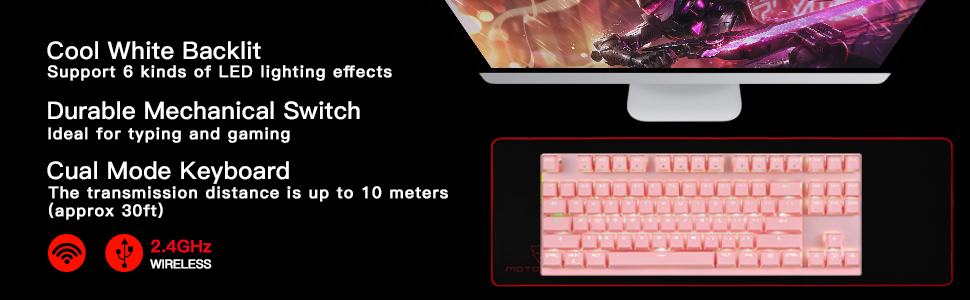
The MOTOSPEED GK82 is engineered for durability and responsiveness, suitable for both gaming and office use. Key features include:
- Dual Connectivity: Seamlessly switch between ultra-fast 2.4G wireless mode (up to 10 meters range) and wired USB mode. The detachable USB cable allows for charging and wired operation.
- Mechanical Blue Switches: Equipped with soft tactile blue mechanical switches, tested for 50 million keystrokes, providing a responsive and durable typing experience.
- 87-Key Compact Layout: A space-saving design without a separate number pad, ideal for smaller desks or portability.
- Anti-Ghosting & N-Key Rollover: All 87 keys feature individual switches with full N-key rollover and anti-ghosting capabilities, ensuring accurate input even during rapid key presses.
- White LED Backlighting: The pink wireless GK82 model features white LED backlighting with support for 6 different lighting effects, enhancing visibility and aesthetics.
- Durable Construction: High-quality aluminum base and ABS double-shot injection molded keycaps ensure longevity and resistance to wear.
- Long-Lasting Battery: Integrated 1300 mAh battery provides extended use in wireless mode (up to 500 hours without backlight).
- Multimedia Functions: 12 combination multimedia shortcut functions for convenient control.
- Wide Compatibility: Works perfectly with Windows Vista/7/8/10, Mac OS X, and IBM systems.
Package Contents
Please ensure all items are present in your package:
- 1 x MOTOSPEED GK82 Wireless/Wired Mechanical Keyboard
- 1 x Micro USB Cable (approx. 1.5M/5FT)
- 1 x USB Receiver (for 2.4G wireless mode)
- 1 x Keycap Puller
- 1 x User Manual (this document)
Setup Instructions
Wired Mode Connection
- Locate the Micro USB port on the keyboard.
- Connect one end of the provided Micro USB cable to the keyboard.
- Connect the other end of the USB cable to an available USB port on your computer.
- The keyboard will automatically be recognized and ready for use.
2.4G Wireless Mode Connection
- Ensure the keyboard is charged or has sufficient battery.
- Locate the USB receiver.
- Simultaneously press the ESC and = keys on the keyboard for 3 seconds to initiate pairing mode. The low-power blue indicator light will remain on.
- Within 10 seconds, insert the USB receiver into an available USB port on your computer.
- Successful pairing is indicated when the blue indicator light on the keyboard turns off. If pairing fails, the keyboard will exit pairing mode after 10 seconds, and the LED will extinguish. Repeat steps 3-5 if necessary.

Operating Instructions
Power On/Off and Mode Switching
The keyboard features a physical ON/OFF switch, typically located on the underside or side of the device. To switch between wired and wireless modes, simply connect or disconnect the USB cable. When the USB cable is connected, the keyboard operates in wired mode and charges simultaneously. When disconnected, it operates in 2.4G wireless mode.
Backlight Control (White LED for Pink Model)
The pink wireless GK82 keyboard features white LED backlighting with 6 different lighting effects. Use the function keys (often in combination with the FN key) to cycle through these effects or adjust brightness. Refer to the keycap legends for specific combinations.
Multimedia Shortcut Functions
The keyboard includes 12 multimedia shortcut functions accessible via the FN key combined with other keys (e.g., F1-F12). These functions typically control media playback, volume, and other system shortcuts. For Apple computers, FN key combinations are limited to player controls, volume adjustment, and mute.
Smart Power Management
In 2.4G wireless mode, if no key is pressed for 1-2 minutes, the keyboard will automatically enter sleep mode to conserve battery. It can be woken up by pressing any key.

Maintenance
Cleaning
To maintain the keyboard's appearance and functionality, regular cleaning is recommended. Use a soft, damp cloth or a wet wipe to gently clean the surface of the keycaps and the keyboard body. For dust and debris between keys, use the provided keycap puller to carefully remove keycaps and clean the switches and base. The keycaps are replaceable, allowing for thorough cleaning or customization.

Troubleshooting
- Keyboard not responding in wireless mode:
1. Ensure the keyboard is powered on. Check the battery level.
2. Verify the USB receiver is securely plugged into your computer.
3. Re-attempt the 2.4G wireless pairing process (ESC + = for 3 seconds, then insert receiver).
4. Try connecting the keyboard in wired mode to confirm basic functionality. - Keys not registering or double-typing:
1. Clean under the affected keycaps using the keycap puller.
2. Ensure the keycaps are properly seated on the switches.
3. If using wireless mode, check for interference or move closer to the receiver.
4. Test in wired mode to rule out wireless connectivity issues. - Backlight not working or inconsistent:
1. Ensure the keyboard is powered on and connected.
2. Adjust backlight settings using FN key combinations (refer to keycap legends).
3. If in wireless mode, low battery might affect backlight performance. Charge the keyboard. - Wireless connection unstable or short range:
1. Ensure the USB receiver is not obstructed and is in line of sight with the keyboard if possible.
2. Avoid placing the receiver near other wireless devices or large metal objects that could cause interference.
3. The stated 10-meter range is for open environments; walls or other obstructions can reduce this.
Specifications
| Brand | MOTOSPEED |
| Model Name | GK82 |
| Model Number | MSGK82-pinkblue |
| Connectivity Technology | Wired, 2.4G Wireless |
| Keyboard Layout | QWERTY, 87 Keys |
| Switch Type | Blue Mechanical Switches |
| Backlighting | White LED (for pink wireless model) |
| Battery Capacity | 1300 mAh |
| Compatible Devices | Laptop, PC |
| Compatible OS | Windows Vista/7/8/10, Mac OS X |
| Material | Acrylonitrile Butadiene Styrene (ABS) |
| Dimensions (L x W x H) | 5.43" x 2.06" x 0.56" |
| Item Weight | 0.8 Kilograms |
Official Product Video
Warranty and Support
For warranty information, technical support, or any product-related inquiries, please refer to the contact details provided on the product packaging or visit the official MOTOSPEED website. Keep your purchase receipt as proof of purchase for warranty claims.


