
SKYVIK CL-FE10
SKYVIK SIGNI One Mobile Camera 10mm Fisheye Lens Kit - User Manual
Model: CL-FE10
1. Introduction
This manual provides comprehensive instructions for the proper use, setup, and maintenance of your SKYVIK SIGNI One 10mm Fisheye Lens Kit. Please read this manual thoroughly before using the product to ensure optimal performance and longevity.
The SKYVIK SIGNI One 10mm Fisheye Lens is designed to enhance mobile photography by providing a 210° angle fisheye effect with controlled distortion and no black corners or vignetting. It is crafted from premium grade Aluminium Alloy and features multi-coated aspherical glass to reduce reflections and light flares.
2. Package Contents
Upon unboxing, please verify that all components listed below are present and in good condition.
- SKYVIK SIGNI One 10mm Fisheye Lens
- Premium Carrying Case
- Cleaning Cloth
- Carrying Pouch
- Universal Clip

Image: All components included in the SKYVIK SIGNI One 10mm Fisheye Lens Kit.
3. Setup and Installation
Follow these steps to properly attach the fisheye lens to your mobile device.
- Remove Protective Caps: Carefully remove the large protective cap from the front of the lens and the small protective cap from the back of the lens.

Image: Illustration of removing the front and back protective caps from the lens.
- Screw Lens onto Clip: Align the threads of the fisheye lens with the universal clip and gently screw the lens onto the clip until it is securely fastened.

Image: The fisheye lens securely screwed onto the universal clip.
- Mount Clip onto Phone: Position the universal clip over your phone's main camera lens. Ensure the fisheye lens is centered over your phone's camera for optimal image quality. The soft rubber on the clip protects your device from scratches.
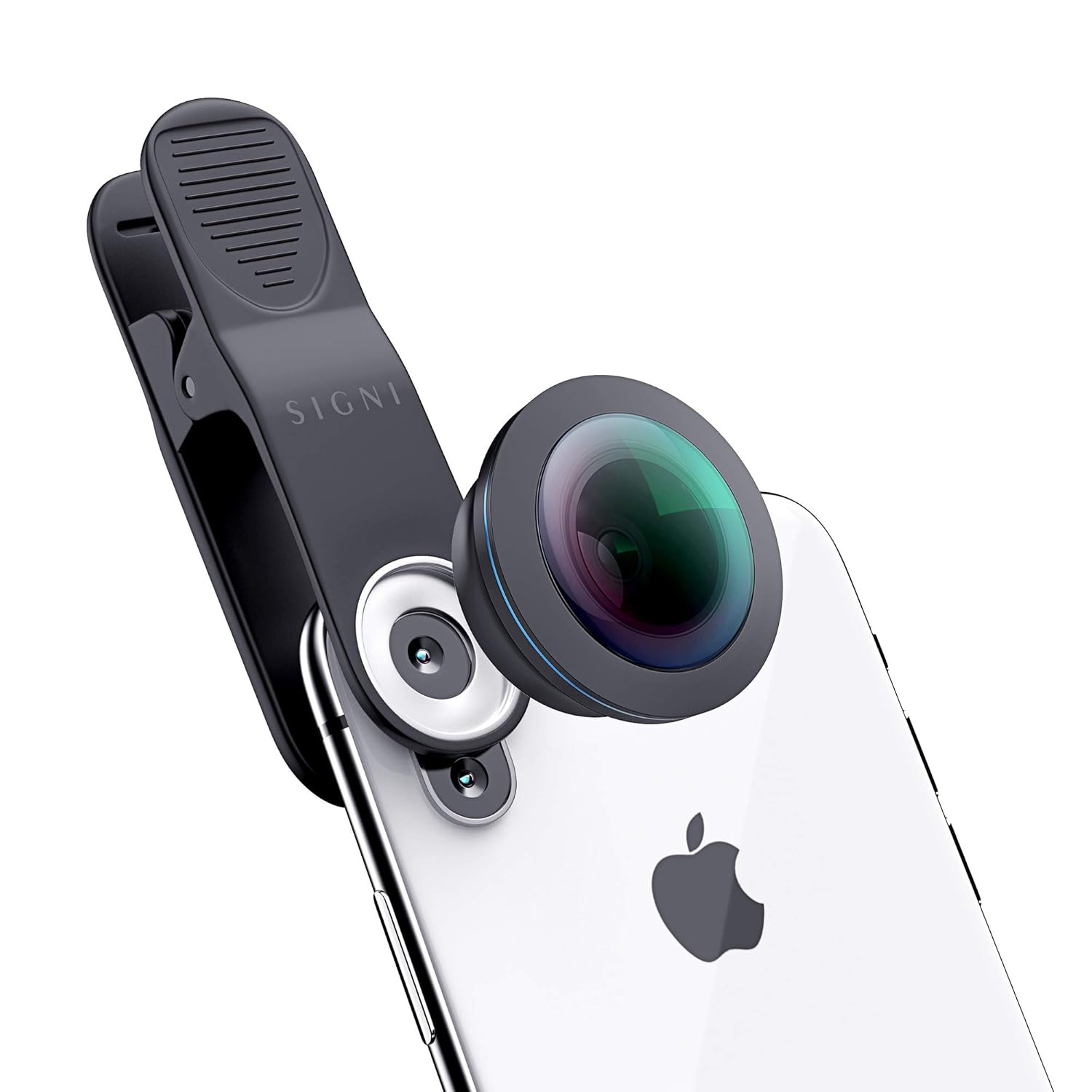
Image: The lens and clip mounted on a smartphone, showing proper alignment.
Compatibility Note: This lens is compatible with most mobile devices. However, it is NOT compatible with the following models: Oneplus 8 Pro, Vivo S1 Pro, Vivo V15 Pro, Vivo V17 Pro, Mi 10i, and Poco X2.
4. Operating Instructions
Once the lens is securely attached, you can begin capturing unique fisheye photos and videos.
- Camera Application: Open your phone's native camera application.
- Framing Your Shot: Look through your phone's screen to compose your shot. The fisheye lens will provide a wide, distorted view, characteristic of fisheye photography.
- Controlled Distortion: The 210° angle offers significant field of view. For a more pronounced fisheye effect, slightly tilt the phone. For a super wide-angle effect with less distortion, keep the phone flat and horizontal.
- Lighting: Ensure adequate lighting for best results. The multi-coated glass helps reduce glare and reflections.

Image: Examples of photos captured using the fisheye lens, showcasing its unique perspective.
5. Care and Maintenance
Proper care will extend the life and maintain the performance of your lens.
- Cleaning the Lens: Use the provided cleaning cloth to gently wipe the lens surfaces. For stubborn smudges, a small amount of lens cleaning solution applied to the cloth can be used. Avoid harsh chemicals or abrasive materials.
- Storage: Always store the lens in its premium carrying case or pouch with both protective caps on when not in use. This protects the lens from dust, scratches, and impacts.
- Handling: Avoid dropping the lens or subjecting it to strong impacts. While durable, the optical elements can be damaged.
- Environmental Conditions: Do not expose the lens to extreme temperatures, high humidity, or direct sunlight for prolonged periods.
6. Troubleshooting
If you encounter issues with your SKYVIK SIGNI One Fisheye Lens, refer to the following common problems and solutions.
| Problem | Possible Cause | Solution |
|---|---|---|
| Black corners/vignetting in photos. | Lens not perfectly centered over phone camera. | Adjust the universal clip to ensure the fisheye lens is precisely aligned with your phone's main camera. |
| Blurry or unclear images. | Dirty lens surface; improper focus; lens not securely attached. | Clean the lens with the provided cloth. Ensure your phone's camera is properly focused. Re-attach the lens to the clip and the clip to the phone securely. |
| Lens does not fit phone. | Incompatible phone model. | Refer to the compatibility list in Section 3. If your phone is listed as incompatible, the lens will not fit correctly. |
| Excessive glare or reflections. | Strong light source directly hitting the lens. | Adjust your shooting angle to avoid direct harsh light. The multi-coated glass minimizes this, but extreme conditions can still cause it. |
7. Product Specifications
| Feature | Detail |
|---|---|
| Model Number | CL-FE10 |
| Lens Type | Fisheye |
| Focal Length | 10 mm |
| Angle of View | 210° |
| Material | Premium Grade Aluminium Alloy, Multi-Coated Aspherical Glass |
| Product Dimensions | 10 x 5 x 5 cm |
| Item Weight | 300 g |
| Manufacturer | SKYVIK TECHNOLOGIES |
8. Warranty Information
The SKYVIK SIGNI One 10mm Fisheye Lens Kit comes with a SKYVIK Worry-free 12 months Warranty from the date of purchase. This warranty covers manufacturing defects and ensures reliable performance of your product. Please retain your proof of purchase for warranty claims.
For detailed warranty terms and conditions, please refer to the official SKYVIK website or contact customer support.
9. Customer Support
If you require assistance, have questions, or need to report an issue, please contact SKYVIK customer support:
- Phone: 18001238830
- Manufacturer: SKYVIK TECHNOLOGIES
Our friendly customer support team is available to assist you.
Related documentsCL-FE10


Ask a question about this manual
Ask about setup, troubleshooting, compatibility, parts, safety, or missing instructions. Manuals+ will review the question and use this page’s manual context to help answer it.