
1. Important Safety Information
Please read this manual thoroughly before operating your new Super General refrigerator-freezer. Retain it for future reference. Following these instructions will ensure safe operation and extend the lifespan of your appliance.
- Electrical Safety: Ensure the appliance is connected to a properly grounded power outlet with the correct voltage (220-240V, 50Hz). Do not use extension cords or adapters. Disconnect power before cleaning or maintenance.
- Ventilation: Maintain adequate space around the appliance for proper air circulation. Refer to installation guidelines for minimum clearances.
- Flammable Materials: Do not store explosive substances or highly flammable materials inside or near the appliance.
- Children Safety: Keep children away from packaging materials. Supervise children to ensure they do not play with the appliance.
- Handling: The appliance is heavy. Use appropriate lifting techniques and assistance during installation to prevent injury.
- Refrigerant: This appliance uses R600a refrigerant, which is flammable. Handle with care and ensure proper ventilation if a leak is suspected.
2. Product Overview
The Super General SGR-710-SBS is a side-by-side refrigerator-freezer designed for efficient food preservation. It features a digital control panel, LED lighting, tempered glass shelves, and a No-Frost system.

Figure 2.1: Front view of the Super General SGR-710-SBS refrigerator-freezer.
Key features include:
- Digital Control Panel: For precise temperature management of both refrigerator and freezer compartments.
- No-Frost Technology: Prevents ice build-up, eliminating the need for manual defrosting.
- Tempered Glass Shelves: Durable and easy to clean, offering flexible storage options.
- LED Lighting: Bright and energy-efficient illumination of the interior.
- Activated Carbon Filter: Helps maintain fresh air inside the refrigerator.
- Twist Ice Maker: Convenient ice production.
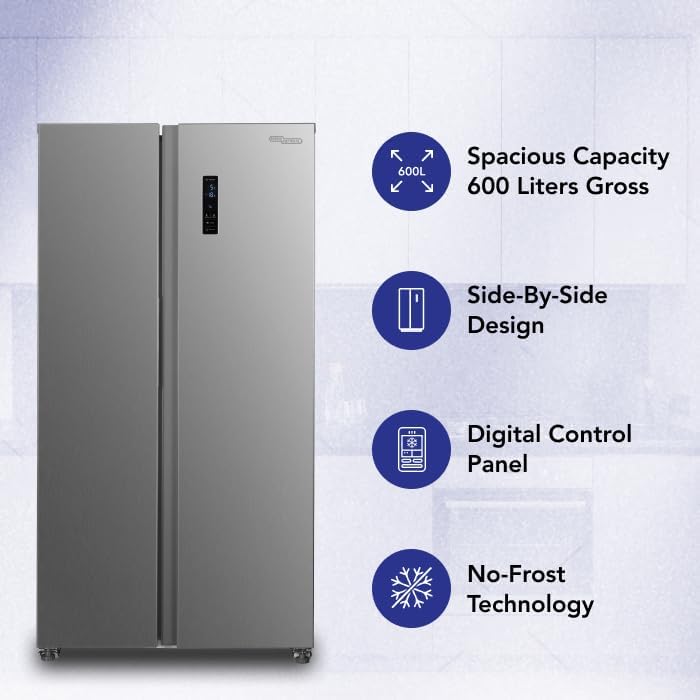
Figure 2.2: Visual representation of key features including tempered glass shelves, twist ice maker, temperature lock, and activated carbon filter.
3. Setup and Installation
3.1 Unpacking
Carefully remove all packaging materials, including foam and adhesive tape. Inspect the appliance for any damage incurred during transit. Keep packaging materials away from children.
3.2 Placement
- Place the refrigerator on a firm, level surface.
- Ensure adequate ventilation. Allow at least 10 cm (4 inches) of space at the back and sides, and 30 cm (12 inches) at the top for proper heat dissipation.
- Avoid direct sunlight or proximity to heat sources (e.g., ovens, radiators).
- The appliance dimensions are approximately 90.5 cm (width) x 59.5 cm (depth) x 177 cm (height).

Figure 3.1: Product dimensions for installation planning.
3.3 Leveling
Adjust the leveling feet at the bottom of the appliance to ensure it is stable and level. This prevents vibrations and ensures proper door sealing.
3.4 Electrical Connection
Plug the appliance into a dedicated, grounded 220-240V, 50Hz power outlet. Wait at least 2-4 hours before turning on the appliance to allow refrigerants to settle.
3.5 Initial Cleaning
Before first use, clean the interior and exterior of the refrigerator-freezer with a soft cloth and a mild detergent solution. Wipe dry thoroughly.
4. Operating Instructions
4.1 Digital Control Panel
The digital control panel, located on the freezer door, allows you to set and monitor the temperatures for both the refrigerator and freezer compartments. Refer to the display for current temperature readings.
- Temperature Adjustment: Use the dedicated buttons on the control panel to increase or decrease the desired temperature for each compartment.
- Temperature Lock: The control panel includes a temperature lock feature to prevent accidental changes to settings. Consult the panel for activation and deactivation.
4.2 Internal Organization
The appliance is equipped with various storage solutions to optimize space and food preservation.

Figure 4.1: Interior layout with adjustable shelves and storage compartments.
- Tempered Glass Shelves: These shelves are adjustable in 5 levels within the refrigerator compartment and 4 levels within the freezer compartment, allowing customization for items of different heights.
- Fresh-Boxes: Dedicated drawers for fruits and vegetables help maintain optimal humidity levels.
- Door Compartments: Multiple bins on both doors provide storage for bottles, jars, and smaller items.
- Twist Ice Maker: Located in the freezer, this allows for easy ice cube production. Fill the tray with water, allow it to freeze, then twist the knob to release ice into the collection bin.

Figure 4.2: Example of organized interior storage.

Figure 4.3: Bright LED lighting illuminates the interior for clear visibility.
5. Maintenance and Care
5.1 Cleaning the Interior
Regularly clean the interior with a mild, non-abrasive detergent and warm water. Remove shelves and drawers for thorough cleaning. Ensure all surfaces are dry before returning items.
5.2 Cleaning the Exterior
Wipe the exterior surfaces with a soft, damp cloth. For stainless steel finishes, use a specialized stainless steel cleaner. Avoid abrasive cleaners or solvents.
5.3 Door Seals
Inspect and clean door seals regularly to ensure they are free from food particles and remain flexible. A clean, tight seal is crucial for energy efficiency.
5.4 Activated Carbon Filter
The activated carbon filter helps neutralize odors. Check the filter periodically and replace it according to manufacturer recommendations (typically every 6-12 months) to maintain optimal performance.
5.5 Power Outage
In case of a power outage, keep the refrigerator and freezer doors closed to maintain internal temperatures for as long as possible. Avoid opening the doors unnecessarily.
6. Troubleshooting
Before contacting service, review the following common issues and their potential solutions:
| Problem | Possible Cause | Solution |
|---|---|---|
| Appliance does not operate | No power supply; power cord not plugged in; circuit breaker tripped. | Check power connection; reset circuit breaker. |
| Temperature is not cold enough | Door not closed properly; excessive door openings; warm food placed inside; temperature setting too high. | Ensure doors are sealed; reduce frequency of door openings; allow hot food to cool before storing; adjust temperature setting lower. |
| Unusual noises | Appliance not level; items vibrating inside; normal compressor operation. | Adjust leveling feet; rearrange items; some operational noises are normal. |
| Water on floor | Drain tube blocked; excessive humidity. | Clear drain tube (refer to service manual if needed); ensure proper ventilation. |
If the problem persists after attempting these solutions, please contact Super General customer support.
7. Specifications
Detailed technical specifications for the Super General SGR-710-SBS refrigerator-freezer:
| Feature | Specification |
|---|---|
| Model | SGR-710-SBS |
| Type | Side-By-Side Refrigerator-Freezer |
| Gross Capacity | 600 Liters |
| Total Net Capacity | 429 Liters |
| Refrigerator Fresh Food Capacity | 291 Liters |
| Freezer Capacity | 138 Liters |
| Dimensions (W x D x H) | 90.5 x 59.5 x 177 cm |
| Net Weight | 83 kg |
| Color | Silver (Inox Matte Finish) |
| Voltage | 220-240V |
| Frequency | 50Hz |
| Wattage | 170 watts |
| Annual Energy Consumption | 832 KWh/Year (ESMA 2-Star Rating) |
| Refrigerant | R600a |
| Defrost System | Automatic (No-Frost) |
| Climate Class | T (Tropical) |
| Shelf Type | Tempered Glass |
| Special Features | Digital Temperature Control, LED Lighting, Twist Ice Maker, Activated Carbon Filter, Temperature Lock |
8. Warranty and Customer Support
Your Super General SGR-710-SBS refrigerator-freezer comes with a 5 Year Compressor Warranty. Please retain your proof of purchase for warranty claims.
For technical assistance, service requests, or warranty inquiries, please contact Super General customer support. Refer to the contact information provided with your purchase documentation or visit the official Super General website.
When contacting support, please have your model number (SGR-710-SBS) and serial number ready.

