
Introduction
This manual provides detailed instructions for the installation, operation, and maintenance of your XTRONS IN79A4AP Android 9.0 Car Stereo. This unit is designed to enhance your in-car entertainment and navigation experience with its advanced features, including a 7-inch touch screen, GPS navigation, Bluetooth 5.0, and Wi-Fi connectivity.
Please read this manual thoroughly before installation and use to ensure proper operation and to prevent damage.
Compatibility and Dimensions
The XTRONS IN79A4AP is compatible with the following vehicle models and years:
- For Audi A4 B6 (8E / 8H): 2000-2006
- For Audi A4 B7 (8E / 8H): 2004-2008
- For Audi S4 B7 (8E / 8H): 2005-2008
- For Audi S4 B6 (8E / 8H): 2003-2005
- For Audi RS4: 2002-2008
- For Audi RS4 B7 (8E): 2006-2008
- For SEAT Exeo: 2008-2012
Before installation, verify the face panel dimensions of your vehicle's console to ensure a proper fit. The unit's face panel measures (Top: 235mm * Bottom: 226mm) * 130mm.

Figure 1: Compatible vehicle models and face panel dimensions for the XTRONS IN79A4AP car stereo.
Setup and Installation
The XTRONS IN79A4AP features a professional plug-and-play design for simplified installation. No cutting or modification of existing wiring is typically required, as customized connectors are provided for your vehicle.
Included Accessories
Verify that all the following accessories are included in your package:
- 1 x ISO Wiring Harness
- 1 x RCA Cables
- 1 x GPS Antenna
- 1 x Microphone
- 3 x USB Cables
- 4 x Fitting Keys
- 1 x User Manual (this document)
- 1 x Wi-Fi Antenna
- 1 x Gift Box (packaging)
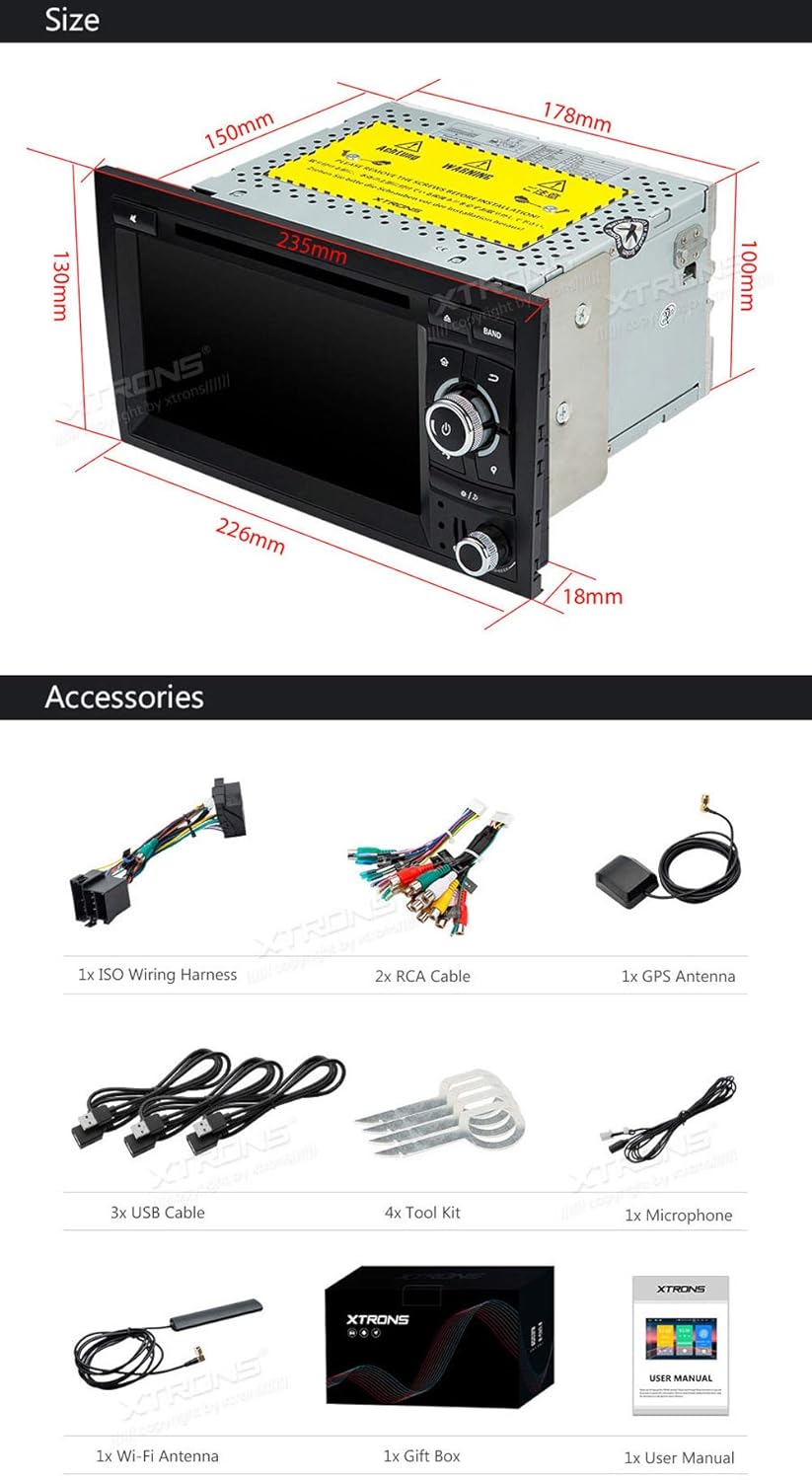
Figure 2: Contents of the XTRONS IN79A4AP package.
Installation Steps (General)
- Preparation: Ensure the vehicle's ignition is off and the battery is disconnected before starting installation.
- Remove Existing Unit: Carefully remove your vehicle's factory stereo unit using appropriate tools.
- Connect Wiring Harness: Connect the provided ISO Wiring Harness to your vehicle's factory wiring harness. The plug-and-play design ensures a secure and correct connection.
- Connect Antennas: Connect the GPS antenna and Wi-Fi antenna to their respective ports on the XTRONS unit. Position the GPS antenna in a location with a clear view of the sky for optimal signal reception.
- Connect USB and RCA Cables: Connect any necessary USB cables for external devices or RCA cables for audio/video output/input.
- Install Microphone: Connect and position the external microphone for hands-free calling.
- Mount the Unit: Securely mount the XTRONS unit into the dashboard opening using the provided fitting keys or your vehicle's mounting brackets.
- Reconnect Battery: Reconnect the vehicle's battery and turn on the ignition to test the unit.
- Initial Setup: Follow the on-screen prompts for initial system setup, including language, time, and network configuration.

Figure 3: XTRONS Plug-and-Play design for simplified installation.
Operating Instructions
The XTRONS IN79A4AP runs on Android 9.0, offering a user-friendly interface and access to various applications.
Basic Functions
- Touch Screen: Navigate the system using the responsive 7-inch multi-touch display.
- Power On/Off: The unit typically powers on with the vehicle's ignition. A power button is usually available for manual control.
- Volume Control: Adjust audio volume using the physical knobs or on-screen controls.
- Home Screen: Access various applications and settings from the customizable home screen.
Connectivity
- Bluetooth 5.0: Pair your smartphone or other Bluetooth devices for hands-free calling and audio streaming. Access your phone's contacts and call history directly from the unit.
- Wi-Fi: Connect to a Wi-Fi hotspot (e.g., from your smartphone) to access online features, download apps, and use online navigation.
- USB Port & SD Slot: Play media files from USB drives or SD cards.

Figure 4: Bluetooth Internet Sharing and online media access.
Navigation
The unit supports various Android GPS navigation applications. You can download and use both offline and online map services such as Google Maps, Sygic, or Waze.
Advanced Features
- Screen Mirroring: Mirror the screen of your Android or iOS smartphone onto the head unit's display. (Compatibility may vary with some phone models).
- Split-Screen Mode: Run two applications simultaneously on the screen, such as navigation and a media player.
- Dual Channel CANbus: Integrated CANbus system for seamless communication with your vehicle's electronics, supporting features like steering wheel controls and displaying vehicle information.
- Vibrant Button Color Schemes: Customize the color of the unit's physical buttons to match your vehicle's interior lighting.

Figure 5: Split-Screen Mode in operation.

Figure 6: Overview of key features.
Optional Accessories
The XTRONS IN79A4AP supports various optional accessories to expand its functionality. These accessories are sold separately.
- DAB+ Tuner: For enhanced digital audio broadcasting reception.
- 3G/4G Dongle: For mobile internet connectivity.
- OBD2 Adapter: To access vehicle diagnostic information.
- DVR Camera: For recording driving footage.
- Front/Reversing Camera: For parking assistance and improved visibility.
- External Keyboard: For easier text input.
- TPMS (Tire Pressure Monitoring System): To monitor tire pressure and temperature.
- CarAutoPlay Dongle: For Apple CarPlay and Android Auto integration.

Figure 7: Optional accessories for the XTRONS IN79A4AP.
Maintenance
To ensure the longevity and optimal performance of your XTRONS IN79A4AP car stereo, follow these maintenance guidelines:
- Screen Cleaning: Use a soft, lint-free cloth slightly dampened with water or a screen-cleaning solution. Avoid harsh chemicals or abrasive materials that can damage the touch screen.
- Dust Removal: Regularly wipe down the unit's exterior to prevent dust buildup, especially around buttons and vents.
- Software Updates: Periodically check for and install available software updates to ensure system stability and access to new features.
- Avoid Extreme Temperatures: Do not expose the unit to extreme heat or cold for extended periods, as this can affect its electronic components.
- Cable Connections: Ensure all cables are securely connected. Loose connections can lead to intermittent issues.
Troubleshooting
If you encounter issues with your XTRONS IN79A4AP, refer to the following common troubleshooting steps:
| Problem | Possible Cause | Solution |
|---|---|---|
| Unit does not power on. | Loose power connection, blown fuse, vehicle battery issue. | Check power wiring harness connections. Inspect vehicle fuses. Ensure vehicle battery is charged. |
| No sound. | Volume too low, incorrect audio source, loose speaker wires. | Increase volume. Select correct audio source. Check speaker wire connections. |
| GPS signal lost or inaccurate. | GPS antenna obstructed or improperly placed, outdated maps. | Ensure GPS antenna has a clear view of the sky. Update navigation maps. |
| Bluetooth connection issues. | Device not in pairing mode, interference, unit's Bluetooth off. | Ensure both devices are in pairing mode. Restart Bluetooth on both devices. Check for interference. |
| System slow or unresponsive. | Too many apps running, low storage, software glitch. | Close unnecessary applications. Clear cache. Perform a system restart. Check for software updates. |
| SD card or USB not recognized. | Incompatible format, damaged card/drive, improper insertion. | Ensure media is formatted correctly (e.g., FAT32). Reinsert the card/drive. Try a different card/drive. |
If the problem persists after attempting these solutions, please contact XTRONS customer support.
Specifications
| Feature | Detail |
|---|---|
| Model Number | IN79A4AP |
| Operating System | Android 9.0 |
| Processor | Cortex-A35 Quad Core |
| RAM | 2GB |
| ROM (Internal Storage) | 16GB |
| Screen Size | 7 Inches |
| Display Type | Digital Multi-Touch Display |
| Bluetooth Version | 5.0 |
| Connectivity | Bluetooth, RCA, USB, Wi-Fi |
| Media Type Support | SD, USB |
| Video Format Support | 1080P |
| Item Weight | 16 Grams (unit only, without accessories) |

Figure 8: Core features and specifications overview.
Figure 9: Physical dimensions of the XTRONS IN79A4AP unit.
Warranty and Support
XTRONS provides a 1-year warranty for the IN79A4AP car stereo unit. This warranty covers manufacturing defects and ensures reliable operation under normal use.
For technical support, warranty claims, or further assistance, please contact XTRONS customer service through their official website or the retailer where the product was purchased. Please have your model number (IN79A4AP) and purchase details ready when contacting support.


