
1. Introduction
Thank you for choosing the Fazley FSP-200-BK Digital Piano. This manual provides essential information for the safe and efficient use of your instrument. Please read it thoroughly before operating the piano and retain it for future reference.
The Fazley FSP-200-BK is an 88-key digital piano designed for musicians seeking a realistic playing experience with versatile sound options. It features semi-weighted, velocity-sensitive keys, 12 distinct voices, and 32-note polyphony, making it suitable for practice, performance, and creative exploration.
2. Safety Information
- Power Supply: Use only the specified power adapter. Ensure the voltage matches your local power supply.
- Water and Moisture: Do not expose the instrument to water or excessive moisture. Avoid placing liquids on or near the piano.
- Ventilation: Do not block ventilation openings. Ensure adequate airflow around the instrument to prevent overheating.
- Placement: Place the piano on a stable, level surface. Avoid direct sunlight, heat sources, and excessive dust.
- Cleaning: Disconnect the power before cleaning. Use a soft, dry cloth. Do not use liquid cleaners or solvents.
- Servicing: Do not attempt to service the instrument yourself. Refer all servicing to qualified personnel.
3. Package Contents
Please check that all items are present in the package:
- Fazley FSP-200-BK Digital Piano
- Music Rest
- Power Adapter
- Sustain Pedal (if included with your specific package)
- User Manual (this document)
4. Setup
4.1 Physical Setup
Carefully remove the digital piano from its packaging. Place it on a sturdy and level surface, such as a keyboard stand or desk. Attach the included music rest into the designated slot on the top panel of the piano.

Image 1: Front view of the Fazley FSP-200-BK Digital Piano with the music rest installed.
4.2 Power Connection
Locate the DC IN port on the rear panel of the piano. Connect the power adapter to this port, then plug the adapter into a standard electrical outlet. Ensure the connection is secure.

Image 2: Rear view of the Fazley FSP-200-BK Digital Piano, illustrating the location of the DC IN and other connection ports.
4.3 Pedal Connection (Optional)
If your package includes a sustain pedal, connect it to the appropriate pedal input jack on the rear panel of the piano.
5. Operating Instructions
5.1 Power On/Off
To power on the piano, press the POWER button located on the left side of the control panel. The indicator light will illuminate. To power off, press the POWER button again.

Image 3: Close-up of the power button and volume knob on the control panel.
5.2 Volume Control
Adjust the overall output volume using the VOLUME knob. Turn it clockwise to increase volume and counter-clockwise to decrease it.
5.3 Voice Selection
The FSP-200-BK offers 12 different voices. To select a voice, press the corresponding button under the "VOICE SELECTION" section on the control panel. Available voices include:
- GRAND PIANO
- UPRIGHT PIANO
- E.PIANO 1
- E.PIANO 2
- VIBRAPHONE
- ROCK ORGAN
- HARPSICHORD
- CHURCH ORGAN
- STRINGS
- CHOIR
- GUITAR
- BASS
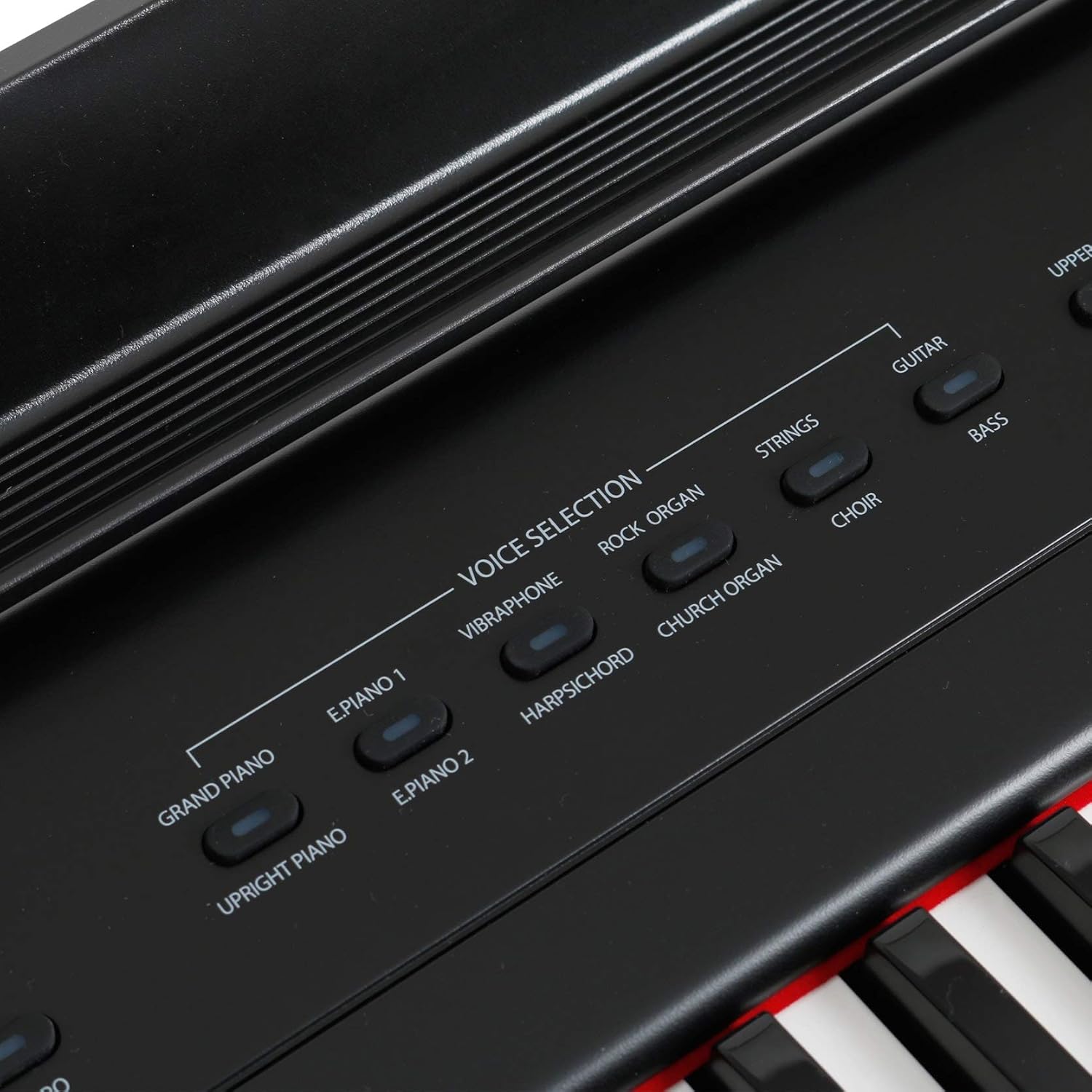
Image 4: Close-up view of the voice selection buttons on the control panel.
5.4 Effects (Reverb, Chorus)
The piano includes built-in Reverb and Chorus effects to enhance the sound. Press the REVERB or CHORUS buttons to activate or deactivate these effects. The corresponding indicator light will show their status.
5.5 Metronome
To assist with timing and practice, the FSP-200-BK features a metronome. Press the METRONOME button to start or stop the metronome. Use the TEMPO button (often combined with a function key) to adjust the metronome's speed.

Image 5: Control panel section displaying the Reverb, Chorus, Metronome, and Tempo buttons.
5.6 Demo Songs
The piano includes demonstration songs to showcase its various voices and features. Press the DEMO button to start playback of the demo songs. Press it again to stop.
5.7 Headphone Use
For private practice, connect standard stereo headphones to the PHONES jack on the rear panel. This will mute the internal speakers.
6. Maintenance
- Cleaning: Wipe the surface of the piano with a soft, dry, lint-free cloth. For stubborn dirt, slightly dampen the cloth with water, then wipe dry immediately. Avoid abrasive cleaners, waxes, or solvents.
- Storage: When not in use for extended periods, disconnect the power adapter. Store the piano in a cool, dry place, away from extreme temperatures and humidity.
- Key Care: Keep the keys clean. Avoid pressing them with excessive force or striking them with sharp objects.
7. Troubleshooting
| Problem | Possible Cause | Solution |
|---|---|---|
| No sound | Power not connected; Volume too low; Headphones connected. | Ensure power adapter is securely connected and power is on. Increase volume. Disconnect headphones if using internal speakers. |
| Distorted sound | Volume too high; Faulty connection. | Reduce volume. Check all cable connections. |
| Keys not responding | Instrument not powered on; Internal malfunction. | Ensure power is on. If problem persists, contact customer support. |
| Metronome not working | Metronome not activated. | Press the METRONOME button to activate. |
8. Specifications
| Feature | Description |
|---|---|
| Model | FSP-200-BK |
| Keys | 88 semi-weighted, velocity-sensitive keys |
| Voices | 12 (including Grand Piano, Electric Piano, Organ, Strings) |
| Polyphony | 32 notes |
| Effects | Reverb, Chorus |
| Functions | Metronome, Demo Songs |
| Connections | DC IN, Pedal Input, Headphone Output |
| Color | Black |
| Weight | Approximately 10 Kilograms |
| Skill Level | Professional |
| Special Feature | Lightweight design |
9. Warranty and Support
Fazley products are designed for reliability and performance. For information regarding warranty coverage, please refer to the warranty card included with your purchase or visit the official Fazley website. For technical support, troubleshooting assistance, or spare parts, please contact your authorized Fazley dealer or customer service representative.

