
Introduction
This manual provides detailed instructions for the safe and efficient operation of your Lazmin Portable FM Radio Speaker, Model TD-V26. Please read this manual thoroughly before using the device and retain it for future reference.
The Lazmin TD-V26 is a compact and versatile audio device featuring FM radio, MP3/MP4 music playback from TF cards and USB disks, and a built-in rechargeable battery. Its portable design makes it suitable for various indoor and outdoor environments.
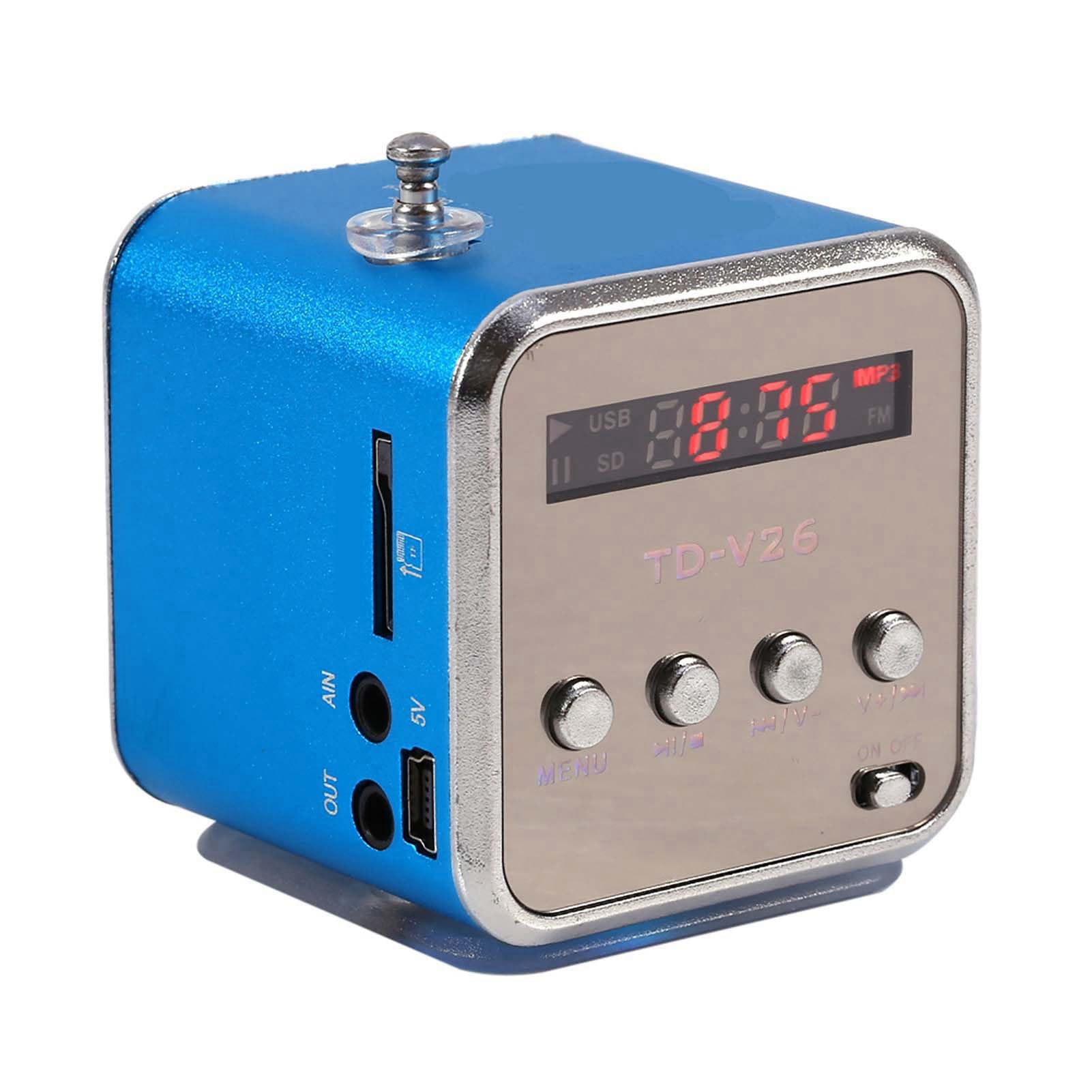
Figure 1: Front view of the Lazmin Portable FM Radio Speaker TD-V26 with antenna extended.
Package Contents
Verify that all items are present in the package:
- Lazmin Portable FM Radio Speaker (TD-V26)
- USB Charging Cable
- User Manual (this document)

Figure 2: The Lazmin TD-V26 speaker shown with its USB charging cable.
Product Overview
Familiarize yourself with the various parts and controls of your speaker.
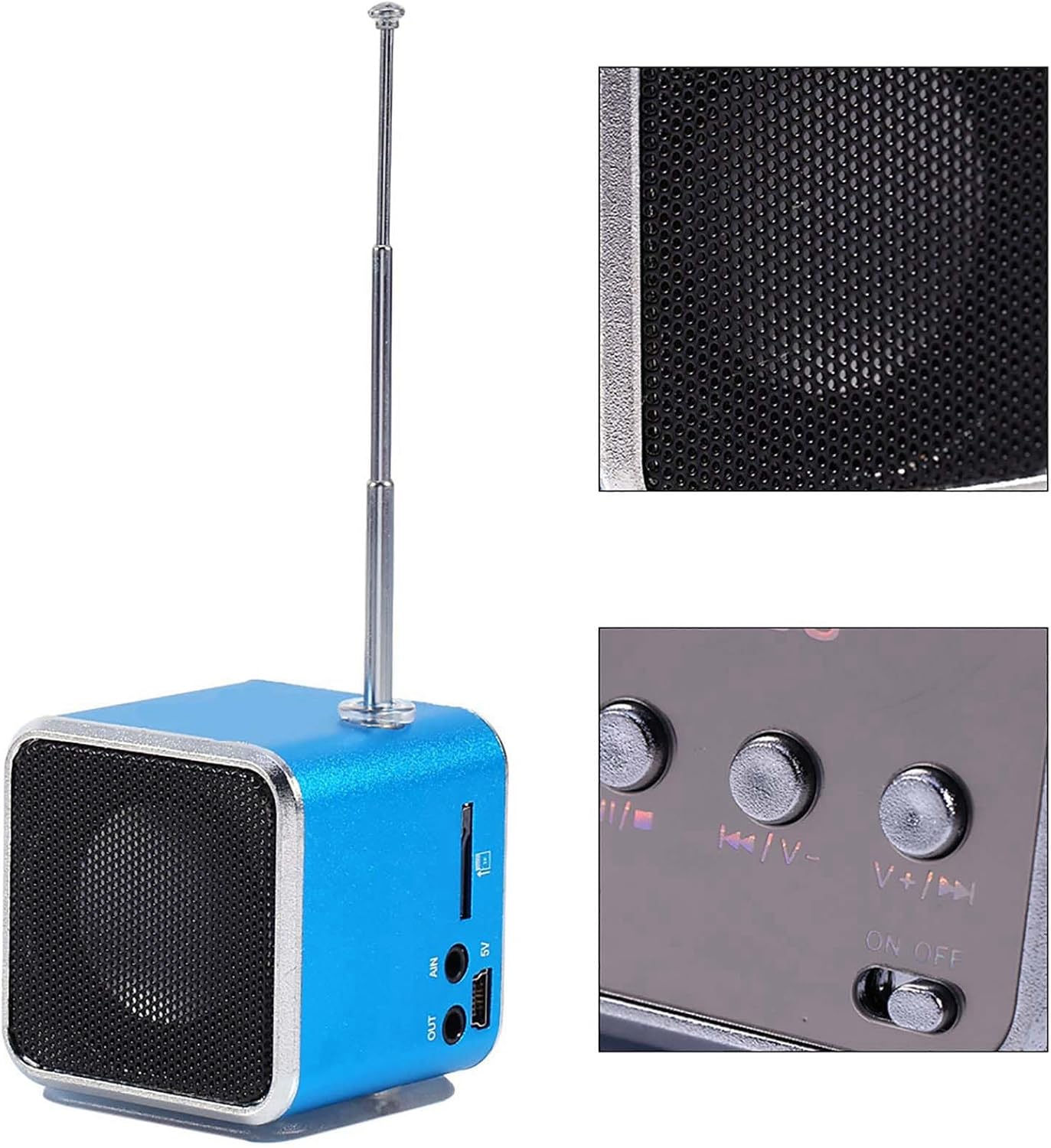
Figure 3: Detailed view of the speaker's control panel and connectivity ports.
Controls and Ports:
- Antenna: Extend for improved FM radio reception.
- Display Screen: Shows current mode, track number, and FM frequency.
- MODE Button: Switches between FM Radio, TF Card, and USB Disk playback modes.
- Play/Pause Button (►/∖∖): Plays or pauses audio playback. In FM mode, short press to auto-scan and save stations.
- Previous Track/Volume Down (◀◀/V-): Short press for previous track/station. Long press to decrease volume.
- Next Track/Volume Up (V+/►►): Short press for next track/station. Long press to increase volume.
- ON/OFF Switch: Powers the device on or off.
- TF Card Slot: Insert a TF (MicroSD) card for MP3/MP4 playback.
- USB Disk Slot: Insert a USB flash drive for MP3/MP4 playback.
- 5V DC Input: Micro USB port for charging the internal battery.
- OUT (Headphone Jack): 3.5mm audio output for headphones.

Figure 4: Note that slight variations in model appearance may exist. Functionality remains consistent.
Setup
1. Charging the Battery
- Locate the 5V DC input (Micro USB port) on the side of the speaker.
- Connect the provided USB charging cable to the speaker's 5V DC input.
- Connect the other end of the USB cable to a USB power adapter (not included) or a computer's USB port.
- The charging indicator light (if present) will illuminate during charging and turn off when fully charged.
- A full charge typically takes 2-3 hours. The speaker provides 2-5 hours of playback depending on volume level.
2. Inserting Storage Media (TF Card / USB Disk)
- Ensure the speaker is powered off.
- For TF Card: Gently insert a TF (MicroSD) memory card (FAT16/FAT32 format) into the TF Card slot until it clicks into place.
- For USB Disk: Insert a USB flash drive (FAT16/FAT32 format) into the USB Disk slot.
- The speaker will automatically detect the media when powered on and switch to the appropriate playback mode.
Operating Instructions
1. Power On/Off
- To power on, slide the ON/OFF switch to the "ON" position. The display will light up.
- To power off, slide the ON/OFF switch to the "OFF" position.
2. Mode Selection
- Press the MODE button repeatedly to cycle through available modes: FM Radio, TF Card Playback, USB Disk Playback.
- The display will indicate the current mode.
3. FM Radio Operation
- Extend the antenna fully for optimal reception.
- Switch to FM Radio mode using the MODE button.
- Auto-Scan and Save Stations: Press the Play/Pause (►/∖∖) button once. The speaker will automatically scan for available FM stations and save them. This process may take a few minutes.
- Manual Station Selection: After auto-scanning, use the Previous Track/Volume Down (◀◀/V-) and Next Track/Volume Up (V+/►►) buttons to navigate through the saved stations.
4. MP3/MP4 Playback (TF Card / USB Disk)
- Insert a TF card or USB disk containing MP3/MP4 audio files.
- Switch to TF Card or USB Disk mode using the MODE button. The speaker will automatically begin playing the first track.
- Play/Pause: Press the Play/Pause (►/∖∖) button to pause or resume playback.
- Previous/Next Track: Short press the Previous Track/Volume Down (◀◀/V-) or Next Track/Volume Up (V+/►►) buttons to skip to the previous or next track.
5. Volume Control
- To decrease volume, long press the Previous Track/Volume Down (◀◀/V-) button.
- To increase volume, long press the Next Track/Volume Up (V+/►►) button.
6. Headphone Output
- Connect standard 3.5mm headphones to the "OUT" port for private listening. The speaker's internal speaker will mute automatically.
Maintenance
1. Cleaning
- Wipe the speaker's exterior with a soft, dry cloth.
- Do not use abrasive cleaners, solvents, or strong chemicals, as these may damage the finish.
- Avoid getting moisture into the ports or speaker grille.
2. Battery Care
- To prolong battery life, avoid fully discharging the battery frequently.
- If storing the device for an extended period, charge it to approximately 50% every few months.
- Do not expose the battery to extreme temperatures.
3. Storage
- Store the speaker in a cool, dry place away from direct sunlight and excessive dust.
Troubleshooting
If you encounter issues with your speaker, refer to the following common problems and solutions:
| Problem | Possible Cause | Solution |
|---|---|---|
| No power / Device does not turn on. | Battery is discharged. | Charge the battery using the provided USB cable. |
| No sound. | Volume is too low or muted. Incorrect mode selected. Headphones connected. | Increase volume. Ensure correct mode (FM, TF, USB) is selected. Disconnect headphones if using the internal speaker. |
| Poor FM radio reception / Static. | Antenna not extended. Weak signal. Interference. | Extend the antenna fully. Try repositioning the speaker. Perform an auto-scan for stations again. |
| TF card / USB disk not recognized. | Incorrect file system (not FAT16/FAT32). Media not inserted correctly. Corrupted files. | Ensure media is formatted to FAT16 or FAT32. Reinsert the media. Try a different TF card or USB disk. |
| Buttons unresponsive. | Temporary software glitch. | Power off the device, then power it back on. |
Specifications
Technical specifications for the Lazmin Portable FM Radio Speaker TD-V26:
- Model Number: TD-V26 (ASIN Model: 4c2u3rfhki-03)
- Music Format Support: MP3, MP4 (common rates)
- Headphone Jack: 3.5mm output
- Power Input: DC 5V (USB charging)
- Battery: Built-in 600mAh Lithium battery
- Playback Time: 2-5 hours (actual time varies with volume)
- Frequency Response: 150 - 18000Hz (±3dB)
- Storage Media: TF memory card (FAT16 / FAT32), USB Disk
- Signal-to-Noise Ratio (SNR): >85dB
- Output Power: RMS 3W x 2 (THD = 10%)
- Dimensions: Approximately 5 x 5 x 5.2 cm (1.97"L x 1.97"W x 2.05"H)
- Item Weight: Approximately 4.6 ounces
- Tuner Technology: FM
- Connectivity: USB
Warranty and Support
This product is manufactured by Lazmin. For any questions, technical support, or warranty inquiries, please refer to the retailer where the product was purchased or contact Lazmin customer service through their official channels.
Please retain your proof of purchase for warranty claims.