
1. Introduction
This manual provides essential information for the safe and effective use of your Superer Laptop Charger, Model ADP195231D. This power adapter is designed to provide reliable power to compatible HP 15-bs series laptops. Please read this manual thoroughly before use and retain it for future reference.

Image 1.1: The Superer laptop charger, consisting of the main adapter unit and the detachable power cord, ready for connection.
2. Safety Information
Your safety is paramount. This Superer laptop charger is designed and manufactured to meet nationally recognized standards for high-level electronic safety. Adhere to the following guidelines to prevent injury or damage:
- Ensure the charger is connected to a properly grounded power outlet.
- Do not expose the charger to water, moisture, or extreme temperatures.
- Avoid using the charger if the cord or adapter unit is damaged.
- Do not attempt to disassemble or modify the charger.
- Keep the charger away from children and pets.
- Unplug the charger during lightning storms or when unused for extended periods.

Image 2.1: Certification marks indicating the product meets UL, FCC, and CE safety standards for electronic devices.

Image 2.2: Visual representation of the charger's built-in protections against overheating, overvoltage, and electrostatic discharge.
3. Package Contents
Verify that all items are present in the package:
- 1 x Superer Power Adapter (Model ADP195231D)
- 1 x Power Cord
4. Compatibility
This charger is specifically designed for HP 15-bs series laptops that require a 19.5V, 2.31A (45W) power supply with a 4.5mm x 3.0mm connector. It is compatible with the following HP models:
- HP 15-bs0xx series
- HP 15-bs015dx, 15-bs013dx, 15-bs113dx, 15-bs115dx
- HP 15-bs2xx series
- HP 15-bs234wm, 15-bs212wm, 15-bs020wm, 15-bs244wm, 15-bs080wm, 15-bs144wm, 15-bs134wm, 15-bs289wm
Important: Do not use this charger if your laptop requires more than 2.31A or a different connector size. Using an incompatible charger can damage your laptop.

Image 4.1: Visual guide to identify the correct 4.5mm x 3.0mm charging port (blue tip) for compatibility.
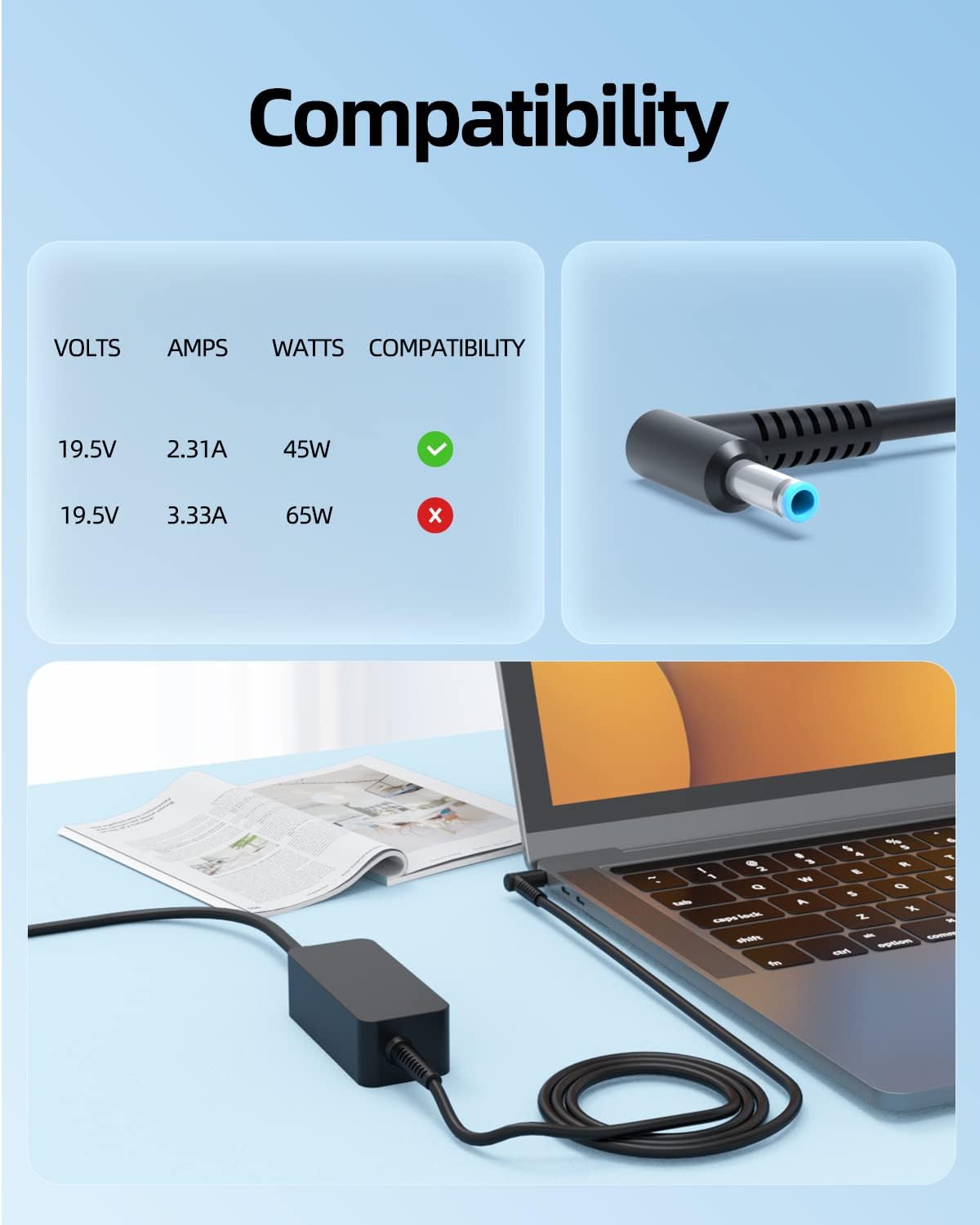
Image 4.2: A table illustrating the correct voltage, amperage, and wattage (19.5V, 2.31A, 45W) required for compatibility.
5. Setup
- Connect the Power Cord: Insert the C5 (cloverleaf) end of the power cord firmly into the corresponding port on the Superer power adapter unit.
- Connect to Power Outlet: Plug the two-prong end of the power cord into a standard wall outlet (100-240V AC).
- Connect to Laptop: Insert the blue-tipped barrel connector (4.5mm x 3.0mm) of the adapter cable into the charging port on your HP laptop. Ensure a snug fit.
6. Operating Instructions
Once connected, the charger will automatically begin supplying power to your laptop and charging its battery. The charging indicator light on your laptop (if present) should illuminate.
- The charger provides a consistent and stable power supply for your laptop's operation and battery charging.
- You can use your laptop while it is connected to the charger.
- To disconnect, first remove the connector from the laptop, then unplug the power cord from the wall outlet.

Image 6.1: A laptop actively charging with the Superer power adapter connected to a wall outlet, demonstrating consistent power delivery.
7. Maintenance
Proper care will extend the life of your charger:
- Keep the charger clean and free from dust. Use a dry, soft cloth for cleaning.
- Avoid tightly wrapping the cables, especially around the connector ends, to prevent strain and damage.
- Store the charger in a cool, dry place when not in use.
- Do not place heavy objects on the cables.
8. Troubleshooting
| Problem | Possible Cause | Solution |
|---|---|---|
| Laptop not charging | Loose connection, incompatible charger, faulty outlet, laptop issue. |
|
| Charger gets hot | Normal operation under load, poor ventilation, excessive load. |
|
| Intermittent charging | Loose connection, damaged cable/connector. |
|
9. Specifications
| Feature | Detail |
|---|---|
| Model Number | ADP195231D |
| Input Voltage | 100-240V AC |
| Output Voltage | 19.5V |
| Output Amperage | 2.31A |
| Output Wattage | 45W |
| Connector Type | Round Connector (4.5mm x 3.0mm, blue tip) |
| Special Feature | UL Safety Certified |
| Item Weight | 0.01 ounces |
| Package Dimensions | 5.35 x 4.61 x 1.81 inches |
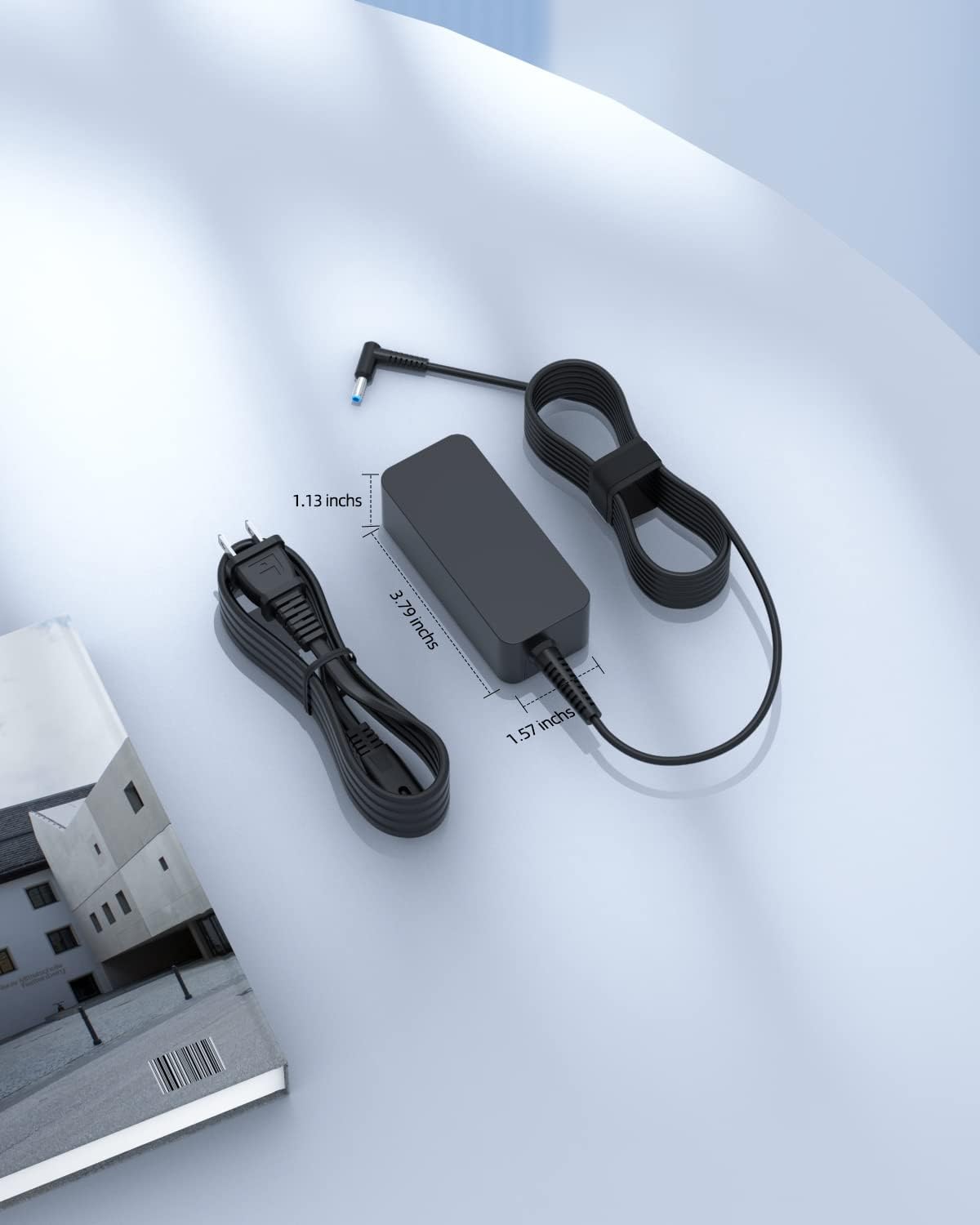
Image 9.1: Physical dimensions of the power adapter unit and the length of the attached cable.
10. Warranty and Support
Superer stands by the quality of its products. This charger is eligible for:
- 30-Day Replacement or Return: If you are not satisfied, you may return or replace the product within 30 days of purchase.
- 12-Month Guarantee: The manufacturer provides an additional 12-month guarantee for defects in materials and workmanship.
For warranty claims, technical assistance, or any product-related inquiries, please contact Superer customer support through the retailer where the product was purchased or visit the official Superer website.

Image 10.1: Overview of the customer support policies, including a 12-month replacement service and a 30-day refund period.