
1. Introduction
The BOYA BY-MM1 is a compact, super-cardioid condenser shotgun microphone designed to significantly improve audio quality for video recording on various devices. It is compatible with smartphones, tablets, DSLR cameras, consumer camcorders, and audio recorders. Its plug-and-play design eliminates the need for batteries, drawing power directly from the connected device.
Key features include a high-quality cardioid directional microphone for clear sound capture, a durable shock mount to minimize handling noise, and a furry windshield for effective wind and environmental noise reduction.
2. What's in the Box
Please verify that all components are present upon unboxing:
- BOYA BY-MM1 Microphone
- Furry Windshield
- Shock Mount
- 3.5mm TRS to TRS Output Cable (for Cameras, Camcorders, Audio Recorders)
- 3.5mm TRS to TRRS Output Cable (for Smartphones, Tablets, Laptops)
- Storage Pouch
- User Manual
- Warranty Card

Image: Contents of the BOYA MM1 package, including the microphone, furry windshield, shock mount, and connection cables.
3. Setup Instructions
3.1 Attaching the Shock Mount and Windshield
- Gently slide the BY-MM1 microphone into the red shock mount. Ensure it is securely seated.
- If recording outdoors or in windy conditions, slide the furry windshield over the microphone capsule.
3.2 Mounting the Microphone
The shock mount features a standard cold shoe adapter and a 1/4-inch thread for versatile mounting options.
- On a Camera (DSLR/Mirrorless): Slide the cold shoe adapter on the shock mount into your camera's hot shoe. Tighten the locking wheel to secure it.
- On a Smartphone/Tablet Rig: Attach the shock mount to any compatible rig or tripod with a cold shoe mount or 1/4-inch screw.
3.3 Connecting to Your Device
Select the appropriate cable for your recording device:
- For Cameras, Camcorders, Audio Recorders: Use the 3.5mm TRS to TRS output cable. Connect one end to the microphone's 3.5mm output jack and the other end to your device's microphone input.
- For Smartphones, Tablets, Laptops: Use the 3.5mm TRS to TRRS output cable. Connect the TRS end to the microphone's 3.5mm output jack and the TRRS end to your device's headphone/microphone jack.

Image: The BOYA MM1 microphone with its furry windshield, showing the TRS and TRRS cables for different device connections.
Video: An overview of the BOYA MM1 microphone, demonstrating its components and basic assembly for recording.
4. Operating Instructions
4.1 Powering On/Off
The BY-MM1 is a plug-and-play microphone and does not require batteries. It draws power directly from the connected device's microphone input. Simply connect the microphone to your device, and it will be ready for use.
4.2 Optimizing Audio Capture
The BY-MM1 features a super-cardioid polar pattern, which means it primarily captures sound from directly in front of the microphone, while reducing sounds from the sides and rear. This is ideal for focusing on a specific sound source and minimizing background noise.
- Positioning: Aim the front of the microphone directly at your desired sound source (e.g., the person speaking).
- Noise Reduction: The included shock mount helps isolate the microphone from vibrations and handling noise. The furry windshield is crucial for outdoor use to reduce wind noise.
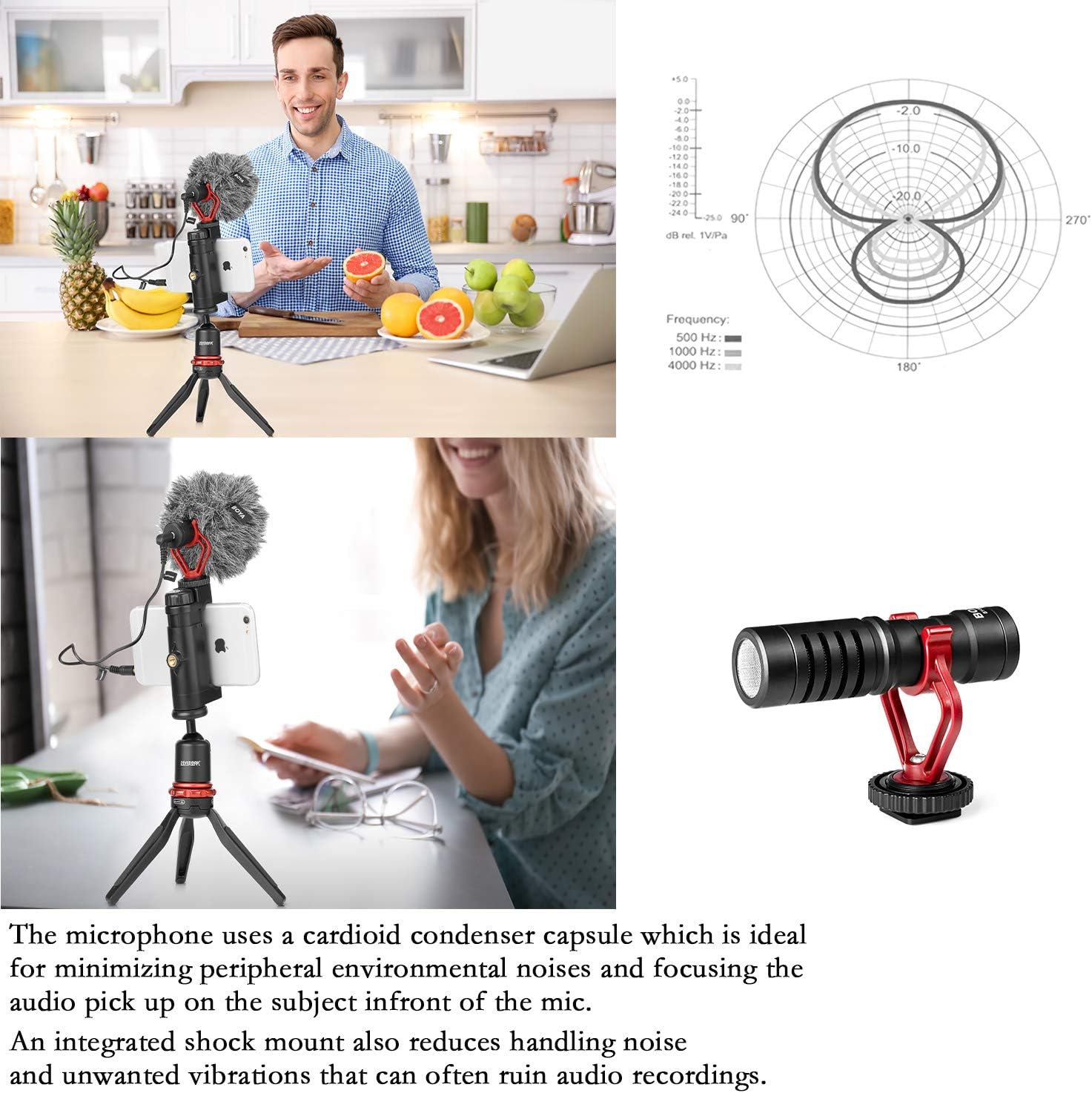
Image: A user demonstrating the BOYA MM1 microphone attached to a smartphone on a tripod, illustrating typical usage.
5. Maintenance
- Cleaning: Use a soft, dry cloth to clean the microphone body. Do not use harsh chemicals or solvents.
- Windshield Care: The furry windshield can be gently shaken or brushed to remove dust and debris. Avoid washing it with water.
- Storage: When not in use, store the microphone and its accessories in the provided storage pouch to protect them from dust and damage.
- Cable Care: Avoid sharp bends or excessive pulling on the cables to prevent internal damage.
6. Troubleshooting
- No Audio/Low Volume:
- Ensure the correct cable (TRS for cameras, TRRS for smartphones) is used and fully inserted into both the microphone and the recording device.
- Check your device's audio input settings to ensure the external microphone is selected and the input level is adequate.
- For smartphones, some apps may require specific microphone settings. Try a different recording app if issues persist.
- Excessive Background Noise/Wind Noise:
- Ensure the furry windshield is properly installed, especially in outdoor or windy environments.
- Verify the microphone is correctly positioned, pointing directly at the sound source to utilize its super-cardioid pattern effectively.
- Check for any loose connections or vibrations that might be picked up by the shock mount.
- Distorted Audio:
- Reduce the input gain or volume on your recording device. The microphone may be too close to a loud sound source.
- Ensure the microphone is not physically obstructed.
7. Specifications
| Feature | Specification |
|---|---|
| Model Name | BY-MM1 |
| Brand | BOYA |
| Microphone Form Factor | Plug On |
| Polar Pattern | Unidirectional (Super-Cardioid) |
| Connectivity Technology | Auxiliary (3.5mm Jack) |
| Audio Sensitivity | 42 Decibels |
| Frequency Response | 18 KHz |
| Signal-to-Noise Ratio | 76 dB |
| Impedance | 1000 Ohm |
| Material | Metal |
| Item Weight | 40 Grams (1.41 ounces) |
| Compatible Devices | Camcorder, Camera, Personal Computer, Smartphone, Tablet |
8. Warranty and Support
The BOYA BY-MM1 Universal Camera Microphone comes with a 12-month product warranty. For any questions or support regarding your microphone, please contact BOYA customer service.
This product is Verified by Transparency, ensuring each item has a unique code verified before shipping.


