
1. Introduction
Thank you for choosing the Parrot Uncle 52-inch Chandelier Ceiling Fan. This fan combines the functionality of a ceiling fan with the elegance of a crystal chandelier, designed for various indoor and covered outdoor spaces. It features a quiet, reversible motor and convenient remote control operation. This manual provides essential information for safe installation, operation, and maintenance of your new ceiling fan.
2. Safety Information
- Always turn off power at the circuit breaker before installation or maintenance.
- All wiring must be in accordance with national and local electrical codes. If you are unfamiliar with wiring, consult a qualified electrician.
- Ensure the installation site can support the fan's weight (approximately 22 pounds).
- Do not bend blade holders during installation or cleaning.
- Keep children away from the fan during operation.
3. Package Contents
Verify that all components are present before beginning installation:
- Ceiling Fan Motor Housing
- 5 Plywood Blades
- Crystal Light Kit
- Remote Control
- 2 Downrods (4-inch and 10-inch)
- Mounting Hardware
4. Setup and Installation
Professional installation is recommended for electrical wiring. Follow these general steps:
- Turn Off Power: Ensure power is disconnected at the main circuit breaker.
- Mounting Bracket: Securely attach the mounting bracket to the ceiling junction box. This fan supports downrod mounting and can be installed on angled ceilings up to 15 degrees.
- Downrod Assembly: Choose the appropriate downrod (4-inch or 10-inch) for your ceiling height and assemble it with the fan motor.
- Wiring: Connect the fan's electrical wires to your household wiring according to the provided wiring diagram. Ensure all connections are secure.
- Blade Attachment: Attach the 5 plywood blades to the motor housing using the provided screws.
- Crystal Light Kit Installation: Install the crystal light kit to the bottom of the fan motor.
- Bulb Installation: Insert 4 E12 base bulbs (max 25 watts each, not included) into the light kit sockets.

Figure 4.1: Overview of fan components and simplified installation steps, including the powerful copper motor, plywood blades, and sparkling crystal decoration.

Figure 4.2: Detailed dimensions of the 52-inch fan and illustrations of the two mounting options: downrod mount for flat ceilings and angled mount for sloped ceilings (up to 15 degrees).
5. Operating Instructions
Your Parrot Uncle ceiling fan is operated via the included remote control.
5.1 Remote Control Functions
- Fan Speed: Select from 3 available speeds (low, medium, high).
- Light Control: Turn the light on or off independently from the fan.
- Timer: Set the fan to automatically turn off after 2, 4, or 8 hours.
5.2 Reversible Motor
The fan features a reversible motor for year-round comfort. A switch on the fan housing allows you to change the direction of blade rotation:
- Clockwise Rotation (Summer Mode): Creates a downdraft, providing a cooling effect.
- Counter-Clockwise Rotation (Winter Mode): Creates an updraft, circulating warm air throughout the room.
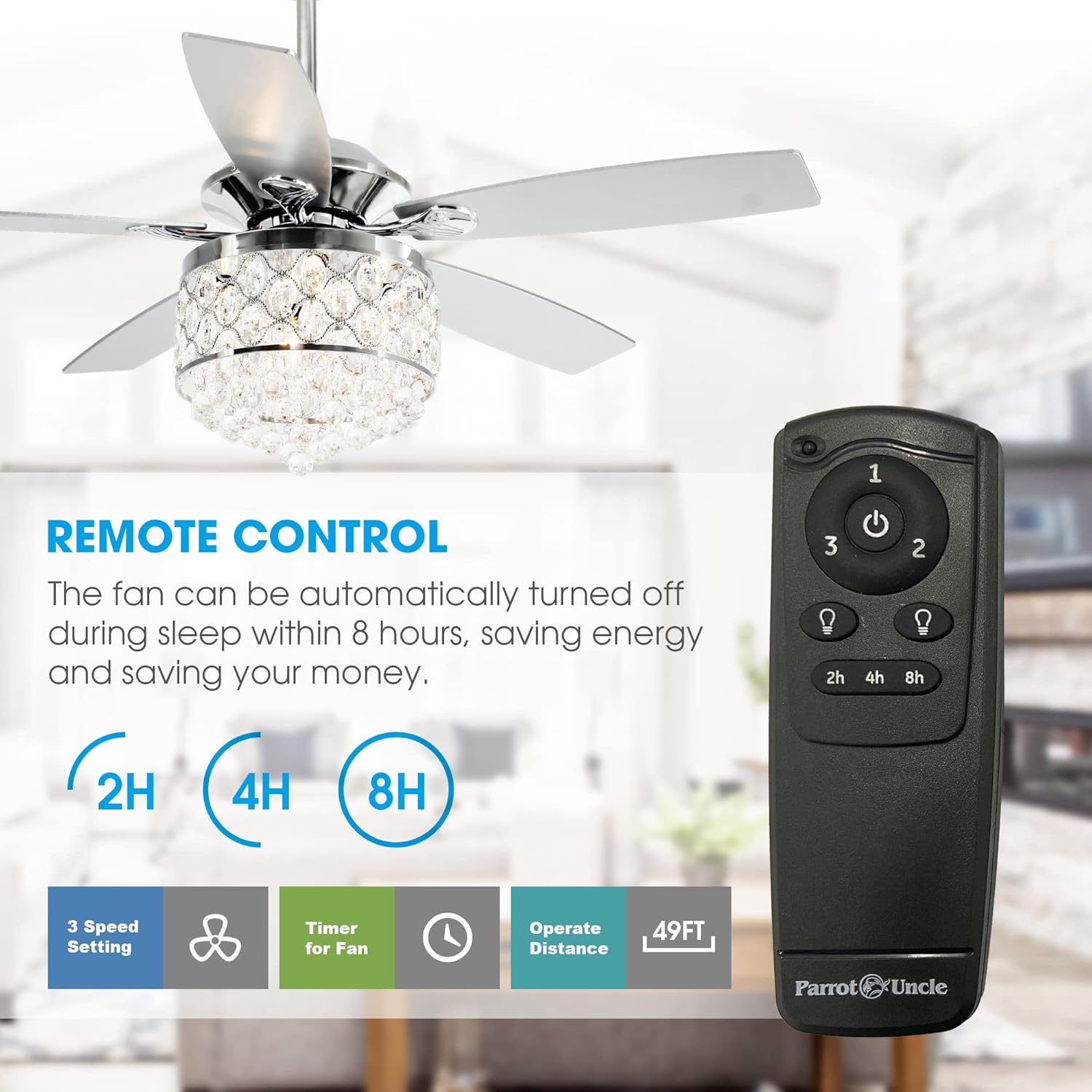
Figure 5.1: The remote control allows for adjustment of fan speed, light operation, and setting a timer for automatic shut-off.

Figure 5.2: Visual representation of the reversible motor's function, showing clockwise rotation for cooling in summer and counter-clockwise rotation for air circulation in winter.
6. Maintenance
Regular maintenance ensures optimal performance and longevity of your fan.
- Cleaning: Dust the blades and fan housing periodically with a soft, lint-free cloth. For the crystal light kit, gently wipe with a damp cloth and mild cleaner, then dry immediately. Do not use abrasive cleaners.
- Bulb Replacement: When replacing bulbs, ensure the power is off. Use 4 E12 base bulbs, with a maximum wattage of 25 watts per bulb.
- Tighten Screws: Periodically check and tighten all screws on the fan blades and mounting hardware to prevent wobbling or noise.
7. Troubleshooting
If you encounter issues, refer to the following common solutions:
| Problem | Possible Cause | Solution |
|---|---|---|
| Fan does not start | No power to fan; Remote control battery low/dead; Incorrect wiring. | Check circuit breaker; Replace remote battery; Verify wiring connections. |
| Light does not work | Bulbs loose or burnt out; Incorrect wiring. | Tighten or replace bulbs; Check light kit wiring. |
| Fan wobbles excessively | Loose blade screws; Unbalanced blades; Loose mounting hardware. | Tighten all blade screws; Use a balancing kit (not included); Ensure mounting bracket is secure. |
| Noisy operation | Loose screws; Motor issues. | Check and tighten all screws; If noise persists, contact customer service. |
For issues not listed or if problems persist, please contact Parrot Uncle customer service.
8. Specifications
| Feature | Detail |
|---|---|
| Brand | Parrot Uncle |
| Model Number | F6218FD |
| Size | 52 Inches |
| Product Dimensions | 52"L x 52"W x 28.3"H |
| Color | Chrome |
| Material | Engineered Wood, Glass, Iron |
| Light Source Type | Incandescent (E12 base) |
| Number of Light Sources | 4 |
| Max Wattage (per bulb) | 25 watts |
| Control Method | Remote Control |
| Special Features | Remote Controlled, Reversible Motor, Timer |
| Indoor/Outdoor Usage | Indoor (Covered Patios) |
| Item Weight | 22 Pounds |
9. Warranty and Support
Parrot Uncle offers a 30-day return and replacement service for this product. Additionally, lifetime professional customer service is provided to assist with any questions or concerns you may have regarding your ceiling fan.
For support, please refer to the contact information provided with your purchase or visit the official Parrot Uncle website.


