
Introduction
The WFCO WF-5100-RM Remote Control is designed to provide convenient on/off functionality for your WFCO WF-5110-HP inverter. This remote panel allows you to control your inverter from a remote location, eliminating the need to access the inverter directly for power management. This manual provides essential information for the proper installation, operation, and maintenance of your WF-5100-RM remote control.
Safety Information
- Always ensure the WF-5110-HP inverter is powered off before connecting or disconnecting the remote control cable.
- Do not attempt to modify the remote control unit or its cable.
- Keep the remote control unit dry and away from moisture.
- If you are unsure about any installation steps, consult a qualified technician.
Package Contents
Verify that all items are present in your package:
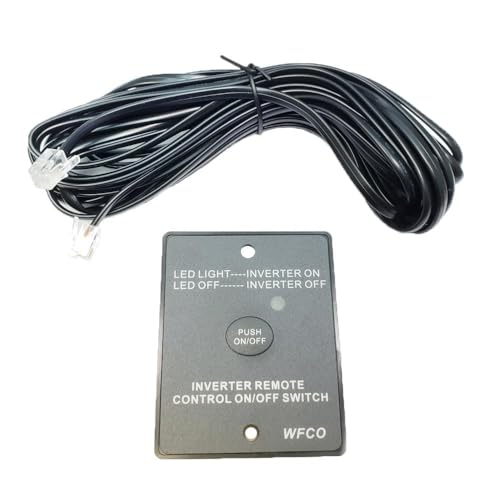
- WFCO WF-5100-RM Remote Control Panel
- RJ11 Communication Cable
Setup and Installation
Follow these steps to install your WF-5100-RM Remote Control:
- Locate the Inverter: Identify the WFCO WF-5110-HP inverter in your RV or installation location.
- Identify RJ11 Port: Locate the dedicated RJ11 communication port on the WF-5110-HP inverter. This port is specifically designed for connecting remote control units.
- Connect Cable to Inverter: Carefully plug one end of the provided RJ11 communication cable into the RJ11 port on the inverter. Ensure a secure connection.
- Connect Cable to Remote Panel: Plug the other end of the RJ11 communication cable into the corresponding port on the back of the WF-5100-RM remote control panel.
- Mount Remote Panel: Choose a convenient and accessible location to mount the remote control panel. Secure it using appropriate fasteners (not included) through the designated mounting holes on the panel. Ensure the cable is routed safely and not pinched.
Once connected, the remote control is ready for operation.
Operating Instructions
The WF-5100-RM remote control provides a simple interface for managing your inverter:
- Power On/Off: To turn the inverter ON or OFF, press the central button labeled "PUSH ON/OFF". Each press will toggle the power state of the connected WF-5110-HP inverter.
- LED Indicator: Observe the LED light on the remote control panel to determine the inverter's status:
- LED Light ON: Indicates that the WF-5110-HP inverter is currently ON and supplying power.
- LED Light OFF: Indicates that the WF-5110-HP inverter is currently OFF.
Maintenance
The WF-5100-RM remote control requires minimal maintenance:
- Cleaning: Wipe the remote control panel with a soft, dry cloth to remove dust. Do not use liquid cleaners or solvents.
- Cable Inspection: Periodically inspect the RJ11 communication cable for any signs of damage, such as cuts, fraying, or kinks. Replace the cable if damage is found to ensure reliable operation.
Troubleshooting
If you encounter issues with your WF-5100-RM remote control, refer to the following:
- Inverter Not Responding:
- Ensure the RJ11 cable is securely connected to both the remote control panel and the WF-5110-HP inverter.
- Verify that the WF-5110-HP inverter itself is receiving power and is operational.
- Check the RJ11 cable for any visible damage.
- LED Indicator Not Functioning:
- Confirm the RJ11 cable connections are firm.
- Ensure the inverter is powered on and functioning correctly.
If problems persist after following these steps, contact WFCO customer support.
Specifications
| Model Number | WF-5100-RM |
| Compatible Inverter | WFCO WF-5110-HP |
| Product Dimensions | 5.5 x 4 x 1.5 inches |
| Connectivity | Wired (RJ11 Cable) |
| Manufacturer | WFCO |
Warranty and Support
For detailed warranty information and customer support, please refer to the official WFCO website or contact their customer service directly. Warranty terms and conditions may vary.
WFCO Official Website: www.wfcoelectronics.com
