Introduction
Thank you for choosing the Yanzeo YS868 Laser Flatbed Desktop Omnidirectional Bar Code Reader. This high-speed automatic 1D laser barcode scanner is designed for efficient and reliable barcode reading in various environments, including retail, logistics, and inventory management. This manual provides detailed instructions to help you set up, operate, and maintain your scanner for optimal performance.

Figure 1: Front view of the Yanzeo YS868 Laser Flatbed Barcode Scanner.
Setup Guide
1. Unboxing and Components
Carefully unpack all items from the box. Ensure all components are present and undamaged. The standard package includes:
- Yanzeo YS868 Barcode Scanner Unit
- USB Connection Cable
- User Manual (this document or a printed version)
- Optional: Stand components (if included with your model)

Figure 2: Contents of the Yanzeo YS868 package, including the scanner, USB cable, and user manual.
2. Connecting the Scanner
The Yanzeo YS868 scanner connects to your computer via a USB cable, providing both power and data transmission. No external power adapter is typically required.
- Locate the USB port on the back or side of the Yanzeo YS868 scanner.
- Insert the smaller end of the provided USB cable into the scanner's USB port.
- Insert the larger end of the USB cable into an available USB port on your computer (PC, Mac, or compatible device).
- The scanner will typically be recognized automatically by your operating system (Windows, macOS, Android, Linux). Drivers are usually not required for basic operation as it functions as a standard HID keyboard device.
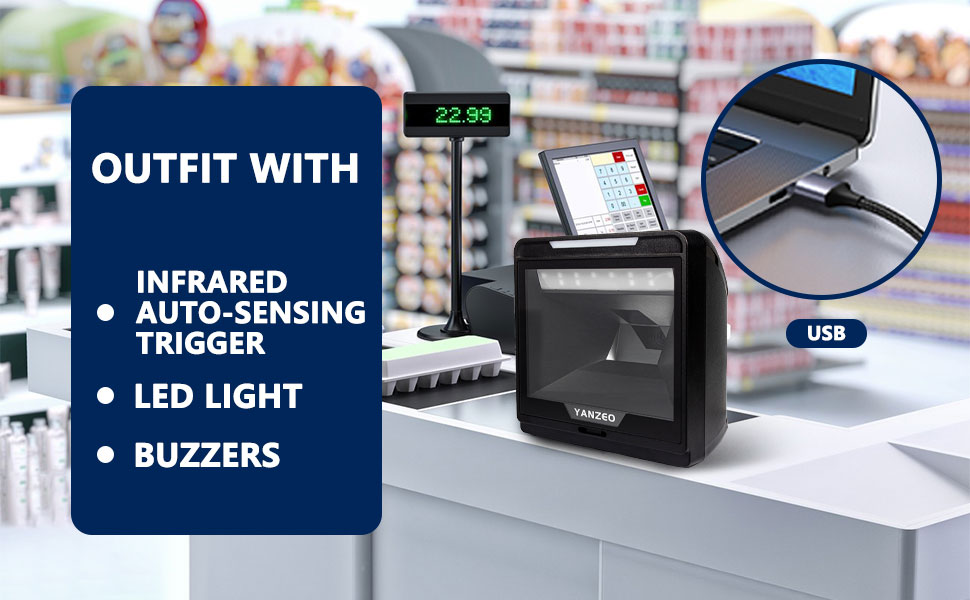
Figure 3: The Yanzeo YS868 scanner connected via USB in a typical point-of-sale setup.
Operation Guide
1. Scanning Barcodes
The Yanzeo YS868 is an omnidirectional, hands-free scanner, meaning it can read barcodes from various angles without needing precise alignment. It features an infrared auto-sensing trigger.
- Place the item with the barcode in front of the scanner's reading window.
- The scanner will automatically detect the barcode and emit a scan line.
- Upon successful scan, the scanner will typically emit an audible beep and/or a visual indicator (LED light) will flash.
- The decoded barcode data will be transmitted to your connected computer as if typed from a keyboard.

Figure 4: The YS868 supports omnidirectional, hands-free scanning for 1D, 2D, and QR codes.
2. Supported Barcode Types and Depth of Field
The YS868 scanner is capable of decoding a wide range of 1D and 2D barcode symbologies. Its depth of field varies based on the barcode density (mil).

Figure 5: List of supported 1D and 2D barcode symbologies, including EAN, UPC, Code 39, QR Code, Data Matrix, and PDF417.
Depth of Field (DOF) Examples:
- 4mil: 10-50mm
- 5mil: 0-90mm
- 7.5mil: 0-170mm
- 10mil: 0-220mm
- 13mil: 0-240mm
- 20mil: 0-300mm
Note: Depth of Field may vary depending on environmental conditions and barcode quality.
Key Features
The Yanzeo YS868 is engineered with several features to enhance its performance and usability:
- Omnidirectional Scanning: Allows for quick and efficient scanning from any angle, reducing the need for precise barcode positioning.
- High-Speed Automatic Scanning: Equipped with 20 lines optical grating mode for rapid and accurate data capture.
- Strong Decode Ability: Capable of reading all common 1D and 2D barcodes, even those that are damaged or poorly printed.
- Durable Design: Built for drop durability, providing anti-shock protection for long-term use in demanding environments.
- Infrared Auto-Sensing Trigger: Automatically activates scanning when an object is presented to the window.
- LED Illumination: Features 617 Nano LED illumination for optimal scanning conditions.
- High Resolution: 1280 pixel (H) x 800 pixel (V) resolution for precise image capture.
- Non-Slip Base: Ensures stability during operation on various surfaces.

Figure 6: The YS868 is designed for drop durability, offering anti-shock protection up to 1.5 meters.

Figure 7: Detailed view of the YS868's features, including LED illumination, pixel resolution, and non-slip base.
Maintenance
Cleaning the Scanner
To ensure consistent performance and longevity of your Yanzeo YS868 scanner, regular cleaning is recommended, especially for the scanning window.
- Power Off: Disconnect the scanner from your computer before cleaning.
- Cleaning Solution: Use a soft, lint-free cloth lightly dampened with water or a mild, non-abrasive glass cleaner. Do not use harsh chemicals, solvents, or abrasive materials.
- Scanning Window: Gently wipe the scanning window to remove dust, smudges, or debris. Avoid scratching the surface.
- Exterior: Wipe the exterior casing of the scanner with a damp cloth.
- Drying: Allow the scanner to air dry completely before reconnecting it to your computer.
Avoid spraying cleaning solutions directly onto the scanner or allowing liquids to seep into any openings.
Troubleshooting
If you encounter issues with your Yanzeo YS868 scanner, refer to the following common problems and solutions:
Scanner Not Responding / No Power
- Check USB Connection: Ensure the USB cable is securely plugged into both the scanner and the computer. Try a different USB port on your computer.
- Computer Power: Verify that your computer is powered on and functioning correctly.
- Cable Integrity: Inspect the USB cable for any signs of damage. If damaged, try a different compatible USB cable.
Barcodes Not Scanning
- Barcode Quality: Ensure the barcode is clear, not smudged, torn, or excessively reflective.
- Distance: Adjust the distance between the barcode and the scanner's window. Refer to the Depth of Field specifications.
- Lighting: While the scanner has its own illumination, extreme lighting conditions (too bright or too dark) can sometimes affect performance.
- Supported Symbology: Confirm that the barcode type is supported by the YS868 scanner (refer to "Supported Barcode Types" section).
- Scanning Window Cleanliness: Clean the scanning window as described in the Maintenance section.
Incorrect Data Output
- Keyboard Layout: Ensure your computer's keyboard layout matches the expected output (e.g., US English).
- Application Focus: Make sure the cursor is active in the application where you want the barcode data to appear (e.g., a text editor, spreadsheet, or POS software).
- Configuration: If the scanner was previously configured with specific settings (e.g., prefix/suffix), these might affect output. A factory reset (if supported by scanning a specific barcode from a full manual) might be necessary, but consult the full PDF manual first.
Specifications
Below are the technical specifications for the Yanzeo YS868 Laser Flatbed Desktop Omnidirectional Bar Code Reader:
| Feature | Detail |
|---|---|
| Model Number | YS868 |
| Product Dimensions | 5.91 x 5.91 x 2.76 inches (15.01 x 15.01 x 7.01 cm) |
| Item Weight | 1.63 pounds (0.74 kg) |
| Connectivity Technology | USB Cable (RS232 optional) |
| Power Source | Corded Electric (USB Powered) |
| Compatible Devices | Desktop Computers (PC, Mac, Android, Linux) |
| Supported Barcodes | 1D (EAN-8, EAN-13, UPC-A, UPC-E, Code 39, Code 128, etc.), 2D (QR Code, Data Matrix, PDF417, Aztec, Maxicode, etc.) |
| Depth of Field | 4mil:10-50mm, 5mil:0-90mm, 7.5mil:0-170mm, 10mil:0-220mm, 13mil:0-240mm, 20mil:0-300mm |
| Scan Mode | Omnidirectional, Automatic Sensing |
| Certifications | CE, ISO, FCC, RoHS |

Figure 8: Detailed dimensions of the Yanzeo YS868 scanner.
Warranty Information
Yanzeo products are manufactured in an ISO-9001 Quality Certified Factory, ensuring high quality. While specific warranty terms are not detailed here, typically, new electronic devices come with a manufacturer's limited warranty covering defects in materials and workmanship for a specified period from the date of purchase. For detailed warranty information, including duration and coverage, please refer to the documentation included with your purchase or contact Yanzeo customer support.
Protection plans are also available for extended coverage, such as 3-Year or 4-Year Protection Plans, which can be purchased separately.
Support and Contact
For further assistance, technical support, or inquiries regarding your Yanzeo YS868 barcode scanner, please utilize the following resources:
- Official User Manual (PDF): A comprehensive PDF user manual is available for download, which may contain advanced configuration options and detailed troubleshooting steps. You can typically find this on the product's support page or via the link: Yanzeo YS868 User Manual PDF.
- Manufacturer's Website: Visit the official Yanzeo website for product information, FAQs, and support contact details.
- Seller Support: If you purchased the product from a specific seller, their customer service may also be able to provide assistance.
When contacting support, please have your product model number (YS868) and purchase details readily available.


