
Tihebeyan AKB72915244
Tihebeyan AKB72915244 Replacement Remote Control User Manual
Model: AKB72915244 | Brand: Tihebeyan
1. Introduction
This document provides comprehensive instructions for the use and maintenance of your Tihebeyan AKB72915244 Replacement Remote Control. This remote is designed as a direct replacement for various LG Smart TV models, offering stable performance and ease of use without requiring programming.
The remote control features a compact design, comfortable buttons, and is constructed from durable ABS material for long-term reliability. It operates on two AA batteries (not included) and maintains codes during battery replacement, contributing to energy efficiency.
2. Package Contents
- 1 x Tihebeyan AKB72915244 Replacement Remote Control
Note: AA batteries are not included and must be purchased separately.
3. Specifications
| Product Name | Replacement Remote Control |
| Model | AKB72915244 |
| Material | ABS |
| Power Supply | 2 x AA Batteries (not included) |
| Transmission Distance | Up to 8 meters |
| Color | Black |
| Dimensions (L x W x H) | Approximately 21 x 4.8 x 2.6 cm (8.27 x 1.89 x 1.02 inches) |
| Weight | Approximately 87 g (3.07 oz) |

Figure 3.1: Remote control with approximate dimensions of 21cm length, 4.8cm width, and 2.6cm thickness.
4. Setup
4.1. Battery Installation
- Locate the battery compartment on the back of the remote control.
- Slide the battery compartment cover downwards and remove it.
- Insert two AA batteries, ensuring the positive (+) and negative (-) terminals align correctly with the markings inside the compartment.
- Replace the battery compartment cover by sliding it back into place until it clicks securely.

Figure 4.1: View of the remote control with the battery compartment open, showing the slots for two AA batteries.
Note: No programming or setup is required. The remote is ready for use once batteries are installed.
5. Operating Instructions
5.1. General Use
Point the remote control directly towards your LG TV. Ensure there are no obstructions between the remote and the TV's infrared receiver. The effective operating range is up to 8 meters.
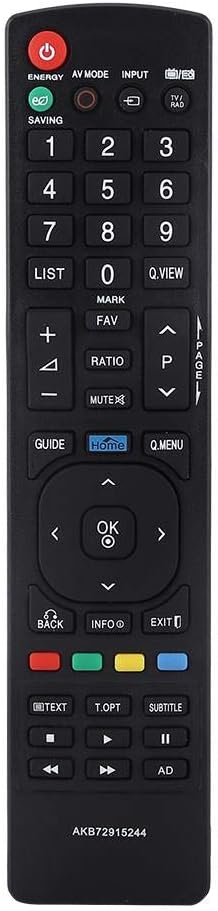
Figure 5.1: Front view of the remote control, displaying all buttons and their labels.
5.2. Button Functions
- POWER (Red Button): Turns the TV on or off.
- ENERGY SAVING: Adjusts the TV's energy saving mode.
- AV MODE: Cycles through available AV input modes.
- INPUT: Selects the input source (HDMI, AV, etc.).
- Number Buttons (0-9): Directly select channels.
- LIST: Displays the channel list.
- Q.VIEW: Switches between the current and previous channel.
- MARK/FAV: Marks or accesses favorite channels.
- VOLUME (+/-): Increases or decreases the volume.
- MUTE: Mutes or unmutes the TV sound.
- RATIO: Adjusts the screen aspect ratio.
- CHANNEL (P Up/Down): Changes channels sequentially.
- GUIDE: Displays the electronic program guide.
- HOME: Accesses the TV's Smart Home menu.
- Q.MENU: Opens the Quick Menu for common settings.
- Navigation Buttons (Up/Down/Left/Right): Navigates through menus.
- OK: Confirms selections in menus.
- BACK: Returns to the previous screen or menu.
- INFO: Displays information about the current program.
- EXIT: Exits the current menu or function.
- Color Buttons (Red, Green, Yellow, Blue): Access specific functions depending on the TV menu or application.
- TEXT: Activates Teletext.
- T.OPT: Teletext options.
- SUBTITLE: Toggles subtitles on/off.
- Media Control Buttons (Play, Pause, Stop, Rewind, Fast Forward): Controls media playback.
- AD: Audio Description.

Figure 5.2: A hand demonstrating the grip and button accessibility of the remote control, with close-ups of the navigation and menu buttons.
6. Maintenance
6.1. Cleaning
To clean the remote control, use a soft, dry cloth. For stubborn dirt, lightly dampen the cloth with water. Avoid using harsh chemicals, abrasive cleaners, or solvents, as these can damage the remote's surface or internal components.
6.2. Battery Replacement
When the remote control's performance degrades (e.g., reduced range, unresponsive buttons), it is likely time to replace the batteries. Follow the battery installation steps in Section 4.1. The remote is designed to retain its codes even when batteries are removed, so no re-pairing is necessary after replacement.
6.3. Storage
If the remote control will not be used for an extended period, it is recommended to remove the batteries to prevent leakage and potential damage to the device.
7. Troubleshooting
- Remote not responding:
- Ensure batteries are correctly inserted with the correct polarity.
- Replace old batteries with new AA batteries.
- Check for any obstructions between the remote and the TV's infrared sensor.
- Ensure you are within the effective operating range (up to 8 meters).
- Buttons are sticky or unresponsive:
- Clean the remote control as described in Section 6.1.
8. Compatible LG TV Models
This replacement remote control is compatible with a wide range of LG LCD, LED, and Plasma TVs. Specifically, it is designed to work with the following LG TV models:
- LG 32LV2530
- LG 22LK330
- LG 26LK330
- LG 32LK330
Note: This list may not be exhaustive. The remote is generally compatible with LG TVs that originally used the AKB72915244 remote.
9. Warranty and Support
For any questions, technical assistance, or support regarding your Tihebeyan AKB72915244 Replacement Remote Control, please refer to the retailer or manufacturer's customer service channels. Specific warranty details may vary by region and retailer.
Ask a question about this manual
Ask about setup, troubleshooting, compatibility, parts, safety, or missing instructions. Manuals+ will review the question and use this page’s manual context to help answer it.