
Introduction
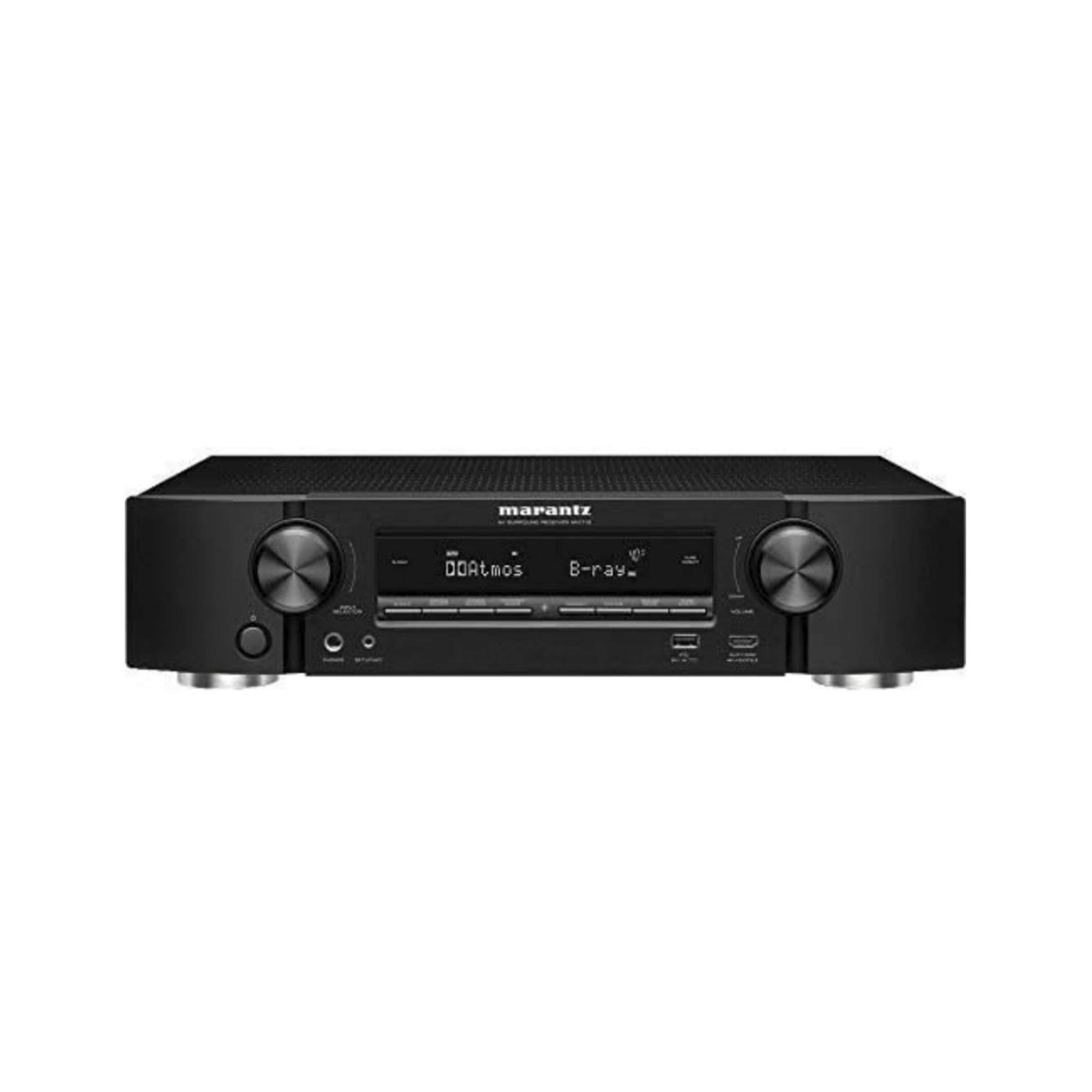
The Marantz NR1710 AV receiver delivers immersive, high-fidelity audio from a compact, slim profile chassis, approximately half the height of traditional AV receivers. This 7.2 channel receiver supports advanced multi-dimensional audio formats including Dolby Atmos, Dolby Atmos Height Virtualization Technology, DTS:X, and DTS Virtual:X. It is designed to enhance your home entertainment experience with exceptional picture quality and thrilling surround sound.
Enjoy your extensive music collection with support for Hi-Res formats, a front-panel USB port, and a phono equalizer for turntable connectivity. Stream music effortlessly from leading services and control the NR1710 with voice commands via Amazon Alexa, Google Assistant, and Apple Siri. Featuring eight HDMI inputs, including one on the front panel, it supports the latest video and picture formatting, including 4K Ultra HD (60Hz full-rate content, 4:4:4 pure color sub-sampling, BT.2020, HDR10, HLG, Dolby Vision), and eARC transmission for enhanced audio.
What's in the Box
- Marantz NR1710 AV Receiver
- Remote Controller
- Quick Start Guide
- Setup Microphone for Room Calibration
- FM/AM Antennas
- Power Cord
- AAA Batteries (for remote controller)
Setup
1. Initial Setup
The NR1710 features an easy-to-understand and user-friendly Setup Assistant with an advanced graphical user interface. This assistant guides you through the step-by-step process of connecting all your audio and video sources to the receiver.
2. Speaker Connection
Connect your speakers to the appropriate terminals on the rear panel of the receiver. The NR1710 supports a 7.2 channel configuration. Ensure correct polarity (+ to + and - to -) for optimal sound performance. The receiver is compatible with speakers having an impedance of 4-16 ohms.
3. HDMI Connections
Utilize the eight HDMI inputs (including one on the front panel) to connect your video sources such as Blu-ray players, gaming consoles (e.g., Xbox One with Auto Low Latency Mode), and cable/satellite boxes. Connect your TV to the HDMI OUT port, which supports eARC for enhanced audio return channel functionality. The receiver supports 4K Ultra HD, Dolby Vision, HDR10, HLG, and BT.2020 for stunning visuals.
4. Network Connection (Wi-Fi & Bluetooth)
Connect the NR1710 to your home network via Wi-Fi or Ethernet for access to streaming services and firmware updates. Bluetooth and AirPlay 2 are also supported for wireless audio streaming from compatible devices. The built-in HEOS technology allows for multi-room audio playback.
5. Room Calibration
Use the included setup microphone and the Audyssey Room Correction software to automatically optimize the sound settings for your specific room acoustics. Place the microphone at your primary listening position and follow the on-screen instructions for precise calibration.
Operating
1. Basic Operation
Use the front panel controls or the remote controller to select input sources, adjust volume, and navigate menus. The on-screen display provides clear feedback on current settings and selections.
2. Sound Modes
The NR1710 supports various sound modes, including Dolby Atmos, Dolby Atmos Height Virtualization, DTS:X, and DTS Virtual:X. Select the desired sound mode to match your content and speaker configuration for an immersive audio experience.
3. Streaming Services
Access popular music streaming services like Spotify, TuneIn, and others via the built-in HEOS platform. The HEOS Home Entertainment App allows you to control music playback in multiple rooms.
4. Voice Control
Control the receiver hands-free using voice commands with Amazon Alexa, Google Assistant, or Apple Siri. This allows for convenient control over music playback, volume, and source selection.
Maintenance
- Cleaning: Use a soft, dry cloth to clean the exterior of the receiver. Avoid abrasive cleaners or solvents.
- Ventilation: Ensure adequate ventilation around the receiver to prevent overheating. Do not block ventilation openings.
- Power: Disconnect the power cord from the wall outlet if the unit will not be used for an extended period.
Troubleshooting
If you encounter issues with your Marantz NR1710, please refer to the following general troubleshooting tips:
- No Power: Check if the power cord is securely connected and the power outlet is functional.
- No Sound: Verify speaker connections, input source selection, and volume levels. Ensure mute is not activated.
- No Picture: Check HDMI cable connections between the source, receiver, and TV. Confirm correct HDMI input selection on both the receiver and TV.
- Network Connection Issues: Restart your router and the receiver. Re-run the network setup assistant.
For more detailed troubleshooting, please consult the full online user manual or contact Marantz customer support.
Specifications
| Product Dimensions | 14.5 x 17.3 x 4.1 inches |
| Item Weight | 22.2 pounds |
| Surround Sound Channel Configuration | 7.2 channel |
| Connectivity Technology | Bluetooth, HDMI, USB, Wi-Fi |
| Total HDMI Ports | 8 |
| Audio Output Mode | Surround |
| Controller Type | Amazon Alexa, Google Assistant, Vera |
| Special Features | Pandora, Tidal, eARC |
| Compatible Devices | Smartphone, Television, Speaker |
Warranty & Support
The Marantz NR1710 AV Receiver comes with a 2-year warranty. For technical support, service, or warranty claims, please visit the official Marantz website or contact their customer service department. You can also refer to the comprehensive online user manual for detailed information.
Product Images
Official Product Videos
Video 1: Official Marantz NR1710 product overview, highlighting its slim design, features, and immersive sound capabilities.


