
1. Introduction and Product Overview
This document provides instructions for the Kufatec PDC Front Control Cable, a specialized wiring harness designed to facilitate the installation of a Park Distance Control (PDC) parking aid system. This cable set is essential for connecting the PDC control unit to the front bumper sensors and the dashboard switch, enabling the front parking assist functionality in compatible vehicles.
Compatibility:
- Audi A4 B8 8K
- Audi A5 8T
- Audi Q5 8R
2. Setup and Installation
The Kufatec PDC Front Control Cable is a specific cable set for the installation of a PDC parking aid. It is designed to integrate seamlessly with your vehicle's existing electrical system.
- Preparation: Ensure the vehicle's ignition is off and the battery is disconnected before beginning installation to prevent electrical damage or injury.
- Connection to PDC Control Unit: Locate the PDC control unit in your vehicle. Connect the designated end of the Kufatec cable set to the appropriate port on the PDC control unit. Refer to your vehicle's service manual for the exact location and port identification.
- Front Bumper Sensor Connection: Route the cable towards the front bumper area. Connect the corresponding wires from the Kufatec cable set to the wiring harness for the front parking sensors. Ensure secure and correct pin assignments.
- Dashboard Switch Connection: Route the remaining part of the cable to the dashboard area. Connect the designated wires to the parking assist switch in the dashboard. This switch allows manual activation or deactivation of the front PDC system.
- Secure Cabling: Use cable ties or clips to secure the newly installed cable set, preventing it from interfering with moving parts or being damaged by heat or abrasion.
- Testing: Reconnect the vehicle battery and turn on the ignition. Test the functionality of the front PDC system according to your vehicle's operating instructions.
Important Note: Due to the complexity of vehicle electrical systems, professional installation by a qualified technician is highly recommended to ensure correct functionality and avoid damage to the vehicle or product.
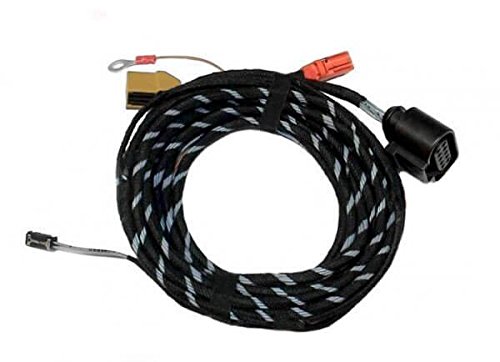
Image showing the Kufatec PDC Front Control Cable, a wiring harness designed for connecting parking assist components.
3. Operating Instructions
The Kufatec PDC Front Control Cable is an integral component of your vehicle's front parking assist system. Once correctly installed, it facilitates the communication between the PDC control unit, the front parking sensors, and the dashboard switch. The operation of the front parking assist system itself is managed by your vehicle's onboard electronics and user interface.
To operate the front parking assist system, refer to your vehicle's owner's manual. Typically, the system activates automatically when reverse gear is engaged or when driving at low speeds. It can also be manually activated or deactivated using the dedicated switch on the dashboard, which is connected via this cable set.
4. Maintenance
The Kufatec PDC Front Control Cable is designed for durability and requires minimal maintenance once installed. To ensure long-term performance and reliability, consider the following:
- Periodic Inspection: During routine vehicle maintenance, visually inspect the accessible parts of the cable for any signs of wear, fraying, cuts, or damage.
- Connection Security: Ensure all connections remain secure and free from corrosion. Loose connections can lead to intermittent system failures.
- Environmental Protection: Avoid exposing the cable to extreme temperatures, harsh chemicals, or excessive moisture, which could degrade the insulation and conductors over time.
- Cleaning: If necessary, gently clean the cable with a dry, soft cloth. Do not use abrasive cleaners or solvents.
5. Troubleshooting
If you experience issues with your front parking assist system after installing the Kufatec PDC Front Control Cable, consider the following troubleshooting steps:
- Check Connections: Verify that all connections of the Kufatec cable set to the PDC control unit, front sensors, and dashboard switch are secure and correctly seated. A loose connection is a common cause of malfunction.
- Inspect Cable for Damage: Look for any visible signs of damage to the cable, such as cuts, pinches, or frayed insulation. Damaged wiring can interrupt signals.
- Vehicle's PDC System: Ensure the overall PDC system of your vehicle is functioning correctly. Consult your vehicle's owner's manual or service manual for specific diagnostic procedures related to the PDC system.
- Fuse Check: Check the relevant fuses for the PDC system in your vehicle's fuse box. A blown fuse can disable the system.
- Professional Diagnosis: If the problem persists after performing these checks, it is recommended to seek assistance from a qualified automotive technician. They can perform advanced diagnostics to identify and resolve the issue.
6. Specifications
| Product Name | PDC Front Control Cable |
| Brand | Kufatec |
| Model Number | 50894456 |
| Part Number | 50894456 |
| Manufacturer | TFS |
| Compatibility | Audi A4 B8 8K, Audi A5 8T, Audi Q5 8R |
| Contents | 1x Cable Set |
7. Warranty and Support
Warranty information for the Kufatec PDC Front Control Cable is not explicitly provided in the available product documentation. For details regarding warranty coverage, terms, and conditions, please refer to the purchase agreement or contact your retailer directly.
For technical support, installation assistance, or any product-related inquiries, please contact the seller or manufacturer, referencing the model number 50894456. Providing your purchase details may expedite the support process.