
Introduction
This manual provides essential instructions for the safe and effective installation, operation, and maintenance of the Square D QO120 Miniature Circuit Breaker. The QO120 is a 1-pole, thermal magnetic trip circuit breaker designed for 120/240 VAC systems, with a 20 A current rating and a 10 kA interrupt capacity. It features a plug-on mount for easy installation in compatible Square D QO load centers.
Important Safety Information: Always consult a qualified electrician for installation and service. Disconnect power before working on electrical equipment. Failure to follow these instructions can result in serious injury or death.

Image: A yellow triangular warning sign with a black exclamation mark, indicating caution or important safety information.
Specifications
| Feature | Detail |
|---|---|
| Model Number | QO120 |
| Brand | Square D |
| Voltage Rating | 120/240 VAC |
| Current Rating | 20 Amps |
| Frequency | 50/60 Hz |
| Interrupt Capacity | 10 kA |
| Trip Type | Thermal Magnetic |
| Number of Poles | 1 |
| Phase | 1 Phase |
| Mounting Type | Plug-On Mount |
| Wire Compatibility | 14 to 8 AWG |
| Operating Temperature | 40°C |
| Dimensions (W x D x H) | 0.75 in x 2.91 in x 3 in |
Installation and Setup
The Square D QO120 circuit breaker is designed for plug-on installation into Square D QO load centers. Ensure the load center is de-energized before beginning installation.
Safety Precautions:
- Always turn off the main power supply to the load center before installing or removing circuit breakers.
- Use appropriate personal protective equipment (PPE), including insulated gloves and safety glasses.
- Verify that the circuit breaker rating matches the circuit requirements and the load center specifications.
- Consult local electrical codes and regulations.
Installation Steps:
- De-energize: Turn off the main breaker in the load center and confirm power is off using a voltage tester.
- Remove Panel Cover: Carefully remove the front cover of the load center.
- Position Breaker: Align the QO120 circuit breaker with an available slot on the load center's bus bar.
- Plug-On Connection: Firmly push the circuit breaker onto the bus bar until it is securely seated. You should feel a distinct click.
- Wire Connection: Connect the circuit wire (14 to 8 AWG) to the terminal screw on the circuit breaker. Ensure the wire is stripped to the correct length and the screw is tightened to the manufacturer's specified torque.
- Restore Panel Cover: Replace the load center cover.
- Re-energize: Turn on the main breaker, then turn on the newly installed QO120 circuit breaker.

Image: A close-up view of the Square D QO120 Miniature Circuit Breaker, showing the "I/ON" position indicator and the 20 Amp rating. This image illustrates the breaker in its operational state.
Operating Instructions
The Square D QO120 circuit breaker provides overcurrent protection for electrical circuits. It has two primary states: ON and OFF, and a tripped state.
Turning ON/OFF:
- To turn the circuit ON, push the handle firmly to the "I/ON" position.
- To turn the circuit OFF, push the handle firmly to the "O/OFF" position.
Tripped State:
If an overload or short circuit occurs, the circuit breaker will automatically trip to protect the circuit. When tripped, the handle will move to a center position, between "I/ON" and "O/OFF", and a red indicator will typically be visible.
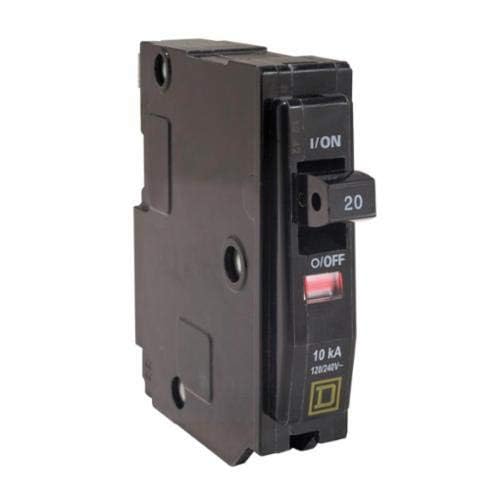
Image: A close-up view of the Square D QO120 Miniature Circuit Breaker in its tripped state, showing the handle in the middle position and a visible red indicator, signifying an electrical fault.
Resetting a Tripped Breaker:
- Identify Cause: Before resetting, identify and correct the cause of the trip (e.g., unplug overloaded appliances, fix short circuits).
- Full OFF: Push the handle completely to the "O/OFF" position. You may feel resistance as it resets internally.
- Turn ON: Push the handle firmly to the "I/ON" position.
- If the breaker immediately trips again, do not attempt to reset it further. Consult a qualified electrician.
Maintenance
The Square D QO120 circuit breaker is designed for minimal maintenance. Regular visual inspections are recommended.
Recommended Maintenance:
- Annual Visual Inspection: With power off, inspect the breaker for any signs of physical damage, discoloration, loose connections, or corrosion.
- Cleanliness: Ensure the area around the circuit breaker within the load center is clean and free of dust or debris.
- Testing: While not typically required for residential circuit breakers, some commercial or industrial applications may require periodic testing by a qualified professional.
Do not attempt to disassemble or repair the circuit breaker. If damage is observed or the breaker malfunctions, replace it with an identical Square D QO120 model.
Troubleshooting
This section addresses common issues you might encounter with your QO120 circuit breaker.
| Problem | Possible Cause | Solution |
|---|---|---|
| Breaker trips frequently | Overloaded circuit, short circuit, ground fault, faulty appliance | Reduce load on circuit, inspect appliances for faults, check wiring for short circuits. If problem persists, consult an electrician. |
| Breaker will not reset | Persistent fault (short circuit, severe overload), internal breaker damage | Ensure the handle is pushed fully to OFF before attempting to reset. If it still won't reset, there is likely a persistent fault or internal damage. Do not force it. Consult an electrician. |
| No power to circuit, but breaker is ON | Loose connection, faulty wiring, internal breaker failure, main breaker tripped | Check connections at the breaker and outlets. Verify main breaker is ON. If issues persist, consult an electrician. |
Always prioritize safety. If you are unsure about any electrical issue, contact a certified electrician.
Additional Resources
Official Product Video:
Video: An official brand story video from Schneider Electric, the manufacturer of Square D products. This video provides an overview of Schneider Electric's commitment to powering data centers, software solutions, lifecycle services, smart homes, real-time automation, and reliable power, emphasizing their role as a digital partner for sustainability and efficiency. It showcases various applications of their technology in daily life and industry.
Warranty Information
For specific warranty details regarding your Square D QO120 Miniature Circuit Breaker, please refer to the documentation provided with your purchase or visit the official Square D / Schneider Electric website. Warranty terms typically cover manufacturing defects under normal use and service.
Retain your proof of purchase for warranty claims.
Support and Contact
For technical assistance, product inquiries, or to locate a certified electrician, please contact Square D / Schneider Electric customer support.
- Online Support: Visit the Square D website for FAQs, product documentation, and support resources.
- Customer Service: Refer to your product packaging or the official website for regional contact numbers.
