
BEPER VE.510
BEPER VE.510 Water-Cooled Pedestal Fan User Manual
Model: VE.510
Brand: BEPER
Important Safety Instructions
Please read this manual carefully before using the appliance and keep it for future reference. Failure to follow these instructions may result in electric shock, fire, or serious injury.
- Always ensure the power supply matches the voltage specified on the rating label.
- Do not immerse the appliance, cord, or plug in water or any other liquid.
- Unplug the fan from the power outlet when not in use, before cleaning, or before moving.
- Do not operate the fan with a damaged cord or plug, or after the appliance malfunctions or has been damaged in any manner.
- Keep hands, hair, clothing, and other objects away from the fan blades during operation to prevent injury.
- Do not use the fan in areas with high humidity, such as bathrooms, or near water sources.
- Ensure the fan is placed on a stable, flat surface to prevent tipping.
- This appliance is for household use only. Do not use outdoors or for commercial purposes.
- Keep out of reach of children.
Product Overview
The BEPER VE.510 is a versatile pedestal fan designed to provide cooling and humidification. It features a digital control panel and a remote control for convenient operation.
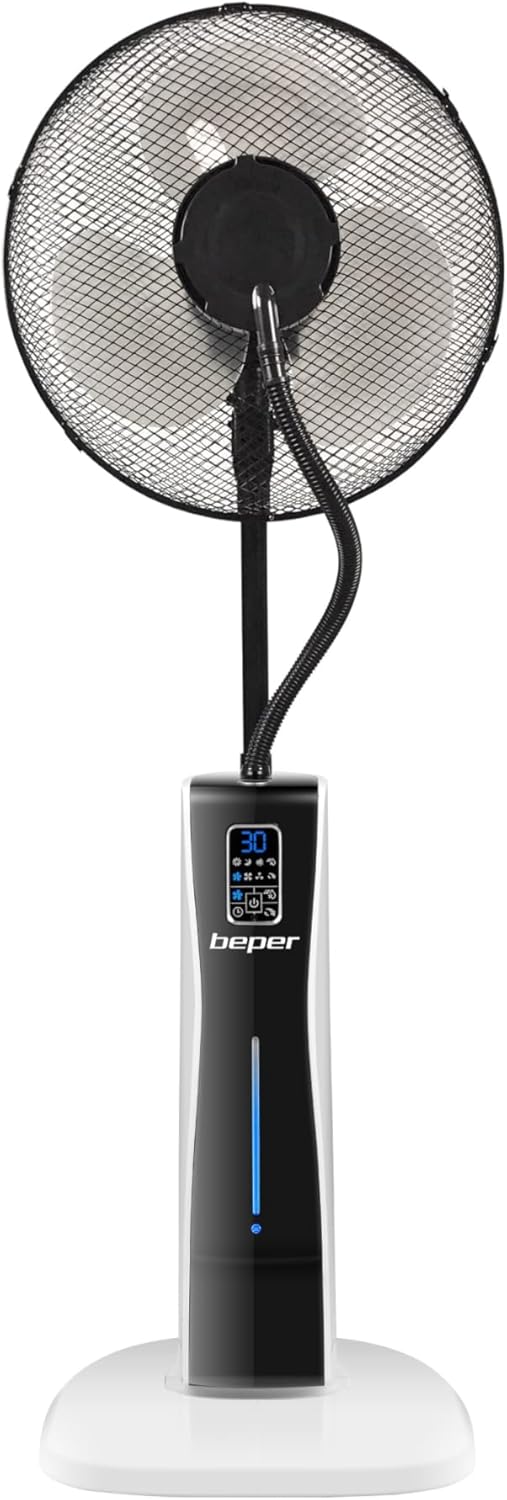
Figure 1: Front view of the BEPER VE.510 Water-Cooled Pedestal Fan.
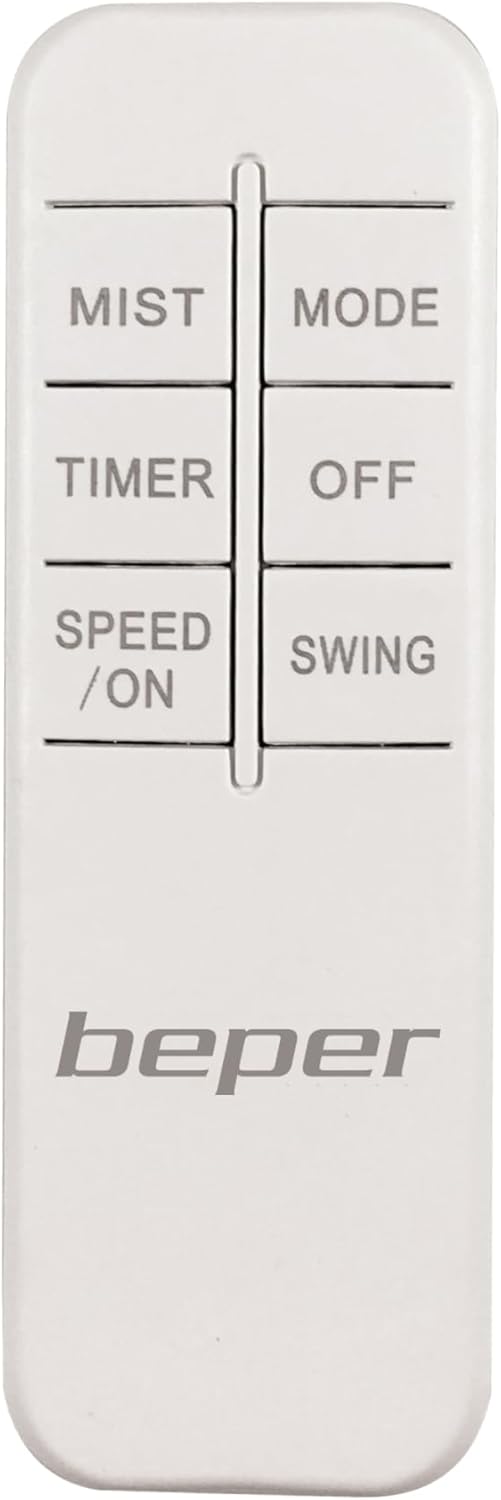
Figure 2: The remote control for the BEPER VE.510 fan, allowing convenient operation from a distance.

Figure 3: Close-up of the digital control panel with various function icons and a digital display.

Figure 4: The sturdy base of the fan, equipped with wheels for easy mobility.
Components:
- Fan Head with Blades and Grille
- Mist Nozzle and Tube
- Main Body with Digital Control Panel
- Water Tank (2-liter capacity)
- Base with Wheels
- Remote Control
- Power Cord
Setup
Unpacking:
Carefully remove all components from the packaging. Retain the packaging for future storage or transport.
Placement:
Place the fan on a firm, level surface. Ensure there is adequate space around the fan for proper air circulation and to prevent obstruction of the mist output.
Filling the Water Tank (for Humidifier Function):
- Locate the water tank access on the main body of the fan.
- Carefully remove the water tank.
- Unscrew the cap of the water tank.
- Fill the tank with clean, cool tap water. Do not exceed the maximum fill line.
- Securely screw the cap back on and reinsert the water tank into its compartment until it clicks into place.

Figure 5: Opening the side panel to access the water tank for refilling.

Figure 6: Pouring water into the removable tank before reinserting it into the fan unit.
Power Connection:
Plug the power cord into a standard electrical outlet. The fan is now ready for operation.
Operating Instructions
The BEPER VE.510 fan can be operated using either the digital control panel on the unit or the included remote control.
Using the Control Panel and Remote Control:

Figure 7: A hand holding the remote control, demonstrating its compact size and ease of use.
Figure 8: The digital control panel, showing various settings and indicators for fan operation.
Power On/Off:
Press the "SPEED / ON" button on the remote or the power icon on the control panel to turn the fan on. Press the "OFF" button on the remote or the power icon again to turn it off.
Adjusting Fan Speed:
Press the "SPEED / ON" button repeatedly to cycle through the 3 available fan speeds (Low, Medium, High).
Selecting Operating Mode:
Press the "MODE" button to switch between the three ventilation modes:
- Normal: Constant airflow at the selected speed.
- Breeze: Simulates natural wind with varying fan speeds.
- Nature: Provides a gentle, fluctuating airflow for a more natural feel.
Timer Function:
Press the "TIMER" button to set the automatic shut-off timer. Each press increases the timer by 1 hour, up to a maximum of 12 hours. The set time will be displayed on the digital panel.
Mist/Humidifier Function:
Press the "MIST" button to activate or deactivate the water mist function. Ensure the water tank is filled for this function to operate.

Figure 9: Visible mist being emitted from the fan, indicating the humidifier function is active.
Oscillation Function:
Press the "SWING" button to activate or deactivate the oscillation feature, allowing the fan head to rotate and distribute air over a wider area.
Maintenance
Regular cleaning and maintenance will ensure the longevity and optimal performance of your BEPER VE.510 fan.
General Cleaning:
Before any cleaning, always turn off the fan and unplug it from the power outlet. Use a soft, slightly damp cloth to wipe down the exterior surfaces of the fan. Do not use abrasive cleaners, solvents, or harsh chemicals, as these may damage the plastic parts.
Water Tank Cleaning:
To prevent mineral buildup and ensure hygienic operation, regularly clean the water tank. Remove the tank, empty any remaining water, and rinse it thoroughly with clean water. For stubborn deposits, a mild descaling solution (e.g., vinegar and water) can be used, followed by thorough rinsing. Allow the tank to air dry completely before refilling.
Fan Grille and Blades:
Periodically, dust may accumulate on the fan grille and blades. Use a soft brush or a vacuum cleaner with a brush attachment to gently remove dust. If necessary, the front grille can be carefully removed (refer to assembly instructions if applicable) for more thorough cleaning of the blades, ensuring the fan is unplugged.
Storage:
If storing the fan for an extended period, ensure it is clean and dry. Store it in its original packaging in a cool, dry place, away from direct sunlight and extreme temperatures.
Troubleshooting
This section addresses common issues you might encounter with your BEPER VE.510 fan. If the problem persists after following these steps, please contact customer support.
| Problem | Possible Cause | Solution |
|---|---|---|
| Fan does not turn on. | No power supply; Power button not pressed; Remote control batteries dead. | Check if the power cord is securely plugged into a working outlet. Press the power button on the unit or remote. Replace remote control batteries. |
| Mist function is not working. | Water tank is empty; Water tank not properly seated; Mist nozzle clogged. | Fill the water tank. Ensure the water tank is correctly inserted. Clean the mist nozzle if visible blockage. |
| Fan makes unusual noise. | Obstruction in fan blades; Fan not on a level surface; Internal component issue. | Turn off and unplug the fan, then check for any obstructions around the blades. Ensure the fan is on a stable, flat surface. If noise persists, contact customer support. |
| Remote control not responding. | Batteries are dead or incorrectly inserted; Obstruction between remote and fan; Remote control too far. | Replace batteries, ensuring correct polarity. Remove any obstructions. Operate the remote within its effective range. |
Specifications
| Feature | Detail |
|---|---|
| Model Number | VE.510 |
| Product Dimensions | 38 x 38.5 x 124 cm (14.96 x 15.16 x 48.82 inches) |
| Product Weight | 7.14 Kilograms (15.74 lbs) |
| Wattage | 75 Watts |
| Power Source | Corded Electric |
| Water Tank Capacity | 2 Liters |
| Timer | Up to 12 hours |
| Fan Speeds | 3 (Low, Medium, High) |
| Operating Modes | Normal, Breeze, Nature |
| Control Type | Digital Touch Panel, Remote Control |
| Included Components | Remote Control |
Warranty and Support
For warranty information, please refer to the documentation provided with your purchase or contact the retailer where the product was acquired. BEPER products are designed for reliability and performance.
If you encounter any issues or require technical assistance, please contact BEPER customer support. Contact details can typically be found on the official BEPER website or on your product packaging.
You can also visit the official BEPER store for more information and support:
Related documentsVE.510


Ask a question about this manual
Ask about setup, troubleshooting, compatibility, parts, safety, or missing instructions. Manuals+ will review the question and use this page’s manual context to help answer it.