
1. Introduction
Thank you for choosing the EdgeStar BIDW1802 18-inch built-in dishwasher. This manual provides essential information for the safe and efficient operation, installation, and maintenance of your appliance. Please read it thoroughly before use and retain it for future reference.

Image: The EdgeStar BIDW1802 18-inch built-in dishwasher in a kitchen setting.
2. Safety Information
To reduce the risk of fire, electric shock, or injury when using your dishwasher, follow these basic precautions:
- Read all instructions before using the appliance.
- Connect to a properly rated, protected, and grounded power supply.
- Do not operate the dishwasher if it has a damaged power cord or plug, or if it is not working properly.
- Keep children away from the dishwasher, especially when it is operating.
- Use only detergents and rinse agents recommended for dishwashers.
- Do not touch the heating element during or immediately after use.
- Always turn off the power supply before performing any maintenance or cleaning.
3. Product Overview
The EdgeStar BIDW1802 is an 18-inch wide built-in dishwasher designed for compact spaces, offering efficient cleaning with a variety of features.
Key Features:
- Accommodates up to eight (8) place settings.
- Includes a silverware basket and cup tray for optimized loading.
- Six (6) Wash Cycles: Heavy, Normal, ECO, Glass, Rapid, and Rinse.
- Three (3) Options: Sanitize, Hi Temp, and Heated Dry.
- Leakage sensor automatically shuts off water flow if a leak is detected.
- Quiet 52dB operation.
- Digital push-button control panel with digital display.
- Control panel lock feature to prevent accidental usage.
- Rinse aid compartment for spot-free drying.
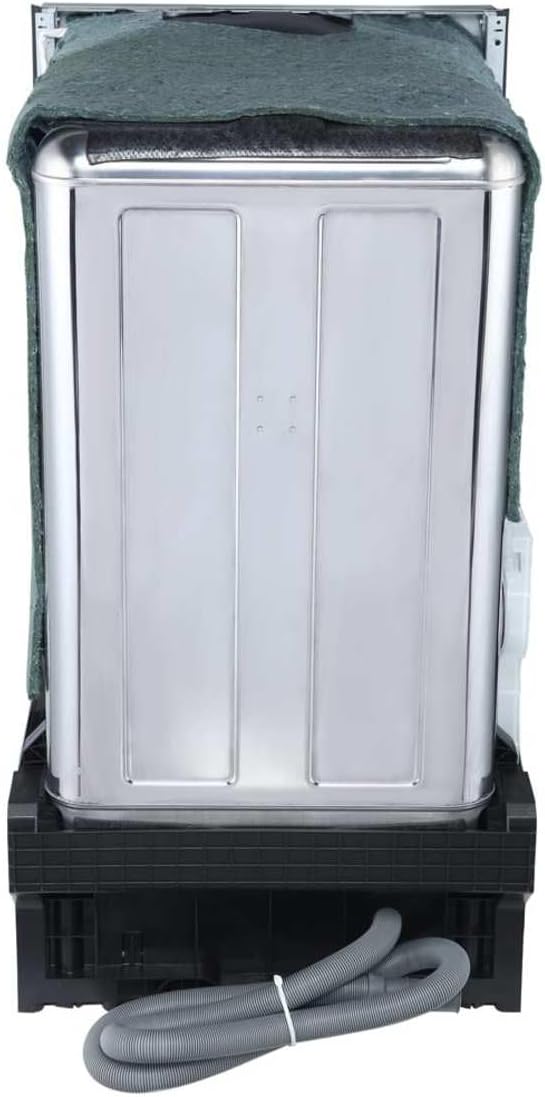
Image: Removable silverware basket and cup tray.
4. Setup and Installation
Proper installation is crucial for the performance and longevity of your dishwasher. It is recommended that installation be performed by a qualified professional.
Dimensions:
- Height: 32.5 inches
- Width: 17.6 inches
- Depth: 22.4 inches
Ensure adequate space and proper utility connections (water inlet, drain, electrical) are available before installation. Note that the unit does not typically include a power cord or installation kit, which may need to be purchased separately.

Image: Dimensional drawing of the dishwasher.

Image: Rear view of the dishwasher with water and drain hoses.
5. Operating Instructions
Control Panel:
The digital push-button control panel allows for easy selection of wash cycles and options. The digital display shows remaining time and error codes.

Image: Control panel with cycle and option buttons.
Wash Cycles:
- Heavy: For heavily soiled dishes and pots.
- Normal: Standard cycle for everyday dishes.
- ECO: Energy-saving cycle for normally soiled dishes.
- Glass: Gentle cycle for delicate glassware.
- Rapid: Quick wash for lightly soiled dishes.
- Rinse: Pre-rinse cycle for dishes not washed immediately.
Options:
- Sanitize: Increases water temperature for enhanced sanitization.
- Hi Temp: Boosts wash temperature for improved cleaning.
- Heated Dry: Activates a heating element for faster drying (available for all cycles except Rinse).
Loading Dishes:
Load dishes to maximize space and ensure water spray reaches all surfaces. Place larger items in the lower rack and smaller items, cups, and glasses in the upper rack. Use the dedicated silverware basket for cutlery.

Image: Dishwasher interior with dishes properly loaded.
6. Maintenance
Rinse Aid:
Regularly check and refill the rinse aid compartment. Rinse aid helps prevent spots and film build-up on dishes and improves drying performance. Use only rinse aid specifically designed for dishwashers.
Cleaning:
- Wipe the exterior with a soft, damp cloth.
- Clean the interior filter regularly to prevent food particle accumulation.
- Periodically run a dishwasher cleaning cycle with a specialized cleaner.
7. Troubleshooting
If your dishwasher is not operating correctly, consult the following common issues before contacting service.
| Problem | Possible Cause | Solution |
|---|---|---|
| Dishwasher does not start | Power supply issue, door not closed properly, cycle not selected. | Check power, ensure door is latched, select a wash cycle. |
| Dishes not clean | Improper loading, clogged spray arms, insufficient detergent, low water temperature. | Reload dishes, clean spray arm nozzles, use correct detergent amount, check water heater setting. |
| Water remaining in tub | Clogged drain filter, blocked drain hose, faulty drain pump. | Clean drain filter, check drain hose for kinks, contact service if pump is faulty. |
| Error Code E4 | Overflow detected. | Turn off power at the breaker for 24+ hours to allow the unit to dry. If the issue persists, contact customer support. |
8. Specifications
| Feature | Detail |
|---|---|
| Brand | EdgeStar |
| Model Name | EdgeStar BIDW1802BL 18 Inch Wide 8 Place Setting Built-In Dishwasher |
| Model Number | BIDW1802 |
| Installation Type | Built-In |
| Place Setting Capacity | 8 |
| Number of Cycles | 6 |
| Number of Options | 3 |
| Noise Level | 52 dB |
| Product Dimensions (D x W x H) | 17.63" x 22.44" x 32.5" |
| Item Weight | 62.8 pounds |
| Voltage | 120V |
| Energy Consumption | 258.33 kWh |
| Inner Material | Stainless Steel |
| Special Features | Compact, Leakage sensor |
9. Warranty and Support
This EdgeStar dishwasher comes with a 1 Year Manufacturer Warranty. For warranty claims, technical support, or service inquiries, please refer to the contact information provided in your purchase documentation or visit the official EdgeStar website.
Always have your model number (BIDW1802) and serial number ready when contacting support.


