
Glideaway Accord Adjustable Bed (Split Queen Without Lift Kit)
Accord Adjustable Bed User Manual
Model: Split Queen Without Lift Kit
Introduction
Thank you for choosing the Glideaway Accord Adjustable Bed. This manual provides essential information for the safe and efficient operation, setup, and maintenance of your new adjustable bed base. Please read this manual thoroughly before assembly and use, and retain it for future reference.
The Accord Adjustable Bed offers advanced features including Bluetooth, WiFi, voice control, and massage functions, designed to enhance your comfort and sleep experience.
Safety Information
- Electrical Safety: Ensure the power cord is not pinched or damaged. Do not operate the bed with a damaged cord or plug.
- Weight Capacity: Do not exceed the recommended weight capacity of the bed base. Refer to the specifications section for details.
- Pinch Points: Keep hands, feet, and pets clear of moving parts during operation to avoid injury.
- Children and Pets: Do not allow children or pets to play on or under the bed.
- Medical Devices: Consult your physician before using this product if you have a pacemaker or similar medical device, as the massage functions may interfere with its operation.
- Cleaning: Disconnect power before cleaning. Use a dry cloth for cleaning.
Setup
Unboxing and Component Check
Carefully remove all components from the packaging. Verify that all parts are present according to the packing list. Components typically include the adjustable base frame, legs, mattress retainer bar, remote control, power supply, and user manual.

Image: The Glideaway Accord Adjustable Bed base shown in an elevated head and foot position, illustrating its adjustable capabilities. The frame is grey fabric over a black metal structure with black legs.
Assembly Instructions
- Attach Legs: Screw the legs into the designated threaded holes on the underside of the bed base. Ensure all legs are securely tightened.
- Position Base: Carefully place the adjustable bed base in your desired location. It is recommended to have two people for this step due to the weight of the unit.
- Install Retainer Bar: Insert the mattress retainer bar into the holes at the foot of the bed base. This bar prevents the mattress from sliding off when the bed is adjusted.
- Connect Power: Plug the power supply into the control box on the bed base, then plug the power cord into a grounded electrical outlet.
- Initial Pairing (Remote/App): Follow the instructions provided with your remote control or the Glideaway app for initial pairing with the bed base.
Operating Instructions
Remote Control Functions
The wireless backlit ergonomic remote control allows for easy adjustment of your bed. Familiarize yourself with the buttons and their functions.
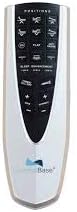
Image: Close-up of the Glideaway Accord adjustable bed remote control, showing various buttons for head and foot adjustments, massage, and preset positions.
- Head Up/Down: Adjusts the head section of the bed.
- Foot Up/Down: Adjusts the foot section of the bed.
- Flat: Returns the bed to a flat position.
- Zero Gravity: Elevates the head and foot to a position that may reduce pressure on the back.
- Anti-Snore: Slightly raises the head to open airways.
- Massage: Activates the massage function. Multiple modes and intensity levels may be available.
- Memory Presets: Program and recall your favorite positions.
- LED Flashlight: Built-in flashlight for convenience.
Bluetooth and WiFi Connectivity
The Accord bed can be controlled via a smartphone app using Bluetooth or WiFi. Download the official Glideaway app from your device's app store and follow the in-app instructions for pairing and control.
Voice Control
For voice control functionality, ensure your bed is connected to your home WiFi network and linked with a compatible smart home assistant (e.g., Amazon Alexa, Google Assistant). Refer to the app's instructions for setting up voice commands.
Maintenance
- Cleaning: Disconnect the power cord before cleaning. Wipe the bed base and frame with a dry cloth. Do not use liquid cleaners or abrasive chemicals.
- Inspections: Periodically check all connections and fasteners to ensure they are secure.
- Power Cord: Ensure the power cord is not pinched or damaged.
Troubleshooting
| Problem | Possible Cause | Solution |
|---|---|---|
| Bed does not operate. | No power, loose connection, remote not paired. | Check power cord connection to outlet and bed base. Ensure remote batteries are fresh and re-pair if necessary. |
| Remote control not responding. | Low batteries, remote out of range, interference. | Replace remote batteries. Move closer to the bed base. Reduce potential interference from other electronic devices. |
| Massage function not working. | Motor issue, power interruption. | Ensure bed has power. If problem persists, contact customer support. |
| Bed makes unusual noise. | Loose components, obstruction. | Check for any loose bolts or obstructions under the bed. |
Specifications
- Model: Accord Adjustable Bed (Split Queen Without Lift Kit)
- Brand: Glideaway
- Form Factor: Adjustable Bed
- Connectivity: Bluetooth, WiFi
- Control: Wireless Backlit Ergonomic Remote, Smartphone App, Voice Control
- Features: Full Range Positions (Head/Foot Up & Down), Zero Gravity, Anti-Snore, Massage (4 Wave Modes, 4 Levels of Intensity), Programmable Memory Positions, LED Underbed Lighting, Emergency Power Down.
- Upholstery: Upscale Charcoal Upholstery Fabric
- Legs: Recessed Steel Legs (Adjustable for heights 8", 11.5", and 15")
- Weight Capacity: 800 lb Total Weight Capacity (for King size, typically similar for Queen)
- UPC: 619843038479

Image: A detailed diagram highlighting key features of the Accord Adjustable Bed, including full range positions, Bluetooth/WiFi compatibility, LED underbed lighting, and various remote control functions.
Warranty and Support
Glideaway products are typically covered by a manufacturer's warranty. For specific warranty details, including coverage periods and terms, please refer to the warranty card included with your product or visit the official Glideaway website.
For technical support, troubleshooting assistance, or to inquire about replacement parts, please contact Glideaway Customer Service:
- Website: www.glideaway.com
- Phone: Refer to the Glideaway website or product packaging for contact numbers.
Please have your model number (Accord Adjustable Bed) and UPC (619843038479) ready when contacting support.
Related documentsAccord Adjustable Bed (Split Queen Without Lift Kit)


Ask a question about this manual
Ask about setup, troubleshooting, compatibility, parts, safety, or missing instructions. Manuals+ will review the question and use this page’s manual context to help answer it.