
Everdure HUB II
Everdure HUB II Charcoal Grill User Manual
Model: HUB II | Brand: Everdure
Introduction
The Everdure HUB II is a sophisticated 54-inch charcoal grill designed for outdoor cooking enthusiasts. It features a patented built-in rotisserie system and a quick electric ignition for convenience. This manual provides essential information for the safe and efficient operation, maintenance, and troubleshooting of your Everdure HUB II grill.

Figure 1: Front view of the Everdure HUB II Charcoal Grill.
Safety Information
WARNING: This product contains chemicals known to the State of California to cause cancer and birth defects or other reproductive harm. Please read the following carefully:
- The burning of charcoal cooking fuel generates some by-products which are on the list of substances known by the State of California to cause cancer, reproductive harm, or other birth defects. To reduce exposure to these substances, always operate this unit according to the use and care manual, ensuring you provide good ventilation when cooking with charcoal.
- Handling the brass material on this product exposes you to lead, a chemical known to the State of California to cause cancer and birth defects or other reproductive harm. Wash hands after handling.
- This product contains chemicals, including lead and compounds, known by the State of California to cause cancer, reproductive harm, or other birth defects.
- Wash your hands after using this product. For more information go to: www.P65Warnings.ca.gov
Always ensure the grill is placed on a stable, non-combustible surface away from flammable materials. Keep children and pets away from the grill during operation.
Setup and Assembly
The Everdure HUB II requires assembly. Please follow the detailed instructions provided in the included User Manual PDF for proper setup. Key components include the main grill body, rotisserie rod, chrome grills, windshield/lid, and Cliplock Forks™.
- Unpacking: Carefully remove all components from the packaging. Inspect for any damage.
- Base Assembly: Assemble the grill's legs and frame according to the diagrams. Ensure all fasteners are securely tightened.
- Firebox and Charcoal Tray: Install the porcelain enamel firebox and charcoal tray. These are designed for easy cleaning.
- Rotisserie System: Attach the rotisserie poles and motor. The system is powered by a retractable power cord.
- Grills and Accessories: Place the chrome grills with stay-cool handles onto the firebox. Prepare the Cliplock Forks™ for rotisserie use.
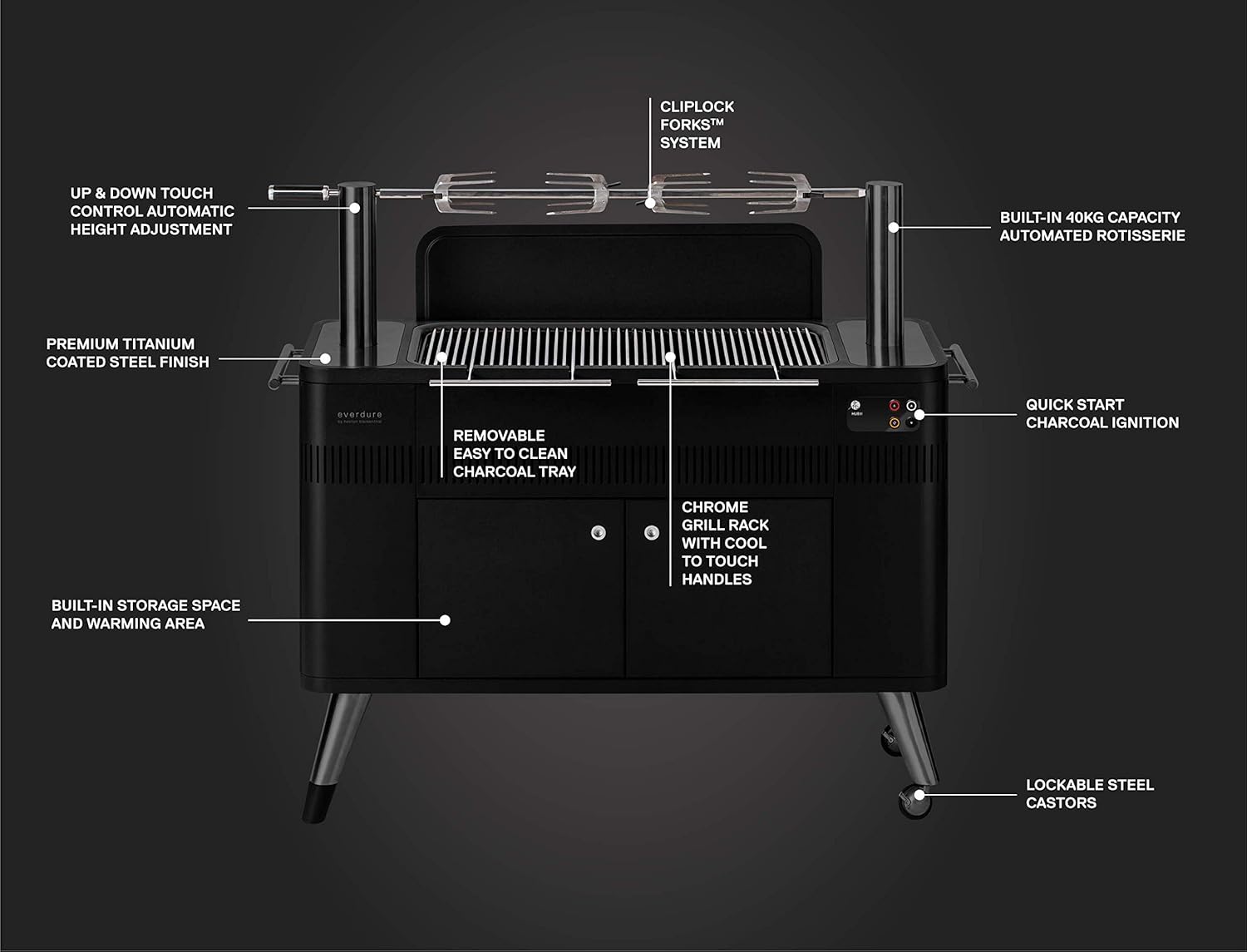
Figure 2: Key features and components of the Everdure HUB II.

Figure 3: Product dimensions for the Everdure HUB II.
Operating Instructions
Fast Flame Ignition System
The Fast Flame Ignition System allows you to get your charcoal burning at the optimal temperature in approximately 10 minutes. This combines the convenience of a gas grill with the authentic flavor of charcoal cooking.
- Ensure the charcoal tray is clean and properly positioned.
- Add your preferred lump charcoal to the tray.
- Press the ignition button on the control panel. The electric element will heat the charcoal.
- Monitor the charcoal until it is glowing and ready for cooking (approx. 10 minutes).

Figure 4: Activating the Fast Flame Ignition System.
Video 1: Demonstration of the Everdure HUB II Charcoal Grill's features, including the Fast Flame Ignition.
Built-in Rotisserie System (Rotiscope Technology)
The patented Rotiscope Technology allows for authentic rotisserie cooking with ease. The built-in rotisserie has 3 height settings and can support up to 85 lbs.
- Prepare your food (e.g., chicken, pork) and secure it firmly onto the rotisserie rod using the Cliplock Forks™.
- Insert the rotisserie rod into the motorized poles.
- Use the up/down touch controls on the panel to adjust the height of the rotisserie to achieve optimal cooking distance from the charcoal.
- Press the rotation button to begin the rotisserie action.
- The rotisserie kit and accessories can be stowed in the side compartment when not in use.

Figure 5: The automated rotisserie system in action, demonstrating its ease of use for entertaining.

Figure 6: Internal mechanism for adjusting rotisserie height with touch controls.
Video 2: A detailed look at grilling and rotisserie cooking on the Everdure HUB II.
Video 3: Demonstrating the use of the rotisserie cage accessory for cooking various items.
Video 4: A demonstration of spit roasting on the HUB II.
General Grilling
For direct grilling, ensure the charcoal is evenly distributed and glowing. Place food directly on the chrome grills. The stay-cool handles allow for easy adjustment or reloading of charcoal during cooking.

Figure 7: Example of direct grilling on the Everdure HUB II.
Storage and Warming Area
The grill is equipped with a two-shelf storage/warming area behind double-lined doors. This area can be used to keep cooked food warm or store grilling essentials.

Figure 8: The integrated storage and warming drawer.
Maintenance and Cleaning
Regular cleaning and maintenance will ensure the longevity and optimal performance of your Everdure HUB II grill.
- Charcoal Tray: The porcelain enamel charcoal tray is removable for easy cleanup. Allow the grill to cool completely before removing and emptying the tray.
- Grill Grates: Clean the chrome grill grates after each use with a grill brush. For stubborn residue, soak in warm, soapy water.
- Exterior Surfaces: Wipe down exterior surfaces with a damp cloth and mild detergent. Avoid abrasive cleaners that may damage the finish.
- Rotisserie Components: Clean the rotisserie rod and Cliplock Forks™ after each use. Store them in the designated side compartment.
- Storage: When not in use, store the grill in a dry, protected area. Consider using a grill cover (sold separately) to protect it from the elements.
Troubleshooting
| Problem | Possible Cause | Solution |
|---|---|---|
| Charcoal not igniting with Fast Flame System. | Power cord not connected; element malfunction; insufficient charcoal contact. | Ensure power cord is securely plugged in. Check for tripped circuit breaker. Arrange charcoal to make good contact with the heating element. If problem persists, contact customer support. |
| Rotisserie not rotating or adjusting height. | Power issue; motor malfunction; obstruction; weight exceeds limit. | Verify power connection. Check for any obstructions preventing rotation or movement. Ensure food weight does not exceed 85 lbs. If motor is faulty, contact customer support. |
| Excessive smoke during cooking. | Too much fat dripping onto coals; insufficient ventilation. | Trim excess fat from meat. Ensure proper ventilation around the grill. Adjust food position to minimize direct fat drips onto hot coals. |
Specifications
- Brand: Everdure
- Model Name: HUB II
- Product Dimensions: 22.8"D x 54"W x 48"H
- Item Weight: 168.87 Pounds
- Color: Graphite
- Fuel Type: Charcoal
- Material: Alloy Steel
- Handle Material: Titanium
- Finish Type: Powder Coated
- Installation Type: Free Standing
- Voltage: 240 Volts
- Number of Racks: 2
- Number of Shelves: 1 (warming/storage area)
- Included Components: HUB II, 1 Rotisserie Rod, 2 Chrome Grills, 1 Lid/Windshield, 4 Cliplock Forks™
- Special Features: Rotisserie, Easy to Clean, Weather Proof, Large Grill, Electric Ignition
Warranty and Support
For detailed warranty information and customer support, please refer to the official Everdure website or the documentation included with your product. Digital versions of the User Guide and User Manual are available for download:
Additional protection plans may be available for purchase to extend coverage beyond the standard warranty period.
Related documentsHUB II


Ask a question about this manual
Ask about setup, troubleshooting, compatibility, parts, safety, or missing instructions. Manuals+ will review the question and use this page’s manual context to help answer it.