
1. Introduction and Overview
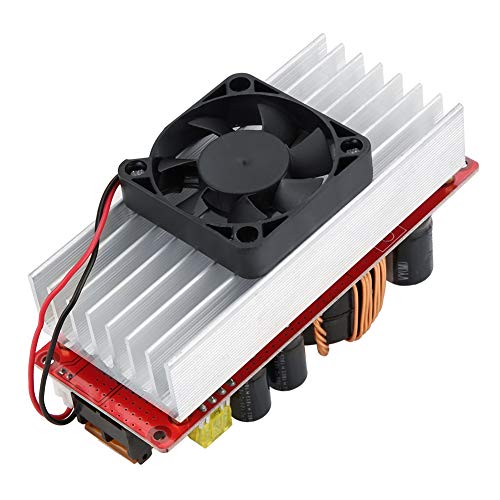
This manual provides essential information for the safe and effective use of your Walfront 10-60V to 12-97V 1500W 30A DC-DC Step-Up Converter Module. This non-isolated DC power converter is designed for high-power applications, offering stable and efficient voltage conversion with advanced protection features.
Key Features:
- High Power Output: Converts 10-60VDC input to a stable 12-97VDC output, supporting up to 1500W.
- High Conversion Efficiency: Achieves 92%-97% efficiency, minimizing energy loss.
- Multiple Protection Functions: Includes overcurrent protection, short circuit protection, and reverse input protection for enhanced safety.
- Intelligent Temperature Control: Features a fan that automatically activates at approximately 60°C and stops below 60°C to maintain optimal operating temperature and extend lifespan.
- Wide Application Range: Suitable for solar street light drivers, LED lighting, vehicle power supplies, DIY adjustable power supplies, and battery charging.
2. Safety Information
Please read and understand all safety warnings before operating this device. Failure to follow these instructions may result in electric shock, fire, or serious injury.
- Electrical Hazard: This module operates with high voltage and current. Always disconnect power before making any connections or adjustments.
- Proper Ventilation: Ensure adequate airflow around the module, especially the heatsink and fan, to prevent overheating.
- Correct Polarity: Always connect input and output with correct polarity. Reverse polarity can damage the module and connected devices.
- Insulation: Ensure all connections are properly insulated to prevent short circuits.
- Professional Installation: If you are not familiar with electrical wiring, seek assistance from a qualified professional.
- Environmental Conditions: Do not expose the module to moisture, extreme temperatures, or corrosive environments.
3. Package Contents
Verify that all items are present and in good condition upon opening the package.
- 1 x Walfront 10-60V to 12-97V 1500W 30A DC-DC Step-Up Converter Module
- User Manual (this document)
4. Setup Instructions
Follow these steps to set up your DC-DC converter module.
- Identify Components: Familiarize yourself with the input/output terminals, voltage/current adjustment potentiometers, and protection features.

- Input Connection: Connect your DC power source (10-60V) to the input terminals labeled 'Input +' and 'Input -' (or 'Input GND'). Ensure correct polarity. Use appropriate gauge wires for the expected current.
- Output Connection: Connect your load or device to the output terminals labeled 'Output +' and 'Output -' (or 'Output GND'). Ensure correct polarity.
- Initial Adjustment (Voltage): Before applying power to the load, turn the CV (Constant Voltage) potentiometer (labeled 'CV電圧調整' or 'w204') counter-clockwise to its minimum setting.
- Initial Adjustment (Current): Turn the CC (Constant Current) potentiometer (labeled 'cc定電流制御') counter-clockwise to its minimum setting.
- Power On: Apply power to the input of the module.
- Set Output Voltage: Using a multimeter, measure the output voltage. Slowly turn the CV potentiometer clockwise until the desired output voltage (12-97V) is reached.
- Set Output Current (Optional, for constant current applications): If using constant current mode (e.g., for battery charging), connect your load. Then, slowly turn the CC potentiometer clockwise until the desired output current is reached. If not using constant current, this step may be skipped, or the CC can be set to maximum to allow the voltage to regulate freely.
- Fan Connection: The module includes a temperature-controlled fan. Connect the fan to the designated fan connector (labeled 'ファン接続'). The fan will operate automatically when the module temperature reaches approximately 60°C.
5. Operating Instructions
Once set up, the module operates automatically. Observe the following guidelines for optimal performance:
- Monitor Temperature: The intelligent fan will manage the module's temperature. Ensure the fan is not obstructed.
- Load Management: Do not exceed the maximum output power (1500W) or current (30A) to prevent damage.
- Voltage and Current Stability: The module is designed to provide stable output. If fluctuations occur, check input power stability and load conditions.
6. Maintenance
Regular maintenance helps ensure the longevity and reliable operation of your module.
- Cleaning: Periodically clean the module, especially the heatsink and fan blades, to remove dust and debris. Use a soft brush or compressed air. Ensure power is disconnected before cleaning.
- Connection Check: Regularly inspect all wiring connections to ensure they are secure and free from corrosion.
- Environmental Check: Ensure the operating environment remains within specified temperature and humidity ranges.
7. Troubleshooting
If you encounter issues with your module, refer to the following common problems and solutions:
| Problem | Possible Cause | Solution |
|---|---|---|
| No output voltage | No input power; Incorrect input polarity; Blown fuse; Output short circuit; Undervoltage protection activated. | Check input power supply; Verify input wiring polarity; Replace fuse if necessary; Check output for short circuits; Ensure input voltage is above the undervoltage protection threshold. |
| Output voltage too low/high | CV potentiometer incorrectly set; Input voltage too low/high. | Adjust CV potentiometer; Ensure input voltage is within 10-60V range. |
| No output current (in CC mode) | CC potentiometer incorrectly set; Load resistance too high; Overcurrent protection activated. | Adjust CC potentiometer; Check load for open circuit; Reduce load or ensure it's within current limits. |
| Module overheating | Insufficient ventilation; Excessive load; Fan malfunction. | Ensure proper airflow; Reduce load; Check fan operation and clear obstructions. |
8. Technical Specifications
Detailed specifications for the Walfront DC-DC Step-Up Converter Module:
| Parameter | Value |
|---|---|
| Brand | Walfront |
| Model Number | Wal front9sbfz08351 |
| Input Voltage | DC 10-60V |
| Output Voltage | DC 12-97V (Adjustable) |
| Output Power | 1500W (Max) |
| Output Current | 30A (Max) |
| Conversion Efficiency | 92% - 97% |
| Operating Temperature | -40°C to 85°C |
| Switching Frequency | 150KHz |
| Module Size (with copper pillars and fan) | 130mm x 52mm x 84mm |
| Module Size (without copper pillars and fan) | 130mm x 52mm x 67mm |
| Product Weight | 0.37 kg |
| UPC | 750086417451 |
| ASIN | B07RMT9W7D |
| Country of Origin | China |

9. Warranty Information
Walfront products are manufactured to high-quality standards. This product is covered by a standard manufacturer's warranty against defects in materials and workmanship. The warranty period typically begins from the date of purchase. Please retain your proof of purchase for warranty claims.
The warranty does not cover damage caused by:
- Improper installation or use.
- Unauthorized modifications or repairs.
- Accidents, abuse, or neglect.
- Operating outside the specified environmental or electrical parameters.
For specific warranty terms and conditions, please refer to the product packaging or contact Walfront customer support.
10. Customer Support
If you have any questions, require technical assistance, or need to make a warranty claim, please contact Walfront customer support through the following channels:
- Online Support: Visit the official Walfront website for FAQs, support resources, and contact forms.
- Email: Refer to your product packaging or the Walfront website for the appropriate support email address.
- Retailer Support: If purchased from a retailer, you may also contact their customer service for assistance.
When contacting support, please have your product model number (Wal front9sbfz08351) and proof of purchase readily available.