
1. Introduction
The Walfront SW-S11 is a compact and lightweight voltage converter designed for international travel. It facilitates the use of small power appliances by converting input and output voltages between 110V-220V and 220V-110V, making it suitable for various countries.

Front view of the Walfront SW-S11 150W Voltage Converter, showing the universal AC output socket and the US-style input plug. The label indicates 'SW-S11 POWER ELECTRICITY CONVERTER 150W ATT Max' and input/output voltage ranges.
2. Safety Information
WARNING: Improper use of voltage converters can lead to appliance damage, overheating, or fire hazards. Always read and follow these safety guidelines.
- Check Appliance Wattage: Ensure your appliance's wattage does not exceed the converter's compatible device power of 80W (maximum output 150W). Overloading can cause the converter to overheat and shut down, or damage the appliance.
- Resistive vs. Inductive Loads: This converter is primarily designed for resistive loads (e.g., hair dryers, curling irons, electric blankets, soldering irons). Inductive loads (e.g., motors, power drills, fans) may draw higher peak currents and should be used with caution, ensuring they are well within the 80W compatible power limit.
- Input Voltage Selection: The converter features a switch on the back to select the correct input voltage (117V for 110V/120V regions or 230V for 220V/240V regions). Always verify this setting matches the local wall outlet voltage before plugging in the converter.
- Overload Protection: The converter is equipped with an auto-trip feature that activates upon 120W overload detection.
- Thermal Defense: The transformer will automatically shut down if its internal temperature reaches 100°C (212°F) and will reset once cooled to 50°C (122°F).
- Indoor Use Only: This device is intended for indoor use only.
- Disconnect Power: Always disconnect the power supply before servicing or if not in use for extended periods.
3. Product Features
- Dual Voltage Conversion: Converts 110V to 220V (step-up) and 220V to 110V (step-down).
- Universal Output Socket: Compatible with various plug types for small power appliances.
- Compact and Lightweight: Ideal for travel due to its small size and portability.
- Stable Performance: Designed for reliable and long-lasting operation.
- Safety Features: Includes overload protection and thermal defense mechanisms.
4. Specifications
| Specification | Detail |
|---|---|
| Model Number | SW-S11 |
| Maximum Output Power | 150W |
| Compatible Device Power | 80W (recommended for continuous use) |
| Input Voltage | AC 110V/120V or AC 220V/240V (selectable via switch) |
| Output Voltage | AC 220V/240V (when input is 110V/120V) AC 110V/120V (when input is 220V/240V) |
| Frequency | 50Hz/60Hz |
| Dimensions (L x W x H) | 4.13 x 2.56 x 2.17 inches (approx. 10.5 x 6.5 x 5.5 cm) |
| Weight | 1.58 pounds (approx. 721 g) |
| Input Plug Type | US-style (Type A/B) with voltage selector switch |
| Output Socket Type | Universal (compatible with various international plugs) |

Detailed image displaying the dimensions of the converter: approximately 11cm (height), 6.7cm (length), and 5.5cm (width). It also reiterates the maximum output of 150W and compatible device power of 80W.
5. Setup
- Identify Local Voltage: Determine the voltage of the wall outlet in your current location (e.g., 110V/120V or 220V/240V).
- Set Input Voltage Switch: Locate the input voltage selector switch on the back of the converter. Set it to match the local wall outlet voltage. For example, if you are in a 110V region, set the switch to 'AC-117V'. If you are in a 220V region, set it to 'AC-230V'.
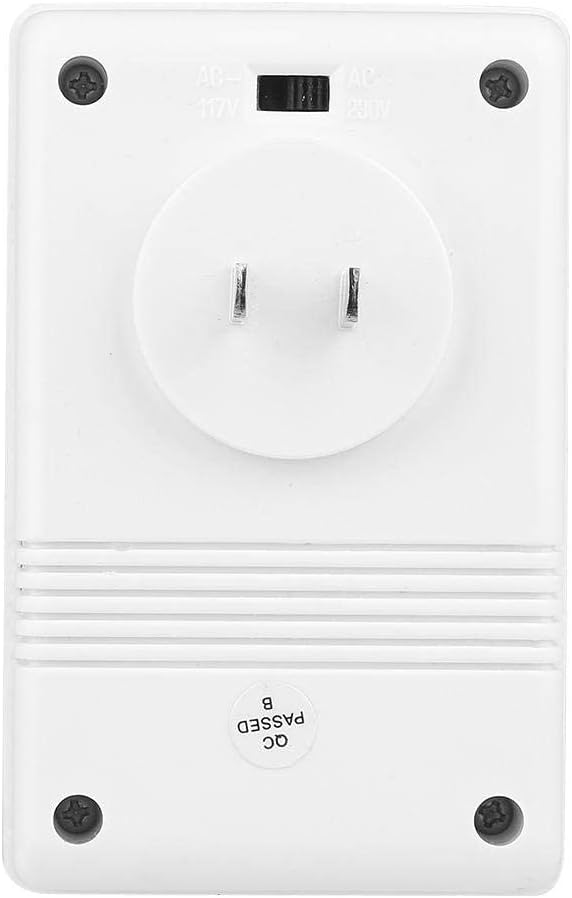
Rear view of the converter, featuring the input voltage selector switch (AC-117V for 110V/120V regions and AC-230V for 220V/240V regions) and the US-style plug.
- Connect to Wall Outlet: Plug the converter's US-style input plug into the appropriate wall outlet.
- Connect Appliance: Plug your appliance into the universal output socket on the front of the converter. Ensure your appliance's plug fits securely into the universal socket.
6. Operating Instructions
- Verify Connections: Double-check that the input voltage switch is correctly set and both the converter and your appliance are securely plugged in.
- Power On: Turn on the power switch on the converter (if present, usually a red ON/OFF switch). The power indicator light should illuminate.
- Use Appliance: You can now safely use your appliance.
- Power Off: When finished, turn off your appliance, then turn off the converter's power switch, and finally unplug the converter from the wall outlet.
This video provides a visual overview of the Walfront SW-S11 150W Voltage Converter, showcasing its design and how to use its step-up and step-down voltage conversion capabilities.
This video demonstrates the unboxing and testing of a similar 120W step-up voltage transformer. It shows how to measure output voltage and tests its performance with various appliances, including a soldering iron and a fan. It also highlights the importance of not exceeding the wattage limit with high-power appliances like a heat gun.
7. Maintenance
- Keep the converter in a dry, well-ventilated area.
- Avoid exposing the converter to extreme temperatures or direct sunlight.
- Clean the exterior with a soft, dry cloth. Do not use liquid cleaners.
- Regularly check the power cord and plugs for any signs of damage.
8. Troubleshooting
- Converter Not Powering On:
- Check if the converter is securely plugged into the wall outlet.
- Ensure the wall outlet is functional.
- Verify the ON/OFF switch on the converter is in the 'ON' position.
- Check the fuse (if accessible) and replace if blown. - Appliance Not Working / Weak Performance:
- Confirm the input voltage switch on the converter is set correctly for the local power supply.
- Ensure the appliance's wattage does not exceed the converter's 80W compatible power limit. Overloading will cause reduced performance or shutdown.
- If the converter has shut down due to thermal defense, allow it to cool down before attempting to use it again. - Overheating:
- Immediately unplug the converter and the appliance.
- Check the appliance's wattage to ensure it is within the converter's limits.
- Ensure adequate ventilation around the converter. Do not cover it.
- Allow the converter to cool down completely before reuse.
9. Warranty and Support
For warranty information or technical support, please refer to the product packaging or contact Walfront customer service directly. Keep your purchase receipt for any warranty claims.
