
Introduction
Thank you for choosing the NAUTICA NAPOBP901 Analog Silver Dial Men's Watch. This manual provides essential information for the proper setup, operation, and maintenance of your new timepiece. Please read these instructions carefully to ensure optimal performance and longevity of your watch.
Product Overview
The NAUTICA NAPOBP901 is a robust analog quartz watch designed for men, featuring a distinctive silver dial and a comfortable red silicone band. It is equipped with a chronograph function and offers water resistance up to 100 meters, making it suitable for various activities.
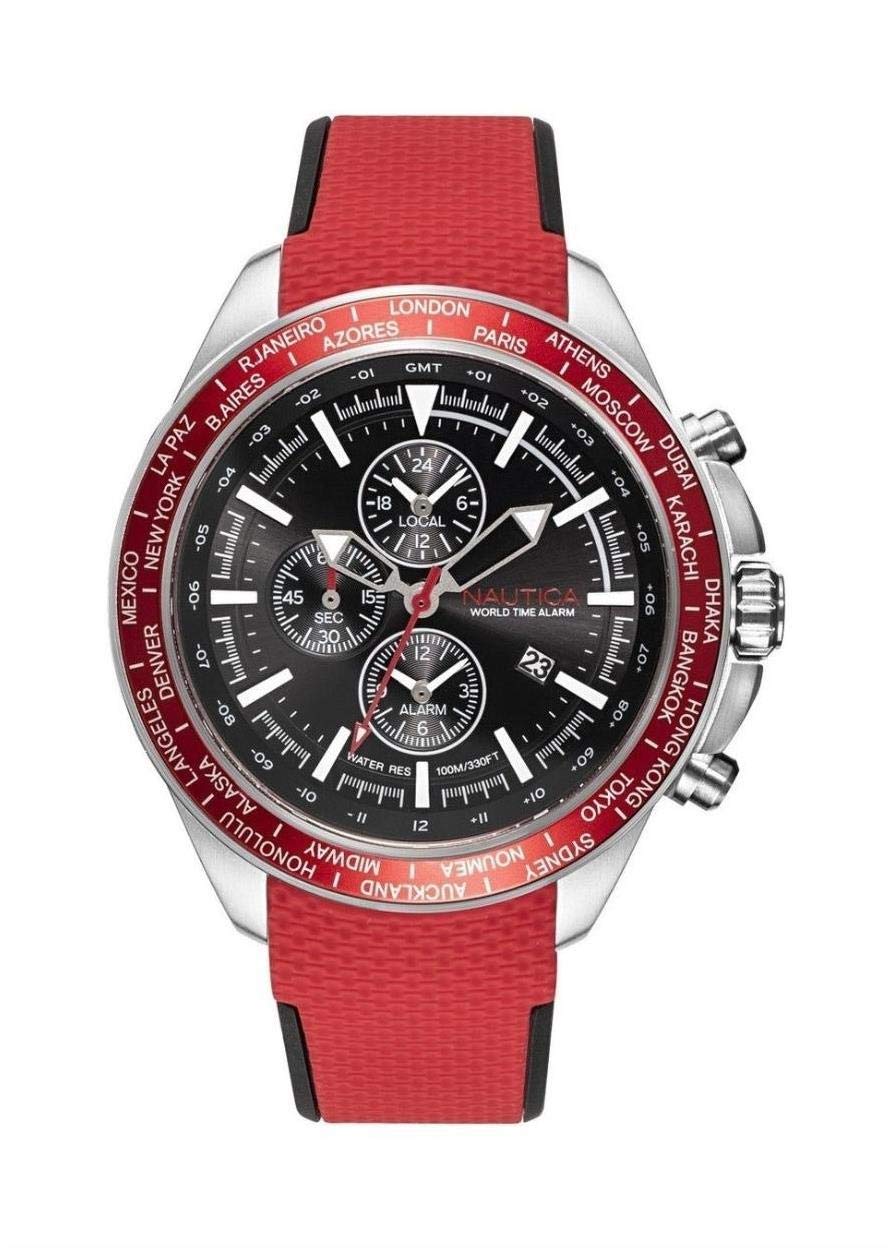
Image: Front view of the NAUTICA NAPOBP901 watch, showcasing its silver dial, red silicone band, and stainless steel case.
Key Features:
- Dial Color: Silver
- Case Shape: Round
- Dial Glass Material: Mineral
- Band Color: Red
- Band Material: Silicone
- Movement Type: Quartz
- Display Type: Analog
- Case Material: Stainless Steel
- Case Diameter: 41 millimeters
- Water Resistance Depth: 100 meters (10 ATM)
- Special Feature: Chronograph
Setup
Setting the Time:
- Locate the crown on the right side of the watch case.
- Gently pull the crown out to the second click position for time adjustment.
- Rotate the crown clockwise or counter-clockwise to set the hour and minute hands to the correct time.
- Once the time is set, push the crown back into its normal operating position against the watch case. The second hand will begin to move, indicating the watch is running.
Note: The watch is powered by a quartz movement and comes with a pre-installed battery. No initial battery installation is required.
Operating Instructions
Using the Chronograph Function:
Your NAUTICA NAPOBP901 watch features a chronograph, which is a stopwatch function. It typically has two pushers located above and below the crown.
- Start/Stop: Press the upper pusher (usually at the 2 o'clock position) to start the chronograph. Press it again to stop the timing.
- Reset: After stopping the chronograph, press the lower pusher (usually at the 4 o'clock position) to reset all chronograph hands to their zero positions.
Ensure the crown is fully pushed in before operating the pushers, especially if the watch is exposed to water.
Maintenance
Water Resistance:
This watch is water resistant up to 100 meters (10 ATM). This means it is suitable for swimming, snorkeling, and showering. However, it is not suitable for scuba diving or high-impact water sports. Always ensure the crown is fully pushed in before any contact with water.
- Do not operate the crown or pushers while the watch is wet or submerged.
- Avoid exposing the watch to hot water or steam, as this can compromise the water seals.
- After exposure to saltwater, rinse the watch with fresh water and dry it thoroughly with a soft cloth.
Cleaning and Care:
- Wipe the watch case and crystal regularly with a soft, dry cloth to remove dust and smudges.
- For the silicone band, you can gently clean it with mild soap and water, then rinse and dry completely. Avoid harsh chemicals or abrasive materials.
- Store your watch in a cool, dry place away from direct sunlight and extreme temperatures when not in use.
- Avoid exposing the watch to strong magnetic fields, as this can affect the accuracy of the quartz movement.
Battery Replacement:
The watch uses 1 AAA battery (included). When the watch stops or the second hand begins to skip, it indicates a low battery. Battery replacement should be performed by a qualified watch technician to ensure proper sealing and water resistance.
Note: The specification "1 AAA batteries required. (included)" is unusual for a watch. Most watches use button cell batteries. If your watch uses a different battery type, please consult a professional.
Troubleshooting
| Problem | Possible Cause | Solution |
|---|---|---|
| Watch has stopped or is running intermittently. | Low or depleted battery. | Replace the battery. Contact a qualified watch technician. |
| Time is inaccurate. | Watch exposed to strong magnetic fields; battery low; internal movement issue. | Keep watch away from magnets. Replace battery if low. If problem persists, seek professional service. |
| Water condensation inside the crystal. | Water resistance compromised (e.g., crown not fully pushed in, seals damaged). | Immediately take the watch to a service center to prevent further damage. Do not attempt to dry it yourself. |
| Chronograph hands do not reset to zero. | Requires calibration or internal issue. | Consult a watch technician for adjustment or repair. |
Specifications
| Model Number | NAPOBP901 |
| Brand | NAUTICA |
| Movement Type | Quartz |
| Display Type | Analog |
| Dial Color | Silver |
| Case Material | Stainless Steel |
| Case Diameter | 41 Millimeters |
| Case Shape | Round |
| Dial Glass Material | Mineral |
| Band Material | Silicone |
| Band Color | Red |
| Band Width | 20 Millimeters |
| Water Resistance Depth | 100 Meters (10 ATM) |
| Special Feature | Chronograph |
| Item Weight | 40 Grams |
| Batteries | 1 AAA battery (included) |
| Product Dimensions | 10 x 10 x 10 cm |
Warranty and Support
Warranty Information:
NAUTICA watches are manufactured to high-quality standards and are covered by a limited warranty against manufacturing defects. The specific terms and duration of your warranty may vary by region. Please refer to the warranty card included with your purchase or visit the official NAUTICA website for detailed warranty information.
Customer Support:
For any questions, service requests, or technical assistance, please contact NAUTICA customer support. Contact details can typically be found on the official NAUTICA website or on your warranty documentation.
When contacting support, please have your watch model number (NAPOBP901) and purchase information readily available.
