
JOYO JF-10
JOYO Dyna Compressor JF-10 Instruction Manual
Model: JF-10 | Brand: JOYO
1. Introduction
The JOYO JF-10 Dyna Compressor is a guitar effect pedal designed for electric guitar and bass, offering dynamic compression with low noise and true bypass. It features a classic Ross compressor re-creation, essential for shaping your tone by evening out signal levels and increasing sustain.

The JOYO JF-10 Dyna Compressor pedal, showcasing its compact design and control layout.
Key Features:
- Dynamic Compression: Compresses louder signals while boosting lower signals for a smoother, more consistent sound.
- Classic Ross Re-creation: Delivers a vintage compression tone.
- Low Noise Design: Engineered to minimize unwanted noise.
- True Bypass: Ensures transparent tone when the effect is disengaged.
- Durable Construction: Features an aluminum-alloy housing with a stoving varnish finish for stability and strength.
2. Setup and Connections
Power Supply:
The JF-10 Dyna Compressor requires a DC 9V power adapter with a center-negative polarity. The power adapter is not included with the pedal. Using a JOYO original power adapter or another reliable brand that meets the working current requirement (8mA) is recommended to ensure proper operation and avoid unexpected noise.

Illustration of the DC 9V power input on the pedal.
Connecting the Pedal:
Ensure your guitar and amplifier are fully connected to the pedal before use.
- Input Jack (IN): Connect your electric guitar or bass to the 'IN' jack using a 1/4-inch instrument cable. (500KΩ impedance)
- Output Jack (OUT): Connect the 'OUT' jack to your amplifier or the next pedal in your signal chain using a 1/4-inch instrument cable. (10KΩ impedance)
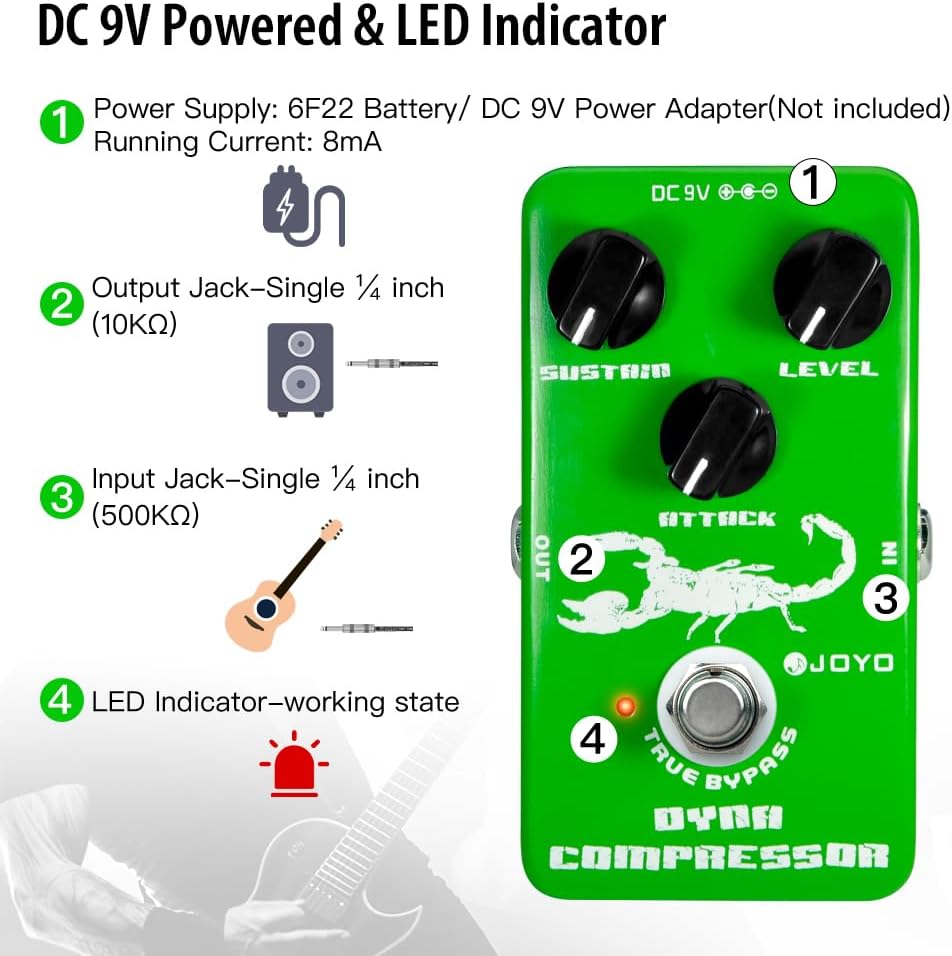
Overview of the pedal's connections and LED indicator.
3. Operation and Controls
The JOYO JF-10 Dyna Compressor features three control knobs and a true bypass footswitch to shape your sound.

The three control knobs and True Bypass footswitch on the Dyna Compressor.
Control Knobs:
- SUSTAIN: Adjusts the delaying time of the compression effect, allowing notes to ring out longer.
- ATTACK: Controls the starting time of the compression effect. Tweak this knob to boost your bottom end and level off high-output pickups.
- LEVEL: Sets the overall output level of the effect.
True Bypass Footswitch:
The footswitch engages or disengages the compression effect. When disengaged, the true bypass circuit ensures that your instrument's signal passes through the pedal without any tonal coloration or loss.
Demonstration Video:
A video demonstrating the sound and functionality of the JOYO Dyna Compressor pedal.
4. Specifications
| Feature | Detail |
|---|---|
| Model Number | Manufacturer-JOYO-0JF10-0019US |
| Item Weight | 10.2 ounces (290 Grams) |
| Product Dimensions | 4.72 x 2.17 x 2.83 inches (12L x 7.2W x 5.5H cm) |
| Body Material | Aluminum, Stainless-Steel |
| Color | Green-white |
| Compatible Devices | Electric Guitar, Guitar Amplifier, Guitar Pedal |
| Connector Type | 1/4-Inch Right Angle, 1/4-Inch Right Angle to Straight, 1/4-Inch Straight |
| Hardware Interface | 1/4-inch Audio |
| Signal Format | Analog |
| Power Source | Corded Electric, Battery Powered (9V battery not included) |
| Voltage | 9 Volts (DC) |
| Running Current | 8mA |
5. Maintenance
To ensure the longevity and optimal performance of your JOYO JF-10 Dyna Compressor pedal, follow these maintenance guidelines:
- Cleaning: Use a soft, dry cloth to clean the pedal's exterior. Avoid using abrasive cleaners or solvents, which can damage the finish.
- Storage: Store the pedal in a cool, dry place away from direct sunlight, extreme temperatures, and high humidity.
- Power Disconnection: Disconnect the power supply when the pedal is not in use for extended periods to prevent battery drain (if using battery) and potential circuit damage.
- Cable Care: Handle instrument and power cables carefully. Avoid sharp bends or kinks that can damage internal wiring.
6. Troubleshooting
If you encounter issues with your JOYO JF-10 Dyna Compressor, consider the following common troubleshooting steps:
- No Sound/Weak Signal:
- Check all cable connections (input, output, power) to ensure they are secure.
- Verify the power supply is correctly connected and providing the specified DC 9V (center negative).
- If using a battery, check if it's depleted and replace it if necessary.
- Ensure the 'LEVEL' knob is not set to minimum.
- Test the pedal with different cables and a different power supply if possible.
- Unexpected Noise/Hum:
- Ensure you are using a regulated 9V DC power supply with center-negative polarity. Unregulated power supplies can introduce noise.
- Check for faulty or unshielded cables.
- Move the pedal away from other electronic devices that might cause interference.
- Ensure proper grounding in your audio setup.
- Effect Not Engaging:
- Press the footswitch firmly to ensure it engages. The LED indicator should light up when the effect is active.
- Check power supply as described above.
7. Warranty and Support
For warranty information, technical support, or service inquiries, please refer to the official JOYO website or contact your authorized JOYO dealer. Keep your purchase receipt as proof of purchase for any warranty claims.
JOYO has a decade of brand reputation, offering reliable products and support to musicians worldwide.
Related documentsJF-10


Ask a question about this manual
Ask about setup, troubleshooting, compatibility, parts, safety, or missing instructions. Manuals+ will review the question and use this page’s manual context to help answer it.