
HTRC C150
HTRC C150 LiPo Battery Charger Instruction Manual
Model: C150 | Brand: HTRC
Introduction
The HTRC C150 is a versatile AC/DC balance charger and discharger designed for various battery types, including LiPo, LiFe, Li-ion, LiHV, NiCd, NiMH, and PB batteries. It features a maximum charge power of 150W and a maximum charge current of 10A, making it suitable for fast and efficient battery management. This manual provides essential information for safe and effective operation of your HTRC C150 charger.
Key Features
- Fast Charging: AC/DC dual input (AC: 100-240V; DC: 11-18V) with 150W max output power and 0.1-10A charge current.
- Wide Battery Compatibility: Supports 1-6s LiPo/LiFe/LiHV/Li-ion, 1-15s NiCD/NiMH, 2-20V PB, and Smart Battery I/II/III.
- Multi-Mode Operation: Includes Charge, Balance Charge, Discharge, Storage, and Cycle modes.
- Advanced Functions: Battery meter (cell counts, total voltage, capacity, individual cell voltage), internal resistance check, balancer, digital DC power, and smart battery support.
- Terminal Voltage Control (TVC): Adjustable charge/discharge end voltage (3.85V to 4.3V for LiPo, expert use only).
- Max Safety Features: Low input voltage limit, automatic charge current limit, Delta-peak sensitivity, capacity limit, processing time limit, and temperature threshold.
- Data Management: 20 memory data storage and loading, firmware update capability.
- Built-in Cooling Fan: Ensures efficient heat dissipation during operation.
- USB Output: Features a 5V 2.1A USB port for charging external devices.
Package Contents
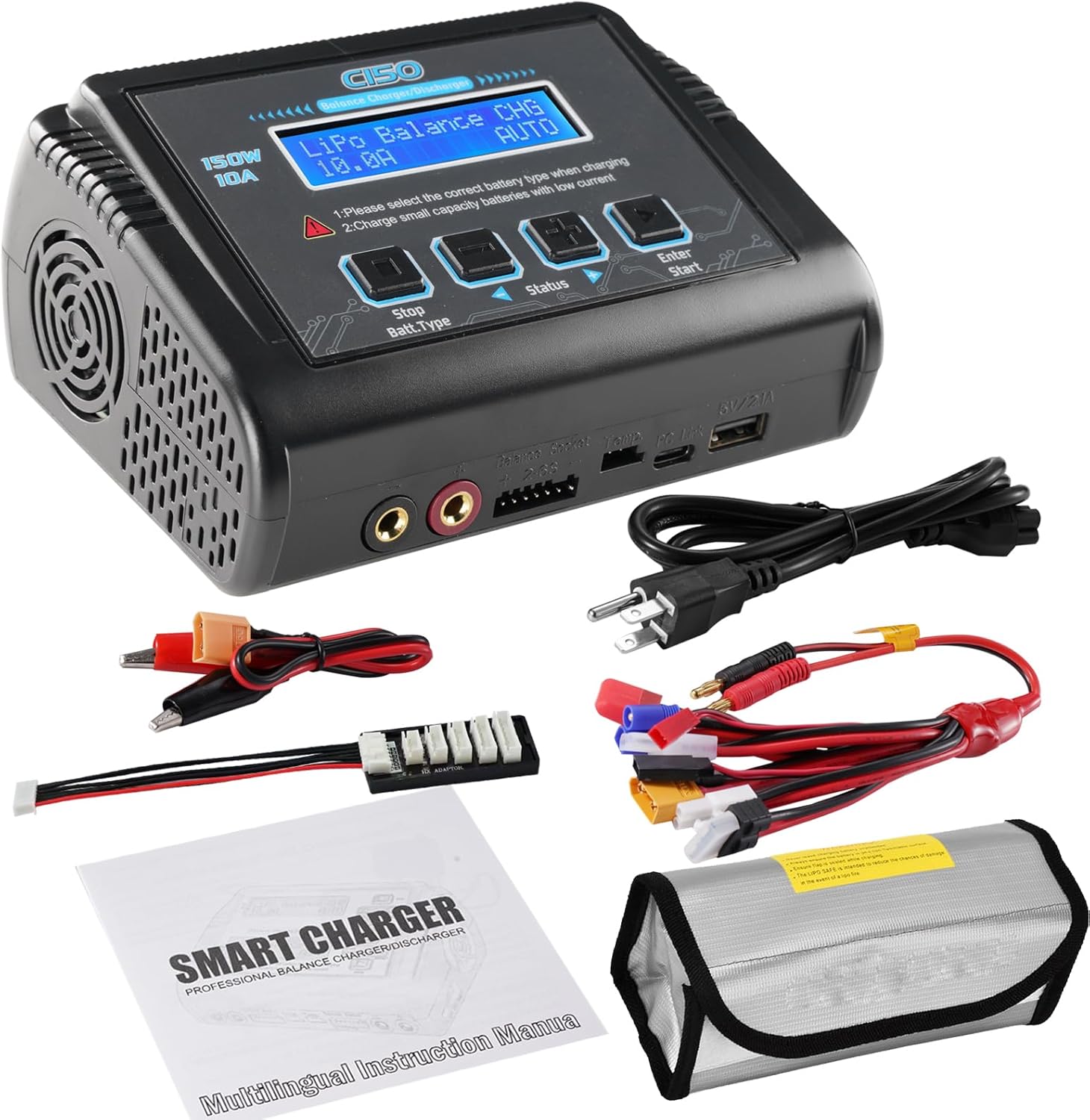
Figure 1: HTRC C150 Charger with included accessories.
- HTRC C150 Battery Charger
- AC Power Cable
- Multi-connector Charging Cable (Octopus cable with T-plug, TRX, Tamiya mini, Futaba, XT60, JST, EC3, Tamiya)
- Balance Board
- Battery Protective Bag
- Instruction Manual
Specifications
| Attribute | Value |
|---|---|
| Product Model | C150 |
| AC Input Voltage | 100-240V |
| DC Input Voltage | 11-18V |
| Charge Power | AC Input 150W, DC Input 150W |
| Charge Current | 0.1-10A |
| Discharge Current | 0.1-2A |
| LiPo/Lilo/LiFe/LiHV Cells | 1-6 cells |
| NiCd/NiMH Cells | 1-15 cells |
| PB Voltage | 2-20V |
| Smart Battery Support | I/II/III |
| Product Dimensions | 3.93"D x 5.71"W x 2.95"H |
| Item Weight | 2.02 pounds (0.92 kg) |
Setup & Connections
Before operating the charger, ensure all connections are secure and correct. Always choose the right battery type in the charger settings to prevent damage.

Figure 2: Detailed connection diagram for the HTRC C150 charger.
- Power Connection: Plug the AC power cable into the charger's AC input port (100-240V). Alternatively, for DC input, connect a DC power source (11-18V) to the DC input port. WARNING: Do not use AC and DC power simultaneously.
- Main Battery Connection: Connect the main positive (+) and negative (-) leads of your battery to the corresponding output ports on the charger using the multi-connector charging cable. Ensure correct polarity.
- Balance Port Connection: For LiPo/LiFe/Li-ion/LiHV batteries, connect the battery's balance lead to the balance board, and then plug the balance board into the charger's balance socket. This is crucial for safe and balanced charging.
Video 1: Official HTRC demonstration of the C150 battery charger operation, including connection steps.
Operating Modes
The HTRC C150 offers various operating modes for different battery management needs. Navigate through the menus using the control buttons.
- Charge: Standard charging mode.
- Balance Charge: Charges and balances individual cells of lithium batteries for optimal performance and safety.
- Fast Charge: Charges lithium batteries at a higher rate, but does not perform balancing.
- Discharge: Discharges the battery to a set voltage.
- Storage: Charges or discharges the battery to a specific voltage level suitable for long-term storage, preserving battery health.
- Cycle: Performs a charge/discharge cycle multiple times to recondition batteries (e.g., NiCd/NiMH).
Video 2: Official HTRC video demonstrating the various charging and discharging modes of the C150 charger.
Advanced Functions
- Battery Meter: Displays real-time information about your lithium battery, including cell counts, total voltage, battery capacity percentage, and individual cell voltages.
- Lithium Battery Internal Resistance Check: Allows you to check the internal resistance of each cell (does not support 1S batteries), which can indicate battery health.
- Battery Balancer: Provides individual-cell-voltage balancing and cell voltage monitoring during charging.
- Digital DC Power: The charger can function as an adjustable digital DC power supply (5-27V output).
- Smart Battery Support: Compatible with Smart Battery I, II, and III (requires optional DJI Charging cable).
Safety Guidelines
Always prioritize safety when operating the charger. Follow these guidelines to prevent accidents and ensure longevity of your device and batteries:
- Never use AC power cable and DC cord at the same time.
- Ensure the battery is genuine, undamaged, and rechargeable before charging.
- Always charge batteries within adult's visual range.
- Choose the correct battery type in the charger settings (e.g., LiPo for LiPo batteries).
- Do not overcharge or over-discharge batteries. The charger has automatic cut-off features, but always monitor the process.
- Keep the charger in a well-ventilated area to allow proper heat dissipation.
- Avoid short circuits and ensure correct polarity for all connections.
Troubleshooting
- Charger not powering on: Ensure AC or DC power cable is securely connected and the power switch on the back is in the 'ON' position.
- Battery not charging: Verify that the correct battery type is selected in the charger's menu. Check all connections (main leads and balance leads) for proper contact and polarity. Ensure the battery is not severely damaged or completely depleted.
- Error message on screen: Refer to the instruction manual for specific error codes and their meanings. Common errors relate to incorrect battery type selection, connection issues, or battery faults.
- Charger fan is loud: This is normal during operation, especially during high-power charging or in warm environments, as the fan works to dissipate heat.
Maintenance
- Keep the charger clean and free from dust and debris. Use a soft, dry cloth for cleaning.
- Store the charger in a cool, dry place away from direct sunlight and moisture.
- Regularly inspect cables and connectors for any signs of wear or damage. Replace damaged components immediately.
- When not in use, disconnect the charger from the power source and store batteries safely.
Warranty & Support
For warranty information, technical support, or service inquiries, please refer to the contact details provided in the included instruction manual or visit the official HTRC website. Keep your purchase receipt as proof of purchase for warranty claims.
Related documentsC150

Ask a question about this manual
Ask about setup, troubleshooting, compatibility, parts, safety, or missing instructions. Manuals+ will review the question and use this page’s manual context to help answer it.