
Introduction
This manual provides essential information for the safe and effective use of your Superer 19V AC Adapter. This power supply is designed to provide consistent and stable power to compatible Samsung J4000 Series LED HD TVs.
Please read these instructions carefully before use and retain them for future reference.
Package Contents
- 1 x Superer 19V AC Adapter
- 1 x Power Cord
Compatibility
This adapter is compatible with Samsung J4000 series models, including but not limited to:
- UN32J
- UN32J4000
- UN32J4000AF
- UN32J4000BF
- UN32J4000AFXZA
- UN32J4000BFXZA
- P/N: A4819-FDY, A5919_FSM, BN44-00838A, A6619_FS, BN44-00837A, BN44-00835A, BN44-00886A
Ensure your TV's power requirements match the adapter's output specifications (19V, 2.53A, 48W).

Image: Compatibility chart for power adapters, indicating that 19V 2.53A 48W is a compatible specification for the device.
Setup Instructions
Unpack the Adapter: Carefully remove the AC adapter and power cord from the packaging.
Connect the Power Cord: Insert the AC power cord into the adapter's input port. Ensure a secure connection.

Image: The Superer AC adapter unit with the detachable power cord securely plugged into its input socket.
Connect to TV: Insert the round-ended tip of the adapter's output cable into the power input port on your Samsung J4000 Series TV. This port is typically located on the back or side of the television.
Plug into Wall Outlet: Plug the other end of the AC power cord into a standard 100-240VAC 50/60Hz wall outlet.

Image: The Superer AC adapter connected to a wall outlet and a television, illustrating a consistent power supply setup.
Verify Connection: Ensure all connections are firm and secure. The TV should now receive power.
Operating Instructions
Once the Superer 19V AC Adapter is correctly connected to your Samsung J4000 Series TV and a power outlet, the TV is ready for operation. Simply power on your television using its remote control or power button.
The adapter is designed to provide a consistent and stable 19V 2.53A 48W power output, ensuring optimal performance for your compatible TV.
Maintenance
- Cleaning: Disconnect the adapter from the power outlet and the TV before cleaning. Use a soft, dry cloth to wipe the adapter. Do not use liquid cleaners or sprays.
- Storage: When not in use for extended periods, store the adapter in a cool, dry place. Avoid extreme temperatures and humidity.
- Cable Care: Avoid bending or crimping the power cord and adapter cable excessively. Use the included fastener tape to keep cables tidy and prevent damage.
- Inspection: Periodically inspect the adapter and cables for any signs of damage, such as frayed wires or cracked casing. If damage is observed, discontinue use and replace the adapter.

Image: Detailed view of the adapter highlighting its robust casing, fastener tape for cable organization, and the extended wire length.
Troubleshooting
- No Power to TV:
- Ensure the adapter is securely plugged into both the TV and a working wall outlet.
- Check if the wall outlet is functional by plugging in another device.
- Verify that the adapter's specifications (19V, 2.53A, 48W) match your TV's power requirements.
- Inspect the adapter and cables for any visible damage.
- Flickering Screen or Unstable Picture:
- Ensure all connections are tight.
- The adapter features built-in overload, over-voltage, and short circuit protection. If issues persist, the adapter may be faulty or the TV may have other issues.
- Adapter Overheating:
- It is normal for the adapter to feel warm during operation. However, if it becomes excessively hot, disconnect it immediately.
- Ensure the adapter is in a well-ventilated area and not covered.
- Verify that the adapter is compatible with your TV's power draw.
Specifications
| Feature | Detail |
|---|---|
| Brand | Superer |
| Model Number | ADP190253D |
| Input Voltage | 100-240VAC, 50/60Hz |
| Output Voltage | 19 Volts |
| Output Current | 2.53 Amps |
| Wattage | 48 Watts |
| Connector Type | Round-ended tip |
| Special Feature | Reliable Overcharge Protection, Over-voltage Protection, Short Circuit Protection |
| Color | BLACK |
| Material | Hard Plastic or Synthetic Material |
| Item Weight | 0.26 Kilograms |
| Power Plug | Type A - 2 pin (North American) |
| Safety Certification | UL Certified |

Image: The Superer AC adapter with its physical dimensions clearly marked for reference.
Warranty and Support
Your Superer 19V AC Adapter comes with a manufacturer's warranty to ensure your satisfaction and product reliability.
- Warranty Period: 24 months manufacturer warranty.
- Replacement Service: Available within 24 months of purchase.
- Refund Policy: Available within 30 days of purchase.
For any questions, concerns, or support needs, please contact Superer customer service. Refer to your purchase documentation for specific contact details or visit the official Superer store on Amazon.
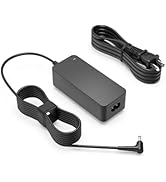
Image: A graphic detailing the 24-month replacement service and 30-day refund policy, highlighting customer support.