
Rhino Rack Nautic 571
Rhino-Rack Nautic 571 Series Kayak/Canoe Carrier Instruction Manual
Brand: Rhino-Rack | Model: Nautic 571
Introduction
This manual provides comprehensive instructions for the safe and effective use of your Rhino-Rack Nautic 571 Series Kayak/Canoe Carrier. Designed for easy rear loading of stand-up paddleboards (SUPs), kayaks, surfboards, or canoes, this carrier features universal cradle clamps compatible with most existing roof rack systems. Please read all instructions carefully before installation and use to ensure proper function and safety.
Package Contents
The Nautic 571 package includes all necessary components for installation and securing your watercraft:
- 1 Kayak Carrier Set (comprising front and rear cradles)
- 2x 10ft (3m) Covered Buckle Straps
- 2x 18ft (5.5m) Tie Down Straps
- Installation Instructions (this manual)
- Mounting Hardware (including security Allen Key)
Setup and Installation
Follow these steps to properly install the Nautic 571 Series Kayak/Canoe Carrier onto your vehicle's roof rack system.
1. Prepare Your Roof Rack
Ensure your vehicle's existing roof rack crossbars are clean and securely mounted. The Nautic 571 is designed for universal fitment, compatible with most current roof rack systems.
2. Mount the Cradles
- Position the front and rear cradles on your crossbars. The front cradles feature santoprene rubber pads for cushioning, while the rear cradles are spring-loaded and felt-covered to facilitate rear loading.
- Use the provided mounting hardware to clamp the cradles securely onto the crossbars. Ensure all bolts are tightened using the security Allen Key for theft prevention and stability.
- Verify that the cradles are evenly spaced and aligned to provide optimal support for your watercraft.
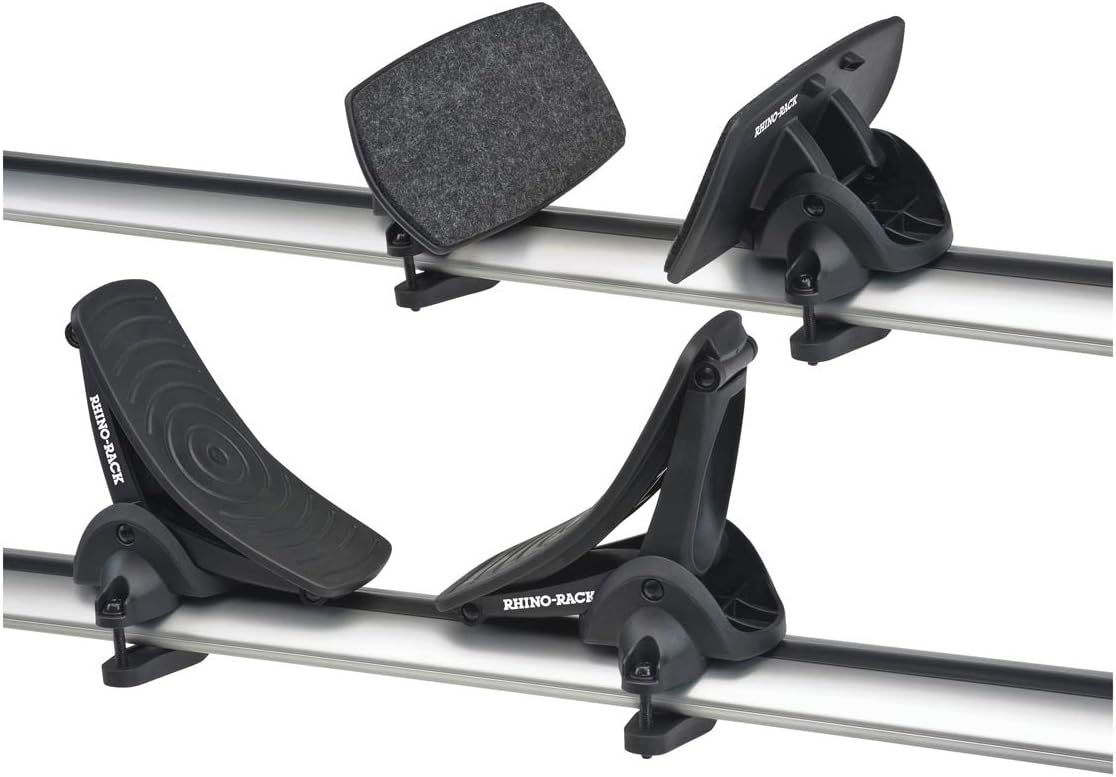
Image: The Rhino-Rack Nautic 571 Kayak Carrier cradles securely mounted on vehicle crossbars, showing the front rubber pads and rear felt-covered, spring-loaded pads.
Operating Instructions
1. Loading Your Watercraft (Rear Loading)
- Position your watercraft (SUP, kayak, canoe, surfboard) at the rear of your vehicle, aligning it with the felt-covered rear cradles.
- Gently lift the front of your watercraft and slide it forward over the felt-covered rear cradles. The spring-loaded design assists in this process.
- Continue sliding until the watercraft rests securely on both the front (rubber padded) and rear (felt-covered) cradles. Ensure it is centered and balanced for optimal stability. The large contact surface area of the cradles provides extra stability.
2. Securing Your Watercraft
- Use the provided 10ft (3m) Covered Buckle Straps to secure the main body of your watercraft to the cradles and crossbars. Thread the straps over the watercraft and around the crossbars, ensuring they are tight and the unique buckle protector prevents damage to your vehicle.
- Utilize the 18ft (5.5m) Tie Down Straps for bow and stern tie-downs. Attach one end to the front of your watercraft and the other to a secure point on the front of your vehicle (e.g., tow hook, hood loop). Repeat for the rear of the watercraft and vehicle. This prevents fore-aft movement during transit.
- Double-check all straps and connections before driving. The watercraft should not shift or move when pushed.
3. Unloading Your Watercraft
Reverse the securing and loading steps. Release the bow and stern tie-downs, then the main body straps. Carefully slide the watercraft off the rear of the vehicle.
Maintenance
To ensure the longevity and optimal performance of your Rhino-Rack Nautic 571 Series Kayak/Canoe Carrier, follow these maintenance guidelines:
- Regular Cleaning: Clean the cradles and straps with mild soap and water after each use, especially after exposure to saltwater. Rinse thoroughly and allow to air dry.
- Inspect for Wear: Periodically inspect all components, including straps, buckles, pads, and mounting hardware, for signs of wear, damage, or corrosion. Replace any worn or damaged parts immediately.
- Hardware Check: Regularly check that all mounting bolts and nuts are tight. The carrier includes stainless steel hardware for corrosion resistance, but regular inspection is still recommended.
- Storage: When not in use, store the carrier in a cool, dry place away from direct sunlight to prolong the life of its UV-protected, waterproof, and corrosion-resistant materials.
Troubleshooting
If you encounter any issues with your Nautic 571 carrier, refer to the following common troubleshooting tips:
- Watercraft Shifting During Transit:
- Ensure all straps (main body, bow, and stern) are tightened securely.
- Verify the watercraft is properly centered and balanced on the cradles.
- Check that the cradles are firmly clamped to the crossbars and have not shifted.
- Difficulty Loading/Unloading:
- Confirm the rear cradles' felt covers are intact and clean to allow smooth sliding.
- Ensure the watercraft is aligned correctly before attempting to slide it onto the carrier.
- Missing or Damaged Parts:
- Refer to the package contents list. Contact Rhino-Rack customer support for replacement parts.
Specifications
| Feature | Detail |
|---|---|
| Model Name | Paddle Board and Kayak Carrier Rear Loading Nautic Series |
| Part Number | 571 |
| Brand | Rhino Rack |
| Color | Black |
| Load Capacity | 150 Pounds |
| Mounting Type | Clamp Mount, Roof Mount, Crossbar Mount |
| Automotive Fit Type | Universal Fit |
| Included Components | 1 Kayak Carrier Set, 2x 10ft (3m) Covered Buckle Straps, 2x 18ft (5.5m) Tie Down Straps, Installation Instructions, Mounting Hardware |
| Durability Features | UV protected, waterproof, corrosion resistant, stainless steel hardware |
Warranty Information
The Rhino-Rack Nautic 571 Series Kayak/Canoe Carrier comes with a 3-year warranty. Please retain your proof of purchase for any warranty claims. For detailed terms and conditions, refer to the official Rhino-Rack website or contact customer support.
Support
For further assistance, technical support, or to purchase replacement parts, please visit the official Rhino-Rack website or contact their customer service department. Always refer to the latest version of the instruction manual available on the manufacturer's website for the most up-to-date information.
Related documentsNautic 571


Ask a question about this manual
Ask about setup, troubleshooting, compatibility, parts, safety, or missing instructions. Manuals+ will review the question and use this page’s manual context to help answer it.