
Product Overview
The Dingling RF-609 is a rechargeable cordless hair trimmer designed for efficient and precise hair cutting. It features a low-noise design, a high-speed motor, and adjustable speed settings for versatile grooming. The sharp alloy steel blades ensure a quick and clean haircut.
Key features include:
- Cordless operation for convenience.
- Low noise operation.
- High-speed motor with two adjustable speed settings.
- Sharp alloy steel blades for effective trimming.
- Includes four different comb attachments, cleaning brush, oil, and charging stand.
- 8-hour charge time for full battery.

Figure 1: The Dingling RF-609 Rechargeable Cordless Hair Trimmer, showing its sleek silver design and integrated comb attachment.
Safety Information
To ensure safe operation and prevent injury or damage, please read and adhere to the following safety guidelines:
- Always keep the trimmer away from water sources. Do not use near bathtubs, showers, basins, or other vessels containing water.
- Do not use on infants or children without proper supervision and care.
- Always clean the trimmer after each use to maintain hygiene and performance.
- Allow the trimmer to cool down completely before storing it.
- Do not use the trimmer while it is charging.
- Always unplug the charger from the power source when not in use or before cleaning.
- Avoid direct contact of the blades with eyes and sensitive skin areas. In case of accidental contact, rinse immediately with plenty of water and seek medical advice if necessary.
- Ensure the transformer has a low voltage DC output for safe operation.
Setup
Before using your Dingling RF-609 hair trimmer for the first time, follow these steps:
- Initial Charge: Fully charge the hair trimmer before its first use. Place the trimmer onto the charging stand, ensuring the electrical contacts align. Connect the transformer to the charging stand and plug it into a suitable power outlet (220V, 50Hz or 110V, 50Hz). A full charge typically takes 8 hours.
- Attach Comb Guide: Select the desired comb guide from the included accessories. Align the comb guide with the trimmer head and slide it on until it clicks securely into place. The trimmer comes with 4 different comb attachments to achieve various hair lengths.
- Blade Adjustment: If necessary, adjust the blade distance using the lever on the side of the trimmer head to fine-tune the cutting length.
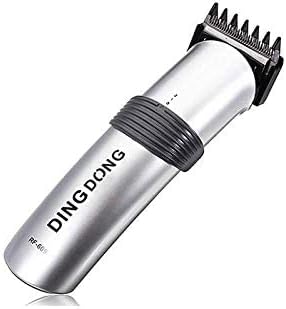
Figure 2: The charging base with electrical contacts, used for recharging the trimmer battery.

Figure 3: Detailed view of the trimmer's high-quality blade, the two-speed adjustment switch, and the blade distance adjustment mechanism.
Operating Instructions
Once the trimmer is charged and a comb guide is attached, you are ready to begin trimming:
- Power On: Press the power button to turn on the trimmer.
- Adjust Speed: The trimmer offers two speed settings. Adjust the speed as needed for your hair type and desired cutting precision.
- Trimming: Begin trimming your hair, moving the trimmer against the direction of hair growth. Follow the desired style and length. The side attachment comb acts as a safeguard, allowing you to get as close as needed.
- Power Off: After use, press the power button again to turn off the trimmer.
Maintenance
Regular maintenance ensures the longevity and optimal performance of your trimmer:
- Cleaning: After each use, turn off and unplug the trimmer. Use the provided cleaning brush to remove any loose hairs from the blades and comb guide. For a more thorough clean, detach the comb guide and rinse it under running water. Ensure the trimmer body itself does not come into contact with water.
- Oiling Blades: Periodically apply a small drop of the included lubricating oil to the blades. This helps maintain blade sharpness and smooth operation. Turn on the trimmer for a few seconds after oiling to distribute the oil evenly.
- Storage: Store the trimmer in a cool, dry place, away from direct sunlight and moisture. Ensure the trimmer is clean and dry before storage. Allow it to cool down if it was recently used.
- Charging: Recharge the trimmer when the battery is low to ensure it is ready for your next use. Avoid overcharging by unplugging the charger once the 8-hour charging cycle is complete or when the charging indicator suggests it is full.
Troubleshooting
If you encounter issues with your Dingling RF-609 trimmer, consider the following common solutions:
- Trimmer not turning on:
- Ensure the trimmer is fully charged. Connect it to the charger for the recommended 8 hours.
- Check if the power button is pressed firmly.
- Poor cutting performance or pulling hair:
- Clean the blades thoroughly to remove any trapped hair or debris.
- Apply a drop of lubricating oil to the blades.
- Ensure the comb guide is correctly attached and not damaged.
- The battery might be low; try recharging the trimmer.
- Trimmer making unusual noise:
- Clean and oil the blades.
- Ensure no foreign objects are lodged in the blade mechanism.
- Trimmer not charging:
- Verify that the charging stand and transformer are correctly connected and plugged into a working power outlet.
- Check that the trimmer is properly seated on the charging stand and the electrical contacts are aligned.
- Inspect the charging cable and transformer for any visible damage.
If the issue persists after trying these steps, please contact customer support.
Specifications
| Feature | Detail |
|---|---|
| Brand | Dingling |
| Model Number | RF609 |
| Power Source | Battery Powered (Rechargeable) |
| Material | Alloy Steel (Blades) |
| Voltage | 220V, 50Hz or 110V, 50Hz |
| Power Consumption | 3W |
| Charge Time | 8 hours |
| Product Dimensions (L x W x H) | 10 x 10 x 10 cm |
| Item Weight | 475 g |
| Special Features | Portable, Rechargeable, Low Noise, Two Speed Settings |
| Included Accessories | 4 comb attachments, oil, cleaning brush, charging stand |
Warranty and Support
For warranty information or technical support regarding your Dingling RF-609 Rechargeable Cordless Hair Trimmer, please refer to the documentation included in your product packaging or contact the retailer from whom you purchased the product. Keep your proof of purchase for any warranty claims.
For further assistance, you may also visit the official Dingling website or contact their customer service department directly. Contact details are typically found on the product packaging or the manufacturer's website.