
1. Introduction
The OREI UHD-EX165H-K HDMI Extender allows you to extend a 4K@60Hz HDR or non-HDR video signal up to 164 feet (50 meters) over a single Cat6 or Cat7 Ethernet cable. This kit includes a sender unit and a receiver unit, designed for reliable and high-quality video transmission over long distances. It is compliant with HDMI 2.0 and HDCP 2.2 standards, supporting resolutions up to 4K@60Hz RGB/YCbCr 4:4:4 or YCbCr 4:2:2.
Key Features
- Extends 4K@60Hz HDR or non-HDR video signal up to 164 feet (50 meters) using Cat6/Cat7 cable.
- HDMI 2.0 and HDCP 2.2 compliant.
- Supports maximum input/output resolution: up to 4K@60Hz RGB/YCbCr 4:4:4 or YCbCr 4:2:2.
- One-way IR control for source management from the remote display.
- EDID management option to copy EDID signal from transmitter's loop-out display or receiver's display.
- Compact and lightweight design with heavy-duty metal enclosure.
- Easy Plug & Play setup without complex installation.
Package Contents
- 1 x OREI UHD-EX165H-K Sender Unit (Transmitter)
- 1 x OREI UHD-EX165H-K Receiver Unit
- 1 x Worldwide Voltage Power Adapter
- 1 x IR Blaster Cable (IR Tx)
- 1 x IR Receiver Cable (IR Rx)
- 1 x Instruction Manual (this document)
Note: HDMI cables and Cat6/Cat7 Ethernet cables are not included and must be purchased separately.

2. Safety Information
Please read and follow these safety instructions carefully before operating the device to ensure proper functionality and prevent damage.
- Do not expose this unit to water, moisture, or excessive humidity.
- Do not place the unit near heat sources such as radiators, heat registers, stoves, or other apparatus that produce heat.
- Use only the power adapter supplied with the unit. Using unauthorized power adapters may damage the device and void the warranty.
- Ensure proper ventilation around the unit to prevent overheating.
- Do not attempt to open or service the unit yourself. Refer all servicing to qualified service personnel.
- Keep the unit away from strong electromagnetic fields.
- Disconnect power during lightning storms or when unused for long periods.
3. Setup and Connection
Follow these steps to properly set up your OREI HDMI Extender.
Before You Begin
- Ensure all devices (source, display, extender units) are powered off before making connections.
- Prepare the necessary cables: HDMI cables for source and display connections, and a single Cat6/Cat7 Ethernet cable for connecting the transmitter and receiver units. For optimum performance, we recommend shielded (STP) round Cat6 cable.
- Note that this extender does not support 2K (2560x1440) resolution.
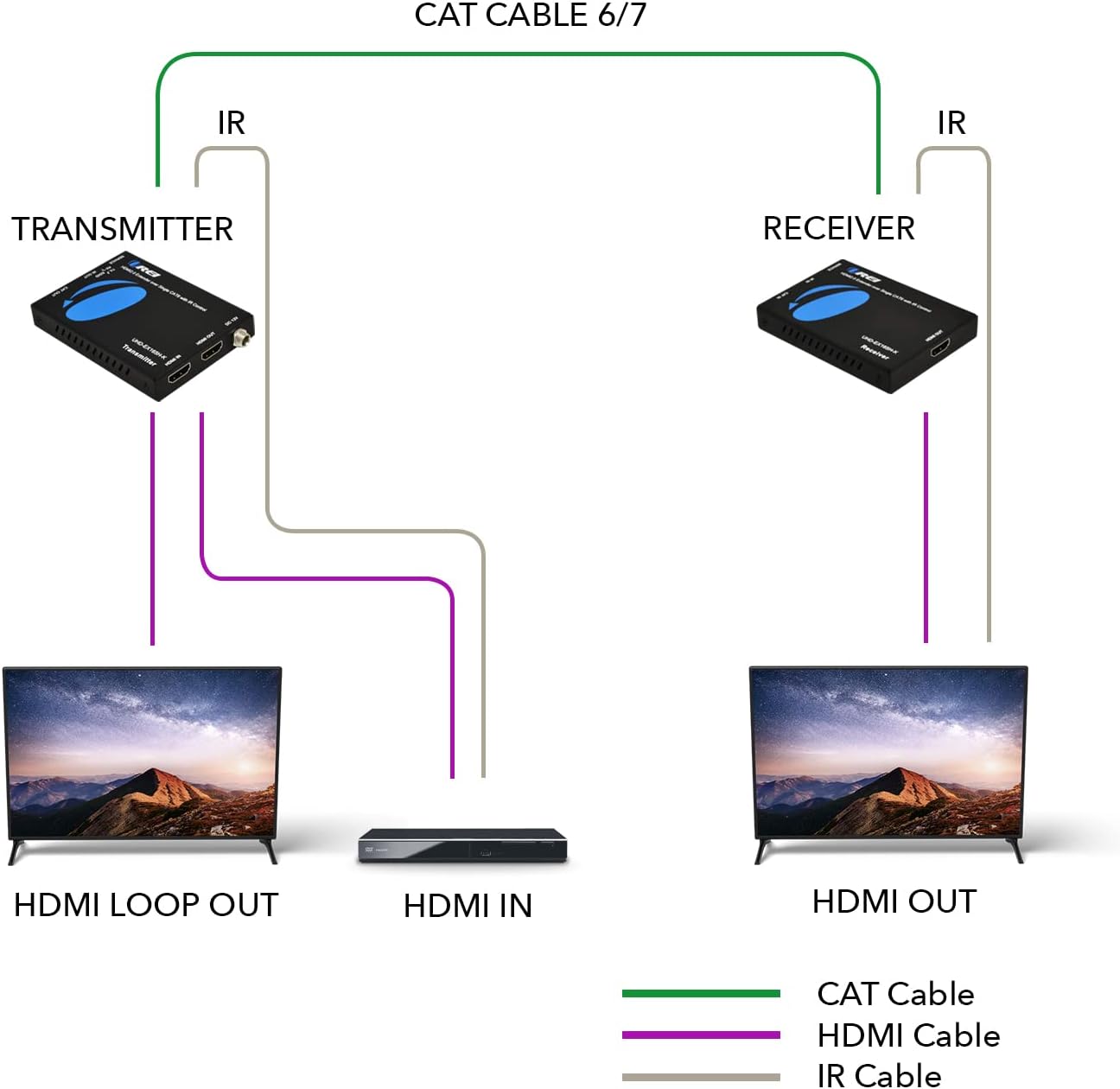
Connection Diagram
Step-by-Step Installation
- Connect your HDMI source device (e.g., Blu-ray player, gaming console, PC) to the HDMI IN port on the Transmitter unit using an HDMI cable.
- If you wish to have a local display, connect an HDMI cable from the HDMI LOOP OUT port on the Transmitter unit to your local display.
- Connect one end of a Cat6/Cat7 Ethernet cable to the CAT OUT port on the Transmitter unit.
- Connect the other end of the Cat6/Cat7 Ethernet cable to the CAT IN port on the Receiver unit.
- Connect an HDMI cable from the HDMI OUT port on the Receiver unit to your remote display (e.g., TV, projector).
- For IR control, connect the IR Blaster (IR Tx) cable to the IR OUT port on the Transmitter unit and position the IR emitter near the IR sensor of your source device.
- Connect the IR Receiver (IR Rx) cable to the IR IN port on the Receiver unit and position the IR receiver in a location where it can receive signals from your remote control.
- Connect the included power adapter to the DC 12V port on either the Transmitter or Receiver unit. This unit requires only one power adapter to work due to Power over Cable (PoC) support.
- Power on all connected devices (source, displays, extender units).

4. Operation
Basic Operation
Once all connections are made and devices are powered on, the extender will automatically detect the HDMI signal and transmit it to the remote display. The system is designed for plug-and-play functionality, requiring no additional software or complex configuration.
IR Control
The one-way IR control feature allows you to control your HDMI source device from the location of your remote display. Simply point your source device's remote control at the IR Receiver (IR Rx) connected to the extender's receiver unit. The signal will be transmitted back to the IR Blaster (IR Tx) connected to the transmitter unit, which will then relay the command to your source device.

EDID Management
The extender provides an option to copy the EDID (Extended Display Identification Data) signal. This allows the source device to recognize the capabilities of either the local display connected to the transmitter's loop-out or the remote display connected to the receiver. This ensures optimal video and audio compatibility.
5. Care and Maintenance
To ensure the longevity and optimal performance of your OREI HDMI Extender, follow these maintenance guidelines:
- Cleaning: Use a soft, dry cloth to clean the exterior of the units. Do not use liquid cleaners or aerosol cleaners, as they may damage the device.
- Storage: When not in use for extended periods, store the unit in a cool, dry place away from direct sunlight and extreme temperatures.
- Handling: Handle the units with care. Avoid dropping or subjecting them to strong impacts.
- Ventilation: Ensure that the ventilation openings on the units are not blocked to prevent overheating.
6. Troubleshooting Guide
If you encounter issues with your OREI HDMI Extender, please refer to the following table for common problems and their solutions.
| Problem | Possible Cause | Solution |
|---|---|---|
| No video output on remote display. | Loose cable connections, incorrect power, incompatible resolution, faulty Cat cable. | Check all HDMI and Cat6/Cat7 cable connections. Ensure the power adapter is securely connected and providing power. Verify that the source resolution is supported (not 2K). Test with a different Cat6/Cat7 cable. |
| Poor video quality (flickering, distorted image). | Low quality or damaged Cat cable, excessive cable length, interference. | Use a high-quality Cat6/Cat7 cable, preferably shielded (STP). Ensure cable length does not exceed 164 feet (50 meters). Minimize electromagnetic interference by keeping cables away from power lines. |
| IR control not working. | IR cables incorrectly connected, IR emitter/receiver not positioned correctly, remote control issues. | Ensure IR Tx is connected to the Transmitter's IR OUT and IR Rx to the Receiver's IR IN. Adjust the position of the IR emitter to directly face the source device's IR sensor. Ensure the IR receiver is in line of sight of your remote control. Check remote control batteries. |
| No audio. | Audio format not supported, loose HDMI cable. | Verify that the audio format is supported by both the extender and the display. Check HDMI cable connections. |
| Power LED is off. | No power, faulty power adapter. | Ensure the power adapter is securely plugged into a working power outlet and the extender unit. Try a different power outlet. If possible, test with another compatible power adapter. |
7. Technical Specifications
Detailed specifications for the OREI UHD-EX165H-K HDMI Extender.
| Feature | Specification |
|---|---|
| Model Number | UHD-EX165H-K |
| HDMI Compliance | HDMI 2.0 |
| HDCP Compliance | HDCP 2.2 |
| Supported Resolutions | Up to 4K@60Hz RGB/YCbCr 4:4:4 or YCbCr 4:2:2 (Does not support 2560x1440) |
| Transmission Distance | Up to 164 feet (50 meters) over single Cat6/Cat7 cable |
| IR Control | One-way IR control |
| EDID Management | Supported |
| Power Supply | DC 12V (PoC support, only one adapter needed) |
| Product Dimensions | 6 x 4 x 2 inches (approximate for one unit) |
| Item Weight | 1.2 pounds (total for both units) |
| Color | Black |
| Enclosure Material | Heavy Duty Metal |

8. Warranty and Technical Support
OREI stands behind the quality of its products and offers comprehensive support.
Manufacturer's Warranty
This OREI HDMI Extender comes with a 12-month manufacturer's warranty from the date of purchase. This warranty covers defects in materials and workmanship under normal use. Please retain your proof of purchase for warranty claims.
Technical Support
OREI provides Lifetime Technical Support for this product. If you encounter any issues or have questions regarding the setup, operation, or troubleshooting of your HDMI extender, please do not hesitate to contact OREI's technical support team. Contact information can typically be found on the OREI official website or through your purchase platform.


